Redemption Version History
Release notes, fixes, and feature additions for Outlook Redemption.
Paid Redemption licenses include the distributable version; see download and license options.
Latest public release
Redemption 6.7
New features
• Added RDOSignature.FolderName property: returns the local folder containing signature files.
• Added RDOAppointmentItem.ICalendarUid property - exposes Outlook’s iCal UID used to correlate meeting requests/updates/responses with existing calendar items.
Bug fixes
• RDOMail.Import(.., olFts):
“Unexpected property type… 1400b” when importing some Graph-exported FTS
files (/admin/exchange/mailboxes/{mailboxId}/exportItems).
• Outlook crash in add-ins using Redemption when Sophos antivirus is installed.
• RDOAccounts.AddPOP3Account / AddLDAPAccount: failed in profiles with non-ASCII names.
• HTMLBody: very slow access for MSG files or encrypted messages.
• Accessing RDOFolder.Parent returned “Top of Information Store” for folders in cached delegate Exchange stores.
• EML
import /
RDOEncryptedMessage.GetDecryptedMessage:
produced MSG files Outlook could not open when
<style> contained HTML tags or
HTML-encoded values.
• EML import / RDOEncryptedMessage.GetDecryptedMessage: embedded HTML image attachments also shown as regular attachments in Outlook.
• EML
import: attachments incorrectly marked hidden when
Content-Id values were similar to
other image/hidden attachments.
• EML
import: plain text body + HTML only in TNEF (winmail.dat)
resulted in plain text message with no HTML.
• EML export: recipient display names containing double quotes lost the quotes.
• The RDOSession.PickFolder and RDOSelectFoldersDialog.Display picker could appear on a different monitor than the parent window.
• The RDOSession.PickFolder and RDOSelectFoldersDialog.Display: preselecting the specified folder sometimes failed.
• RDOFolder2.FolderPath: incorrect path for search folders in the IPM tree.
Older release
Redemption 6.6
New features
• RDOFolder2.Import can now avoid creating duplicate appointment and task items when importing iCal and VTODO files if the new ifDeleteDuplicates flag (rdoImportFlags enum) is specified in a call to RDOFolder2.Import.
|
ifDeleteDuplicates = 256
olToDo = 1029
set Session
= CreateObject("Redemption.RDOSession")
Session.MAPIOBJECT =
Application.Session.MAPIOBJECT
set Folder
= Session.GetFolderFromID(Application.ActiveExplorer.CurrentFolder.EntryID)
set items =
Folder.Import("c:\temp\MultipleAppointments.ics", olICal,
ifDeleteDuplicates)
for
each item
in items
debug.Print item.Subject
next |
• Added RDOAddressEntry.GetProps method that allows to extract multiple MAPI properties in a single call.
|
private
static
int[] _galDetailsPropTags =
new
int[]
{
(int)MAPITags.PR_DISPLAY_NAME_W,
(int)MAPITags.PR_GIVEN_NAME_W,
(int)MAPITags.PR_SURNAME_W,
(int)MAPITags.PR_TITLE_W,
(int)MAPITags.PR_COMPANY_NAME_W,
(int)MAPITags.PR_OFFICE_LOCATION_W,
(int)MAPITags.PR_DEPARTMENT_NAME_W,
(int)MAPITags.PR_MOBILE_TELEPHONE_NUMBER_W,
};
...
var props = galAddressEntry.GetProps(_galDetailsPropTags); |
• Added RDOAddressEntry.BusinessFaxNumber / HomePhone properties.
• The speed of FTS (Fast Transfer Stream) file import for messages with large number of recipients was significantly improved.
• RDOSignatures collection no longer expects all 3 flavors (txt, rtf, htm) of the signature files to be present in the Signatures folder - either file type is now enough for the signature to be present in the collection.
Bug fixes
• RDOEncryptedMessage.GetDecryptedMessage sometimes raised "Could not decrypt the attachment data" exception, especially if the key was stored in the new CNG Key Storage in Windows.
• Importing EML (MIME) files with binary-encoded headers (such as Subject, To, CC, etc.) that had encoding different from the main message body encoding could sometimes corrupt the properties imported from the affected headers.
• Importing some EML (MIME) files with attachments that used non-ASCII characters could result in a truncated filename.
• Importing EML (MIME) into standalone MSG files or accessing decrypted message through RDOEncryptedMessage.GetDecryptedMessage could sometimes cause inadvertent message body changes, e.g. "•" could become "*".
• Saving post item (RDOPostItem) in the HTML format (olHTML / olHTMLEmbeddedImages) did not include "Posted At " / "Posted To" / "Conversation" headers.
• Due to a change in the FTS (Fast Transfer Stream) format, importing some FTS files created by the latest version of the Exchange Server (such as that used by Office 365) could produce "Expected a page break marker" exception.
• Importing some EML message with a TNEF attachment (winmail.dat) or decrypting some encrypted/signed messages that include a TNEF part could produce a message without a body.
• Accessing plain text signature text through RDOSignature.Body for some signatures created by Outlook could throw an exception.
Older release
Redemption 6.5
New features
• Added RDOAccounts.RefreshFromMAPI method. Since there are two kinds of accounts in Outlook - MAPI based (such as Exchange MSEMS) and non-MAPI (such as POP3/SMTP), Outlook (through the IOlkAccountManager interface) keeps the two lists in sync. Some MAPI accounts added directly through Redemption (e.g. by calling RDOStores.AddDelegateExchangeMailBoxStore) might not become immediately visible to Outlook. RDOAccounts.RefreshFromMAPI method forces Outlook to sync the two lists internally without restarting your application or Outlook.
• RDOFolder2.GetActivitiesForTimeRange performance was increased by at least an order by magnitude.
• Added RDOFavorite.GroupName / GroupHeaderID / GroupClsid / StorageItem properties that make it easier to create/access Favorites / Navigation Groups / Navigation Folders in Outlook.
Bug fixes
• Importing EML (MIME) files with long subject with Unicode characters split into multiple lines in the source EML file could sometimes corrupt the subject on the resulting message.
• Importing some FTS (Fast Transfer Stream) files created by the latest version of the Exchange Server (such as that used by Office 365) could produce "Expected a page break marker" exception.
• RDOAppointmentItem.GlobalAppointmentID for the exceptions to recurring activities used the date of the modified exception rather than the original date.
• For the RDOEncryptedMessage object, decrypting the message more than once (e.g. when reading the EncryptionKind property and then calling GetDecryptedMessage) resulted in an exception thrown by the second call.
• Saving a message in the MIME (EML) format failed to properly encode Unicode characters for the sender and recipients with only name (but not SMTP address) available.
• Setting the RDOAppointmentItem.Location property sometimes did not prevent Outlook from auto-populating the location value.
• RDOMail.BodyFormat property sometimes returned olFormatHTML instead of olFormatPlain for the plain text messages under online Exchange store.
• When exporting in the olTxt / olHTML / olRtf formats, oledata.mso hidden file would sometimes be listed; "Sensitivity" header would not be includes at all, and "Flag Status" and "Importance" header values would always be shown in English rather that the current locale.
• Messages exported in the olHTML format would sometimes list the sender/recipient SMTP address twice if it was already included in the display name.
• When a new search folder was added to Outlook Favorites using RDOFavorites.Add, Outlook would not show it in the Favorites pane. Regular folders were properly shown.
• Saving a recurring appointment with exceptions in the EML (MIME) format could raise "Error in IMessage.OpenAttach: MAPI_E_NO_ACCESS" exception for some appointments.
• Redemption SQL parser used in ExecSQL / Restrict / Find / etc. methods did not understand SmtpAddress, PrimarySmtpAddress, TaskDueDate, TaskStartDate, TaskSubject, ToDoTaskOrdinal, TaskCompletedDate properties (they had to be specified in the raw DASL format).
Older history
July 05, 2023
Version 6.4.0.6234
New features
• RDOSession.GetSharedMailbox / GetSharedMailboxEx / GetSharedDefaultFolder are now much faster in Outlook 2016 or newer since they no longer retrieve Autodiscover XML, and therefore do not need cached credentials.
• Added support for the DATALENGTH and LEN SQL functions (based on the RES_SIZE restriction in MAPI) in the SQL queries used by RDOItems.Find/Restrict and MAPITable.ExecSQL. The functions can only be used in the WHERE clause.
The new functions allow to create restrictions on the size of the binary properties or the length of the string properties. When used against the Attachments property (e.g., DATALENGTH(Attachments) > 100000), the restriction is performed against the size of a message attachment.
The example below retrieves messages in the currently selected folder in Outlook with the HTML body size greater than one million bytes:
|
set Session =
CreateObject("Redemption.RDOSession")
Session.MAPIOBJECT = Application.Session.MAPIOBJECT
set Folder =
Session.GetFolderFromID(Application.ActiveExplorer.CurrentFolder.EntryID)
set
RestrictedItems =
Folder.Items.Restrict("SELECT * from Folder WHERE
DATALENGTH(HTMLBody) > 1000000")
for
each item
in RestrictedItems
Debug.Print item.Subject
next |
• Added
RRULE and EXDATE properties to the RDORecurencePattern
object that allow to either initialize the recurrence pattern or retrieve the
recurrence pattern from an Outlook appointment.
RRULE
and
EXDATE are returned/consumed in the standard
RFC 5545 format also
used in iCal.
|
set
Session = CreateObject("Redemption.RDOSession") Session.MAPIOBJECT =
Application.Session.MAPIOBJECT
set
Appt = Session.GetDefaultFolder(olFolderCalendar).Items.Add Appt.Subject = "Test
RRULE" Appt.Body = "Test Appt
Body" Appt.Start = #5/29/2023
11:30am#
Set
myRecurrPatt = Appt.GetRecurrencePattern
myRecurrPatt.RRULE
= "RRULE:FREQ=WEEKLY;COUNT=6;BYDAY=MO,TU,WE,TH"
myRecurrPatt.EXDATE = "EXDATE;TZID=""US Mountain Standard
Time"":20230530T113000,20230531T113000"
Appt.Save |
• Added GetMessageFromID / GetFolderFromID methods to the RDOFolder2 interface (exposed by all RDOFolder objects). This method is necessary for the cached Exchange stores that also host other mailboxes (such as the archive mailbox) in its OST file - RDOStore.GetMessageFromID can fail, but RDOFolder2.GetMessageFromID is guaranteed to succeed for a message entry id from that folder.
• Added VBA version of RedemptionLoader. Note that VBA version of RedemptionLoader will only work with the latest (6.4 and up) version of Redemption.
• Outlook Object Model parity: added RDOAppointmentItem.GetOrganizer method.
• Added olHTMLEmbeddedImagesNoHeaders (1037) file type that can be used with RDOMail.SaveAs and Safe*Item.SaveAs. Similar to olHTMLEmbeddedImages (1033), the HTML files generated by this format embed images in base64 format inside the <img> HTML tags, but without the standard message headers (To/From/Subject/etc.).
• Added RDOFavorite.FolderEntryId / StoreEntryId properties. These properties allow to access the folder entry id and its parent store entry id without opening the corresponding folder object and its store.
Bug fixes
• RDOSession.Stores.AddDelegateExchangeMailBoxStore no longer throws "Could not obtain the server distinguished name" exception under Outlook 2016 or newer.
• For some invalid/corrupted encrypted/signed messages, RDOEntryptedMessage.GetDecryptedMessage could return an empty RDOMail object instead of raising an exception.
• Sometimes decrypted message returned from RDOEntryptedMessage.GetDecryptedMessage would contain decrypted body and attachments, but no envelope properties, such as Subject, Sender, etc..
• HTMLBody and RTFBody symbolic property names could not be used in SQL queries in RDOItems.Find/Restrict and MAPITable.ExecSQL.
• Importing some MIME files with quoted-printable encoded attachments could add an extra line break to the attachment data.
• RDOSession.OutlookVersion property sometimes returned an empty string under click-to-run Office installations.
• SafeRibbon object (returned by SafeExplorer.Ribbon and SafeInspector.Ribbon) failed under German-language version of Outlook
• Saving items with many embedded attachments (e.g., appointments with a large number of exceptions) in the MSG format could take a long time.
• Importing EML files with only an HTML (but not plain text) MIME body part into a standalone MSG file could cause a hang.
• RDOItems.CollectionModified event only fired in the debug version of Redemption.
• RDOMail.GetProps and RDOMail.Fields[] now return PT_BINARY properties (such as PR_ENTRYID) as variant array of byte rather than variant array of variant (byte[] vs object[]) - otherwise COM system was leaking memory. This is a potentially breaking change.
• RDOAttachments.Add did not set the RDOAttachments.DisplayName property.
January 10, 2023
Version 6.3.0.6164
New features
• RDOFolder2.Import now supports multiple To-Do (VTODO) tasks in a single ICS file. Previously, olICal / olVCal, and olVCard formats with multiple objects in a single file were supported.
|
set Session = CreateObject("Redemption.RDOSession") |
• Outlook Object Model parity: added RDOAddressEntry.AddressEntryUserType and RDOAddressList.AddressListType properties equivalent to the properties of the corresponding Outlook objects.
Bug fixes
• After Outlook update in July 2022, saving some messages in the MSG format when the parent mailbox is in the online mode could produce MSG files without most properties (such as subject, sender name, etc.)
• RDOEntryptedMessage.GetDecryptedMessage could take a very long time (minutes) for some large (10+ MB) encrypted messages.
• When importing in the olICal / olVCal, olVCard, olVToDo formats, attachments could be imported with the file name of noname.txt if only "FILENAME" attachment attribute was present, but not "X-FILENAME"
• Calling RDOMail.Recipients.Remove(index) would sometimes hard-crash the host application due to MAPI memory corruption.
• Accessing HTML body of a message opened on top of an MSG file or saving it in the MIME/HTML/MHTML formats sometimes corrupted UTF-16 encoded characters (such as 😃 - smiley)
• Importing MIME (EML) files with recipients/sender names containing a double quote could sometimes remove double quotes.
• RDOMail.Reply/ReplyAll included the current user if invoked on a message from the Sent Items folder
• RDOSignature.ApplyTo, could not handle UTF-16 (MSB) encoded signatures. UTF-8 and UTF-16 (LSB) encodings were handled correctly.
• Exporting some messages opened on top of MSG files into the MIME (EML) format could sometimes corrupt the HTML body by HTML-encoding special characters (such as tabs) in the style section.
June 18, 2022
Version 6.2.0.6122
New features
• Added RDOExchangeMailboxStore.MakeEwsRequest
and
RDOExchangeAccount.MakeEwsRequest methods. These methods
are similar to the
mailbox.MakeEwsRequestAsync method exposed for the Web (JS) addins by
Outlook. Unlike the JavaScript equivalent, MakeEwsRequest in
Redemption is synchronous and is expected to run on a secondary thread (see
here for more on using Redemption in secondary
threads). There are no limitations on what EWS call can be made.
Note that MakeEwsRequest is designed to work in COM
(VSTO) addins or Outlook VBA as it intercepts EWS requests made by Outlook
itself to extract the credentials. It will work outside of the outlook.exe
process only if Outlook cached the credentials or if RDOSession.LogonHostedExchangeMailbox
was used to connect to Exchange (which requires explicit credentials). Also note
that it is expected that the parent RDOSession
object is created well ahead of time (e.g. when the COM/VSTO addin is loaded)
prior to calling MakeEwsRequest to allow Redemption sufficient
time to collect the credentials after Outlook makes its own EWS calls.
|
payload = _
"<?xml
version=""1.0"" encoding=""utf-8""?>" & _
"<soap:Envelope
xmlns:soap=""http://schemas.xmlsoap.org/soap/envelope/""" & _
"
xmlns:t=""http://schemas.microsoft.com/exchange/services/2006/types"">" & _
"
<soap:Header><t:RequestServerVersion
Version=""Exchange2007_SP1""/></soap:Header>" & _
"
<soap:Body>" & _
"
<GetDelegate
xmlns=""http://schemas.microsoft.com/exchange/services/2006/messages""" & _
"
xmlns:t=""http://schemas.microsoft.com/exchange/services/2006/types""" & _
"
IncludePermissions=""true"">" & _
"
<Mailbox>" & _
"
<t:EmailAddress>" & smtpAddress &
"</t:EmailAddress>" & _
"
</Mailbox>" & _
"
</GetDelegate>" & _
"
</soap:Body>" & _
"</soap:Envelope>"
set Session = CreateObject("Redemption.RDOSession")
Session.MAPIOBJECT = Application.Session.MAPIOBJECT
set defaultAccount = Session.Accounts.GetOrder(1).Item(1)
if TypeName(defaultAccount) =
"RDOExchangeAccount"
Then
MsgBox
"This message box simulates a delay between creating RDOSession object " & _
"and a call to MakeEwsRequest to allow it to intercept EWS calls made by
Outlook"
Session.CacheAutoDiscoverXml smtpAddress,
Application.Session.AutoDiscoverXml
'speed things up
reply =
defaultAccount.MakeEwsRequest(payload)
MsgBox reply
End
If |
Bug fixes
• If used inside outlook.exe process space (from a COM/VSTO addin or Outlook VBA), Redemption could cause Exchange Server connection problems if Microsoft Viva was also installed.
• For some Outlook profiles, RDOSession.PickFolder and RDOSelectFoldersDialog.Display showed an empty treeview with no stores or folders.
• Creating a new Outlook client rule using RDOClientRules.Create in a message store without existing rules prevented Outlook from using, opening, or displaying the rules.
• For some attachments created under macOS (with MIME type multipart/appledouble), calling RDOAttachment.SaveAsFile or saving the message in the MIME format (RDOMail.SaveAs(..., olRfc822)) could corrupt the file attachment data.
• Importing appointments in the iCal format could sometimes fail to import the appointment subject. This is a version 6.1 specific problem.
• Importing MIME (EML) files with recipients/sender that only contain an address (but no name) could leave "<" and ">" as parts of the email address. This is a version 6.1 specific problem.
• Setting To/CC/BCC properties to a value that included an SMTP address with the ";" character (e.g. "user;name"domain.demo) inserted an erroneous recipient.
• Accessing RDOExchangeMailboxStore.Delegates collection raised an exception if one or more delegates were invalid (e.g. missing from the Active Directory). The updated version raises an exception only when accessing the invalid delegate's properties; other valid delegates can still be accessed.
• RDOStores.AddDelegateExchangeMailBoxStore could sometimes fail with authentication error.
• Messages with a signature added with RDOSignature.ApplyTo, could have the signature duplicated if the message was later displayed and the user decides to switch to a different signature.
• Importing some Fast Transfer Stream files (RDOMail.Import(..., olFTS)) could raise an exception "80070057 Error in ScDupPropset: MAPI_E_INVALID_PARAMETER"
• Calling RDOStore.GetDefaultFolder could fail if a previous call to RDOStore.GetDefaultFolder failed even if RDOFolder2.SetAsDefaultFolder was called after the first call to GetDefaultFolder.
• Accessing RDOMail.HTMLBody property of an MSG file could sometimes include "~" instead of a non-breaking space.
• If RDOSignature.ApplyTo was used to insert a signature with an image, the message displayed an attachment icon, even if there were no other attachments besides the the signature image(s).
• Using RDOExchangeMailboxStore.Rules or RDOFolder2.Rules could sometimes fail with "IMAPIFolder.OpenProperty(PR_RULES_TABLE): MAPI_E_CALL_FAILED" exception when using cached mode profile.
November 24, 2021
Version 6.1.0.6054
New features
• All Safe*Item objects (SafeMailItem, SafeContactItem, etc.) now expose new MarkSaved method. The method tricks the original OOM object assigned to the Item property into assuming that there are no pending changes to be saved. Closing the Outlook item after calling MarkSaved will not display the save prompt.
|
private
void Inspector_Close()
{
SafeMailItem
smi =
new SafeMailItem();
smi.Item = _inspector.CurrentItem;
//discard pending changes to let
//the inspector close without a prompt
smi.MarkSaved();
} |
• Added
RDOPSTStore.OverridePSTDisableGrow
method that allows to temporarily disable
PSTDisableGrow policy on the per-PST file basis.
Note that
PSTDisableGrowAllowAuthenticodeOverrides registry value must be set prior to
calling
RDOPSTStore.OverridePSTDisableGrow
method since the parent registry key requires elevated rights even though is is
a subkey of HKEY_CURRENT_USER.
|
set session = CreateObject("Redemption.RDOSession")
session.MAPIOBJECT = Application.Session.MAPIOBJECT
set pstStore = session.GetStoreFromID(Application.ActiveExplorer.CurrentFolder.Store.StoreID)
pstStore.OverridePSTDisableGrow() |
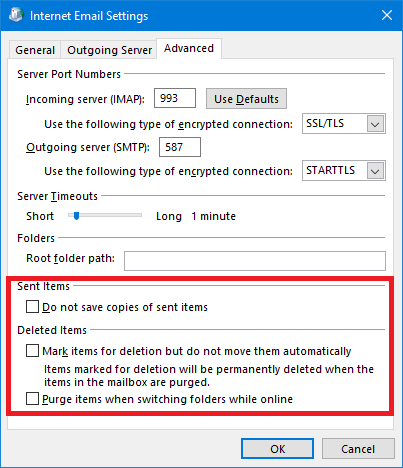
• Added
RDOIMAPAccount.DoNotSaveSentItems
/ MarkForDeletion / EnablePurgeOnSwitch
properties exposed by the IMAP4 accounts..
Bug fixes
• RDOFolder2.GetActivitiesForTimeRange and RDORecurrencePattern.GetOccurrence could sometimes return an extraneous weekly occurrence on a day preceding or following an actual occurrence.
• RDOSession.LogonHostedExchangeMailbox could sometimes fail to open the address book.
• RDOClientRule.Exceptions collection always returned generic RDOClientRuleCondition objects instead of specific objects corresponding to the exception's type (e.g. RDOClientTextRuleCondition or IRDOClientSensitivityRuleCondition).
• RDOClientRule.IsLocalRule property returned wrong value in most cases.
• RDOClientRules.Import failed to raise an exception if the specified file did no exist.
• MIME export (RDOMail.SaveAs(..., olRfc822)) failed to properly export Unicode sender name if no SMTP address was available (e.g. when processing an MSG file with an EX address and no Exchange Server in the active MAPI session)
• Importing an EML file with an ICS MIME part imported sender/subject/recipients from the primary MIME message header rather than the ICS part. It also ignored the SENT-BY attribute of the ORGANIZER field.
• Accessing RDOMail.HTMLBody property of an MSG file could sometimes return no data or corrupted data for the pure RTF or plain text messages.
• Accessing RDOMail.HTMLBody property of an MSG file or saving the message in the MIME (EML) format file could sometimes corrupt HTML images.
• Importing EML (MIME) files failed to set PR_SENDER_SEARCH_KEY and PR_SENT_REPRESENTING_SEARCH_KEY MAPI properties.
August 22, 2021
Version 6.0.0.6012
New features
• Client-side rules are now supported (Exchange Server-side rules have been supported
since version 4.3).
Over 30 new objects exposing rules,
actions,
conditions, and
exceptions available (or previously available) in Outlook.
Access client-side rules on the store basis (Exchange, PST, IMAP4, etc. through
the RDOStore2.ClientRules
property), export rules (RDOClientRules.Export), open
standalone RWZ files (RDOSession.OpenRulesFile), or import RWZ files
(RDOClientRules.Import) into a store.
The example below creates a new client rule that moves received messages from a particular sender unless the subject contains predefined keywords.
|
set Session = CreateObject("Redemption.RDOSession")
Session.MAPIOBJECT = Application.Session.MAPIOBJECT
set colRules =
Session.Stores.DefaultStore.ClientRules
Set oRule = colRules.Create("Test rule", olRuleReceive)
'Specify
the condition in a ToOrFromRuleCondition object
'Condition is if the message is sent by "test@dimastr.com"
Set oFromCondition = oRule.Conditions.From
With oFromCondition
.Enabled =
True
.Recipients.AddEx
"Joe The User",
"test@dimastr.com",
"SMTP"
End
With
'Specify
the action in a MoveOrCopyRuleAction object
'Action
is to move the message to the target folder
Set oMoveRuleAction =
oRule.Actions.MoveToFolder
With oMoveRuleAction
.Enabled =
True
.Folder = oMoveTarget
End
With
'Specify
the exception condition for the subject in a TextRuleCondition object
'Exception condition is if the subject contains "fun" or "chat"
Set oExceptSubject = oRule.Exceptions.Subject
With oExceptSubject
.Enabled =
True
.Text =
Array("fun",
"chat")
End
With
'Update
the rules
colRules.Save |
The following example open a standalone RWZ file and lists all rule names. Note that opening RWZ file and processing its rules does not require an active MAPI session.
|
set Session = CreateObject("Redemption.RDOSession")
set rules = Session.OpenRulesFile("c:\temp\test.rwz")
for
each ClientRule
in rules
Debug.Print
ClientRule.Name
next |
• IRDOSearches.AddCustom
method now allows to specify the excluded folders by passing an array of either
the default folder ids (e.g. olFolderJunk), entry ids, or an
RDOFolder objects. Previously, only default folder
ids were accepted.
|
set Session = CreateObject("Redemption.RDOSession")
Session.MAPIOBJECT = Application.Session.MAPIOBJECT
set Store = Session.Stores.DefaultStore
set Searches = Store.Searches
strSQL =
"Subject LIKE '%Test%' "
Dim excludedFolders(2)
excludedFolders(0) = olFolderJunk
set excludedFolders(1) =
Store.GetDefaultFolder(olFolderJunk)
excludedFolders(2) = Store.GetDefaultFolder(olFolderJunk).EntryID
set NewSearch = Searches.AddCustom("Test", strSQL,
Store.IPMRootFolder,
true, excludedFolders) |
Bug fixes
• Reading HTMLBody property from RDOMail object created on top of an MSG file could be slow for messages with large HTML content. The current version is 6 - 7 times faster.
• Some MSG files with binary 0x0 characters instead of spaces in the RTF body could cause HTMLBody property truncation.
• RDOSession.GetArchiveMailbox often returned an error unless it was used inside an Outlook COM addin.
• RDOExchangeMailboxStore.IsArchive property sometimes returned false for the stores returned by RDOSession.GetArchiveMailbox
• Importing some FTS files (Fast Transfer Stream produced by the ExportItem EWS verb) using RDOMail.Import(..., olFTS), could sometimes raise "Unexpected Property Type" exception.
• Saving a message in the olRfc822 format (when Redemption first tries olRfc822_Outlook if available and then switches to olRfc822_Redemption if not) if used from inside Outlook (COM addin or VBA script) could sometimes add extraneous data at the end of the EML file.
• Importing a MIME message (olRfc822 format) could sometimes incorrectly parse Received MIME header resulting in a wrong value of the RDOMail.ReceivedTime property.
• Importing a MIME message with a plain text part without the Content-Type MIME header resulted in a missing message body.
• RDOSession.ShowAddressBook method and RDOSelectNamesDialog object did not correctly show Unicode title and To/CC/BCC labels.
• RDOSession.ShowAddressBook method and RDOSelectNamesDialog object sometimes retuned RDORecipients collection with the string properties in the ANSI format (PT_STRING8) rather than Unicode (PT_UNICODE), resulting in Unicode character corruption.
• Saving message attachments using Attachment.SaveAsFile (SafeMailItem only, RDOMail object functioned properly) raised "Unknown attachment type (PR_ATTACH_METHOD): 7" exception when processing the new cloud attachments (olByWebReference = 7).
• Saving in the MIME (EML) format using Redemption MIME converter (olRfc822_Redemption) did not export the In-Reply-To and References MIME headers for the Outlook messages without the PR_TRANSPORT_MESSAGE_HEADERS property (such as draft unsent messages).
• RDOAttachment.Hidden property could erroneously return False for the image attachments that referred to web images with a url containing HTTP parameters.
April 10, 2021
Version 5.27.0.5916
New features
• Added RDOContact.Email1SmtpAddress / Email2SmtpAddress / Email3SmtpAddress properties that return and set contact's SMTP addresses explicitly since Email1Address / Email2Address / Email3Address properties can return "EX" type addresses for the contacts added from Exchange GAL. These properties are guaranteed to always return SMTP addresses (if available).
• Added new export format - olRfc822_Tnef (1036), which creates a MIME formatted message with all MAPI-specific properties preserved in an infamous winmail.dat attachment.
|
rdoSaveAsType
exportFormat = rdoSaveAsType.olRFC822_Redemption;
//Save in the
MIME format.
//If the
message is anything but a regular message,
//or is in
the RTF format, or has any user properties set,
//export with
a TNEF file attachment preserving all MAPI properties
if ((msg.BodyFormat == (int)rdoBodyFormat.olFormatRichText) ||
(msg.MessageClass
!=
"IPM.Note") ||
(msg.UserProperties.Count
> 0))
{
exportFormat =
rdoSaveAsType.olRFC822_Tnef;
}
msg.SaveAs(@"c:\temp\test.eml", exportFormat); |
Bug fixes
• Using Redemption inside Outlook (COM addin or VBA) could sometimes interfere with Outlook's connection to an Exchange Server by forcing basic authentication for the connections using authentication tokens.
• After passing an unsaved Outlook item to RDOSession.GetRDOObjectFromOutlookObject, its Saved property could sometimes return true even if the item was not saved.
• Importing a MIME (EML) file (RDOMail.Import(..., 1031)) with a non-standard line length (e.g. 77 characters instead of 76) in base-64 encoded MIME parts, Redemption could sometimes corrupt the attachments.
• Importing a MIME (EML) file (RDOMail.Import(..., 1031)) with the topmost Received MIME header without a date-time stamp produced RDOMail.ReceivedTime with the value of 1/1/1980.
• RDOSignature.ApplyTo did not correctly handle signatures with UTF-16 encoded HTML files.
• Importing some MIME (EML) files with specifically formatted HTML stylesheets with XML-encoded special characters into standalone MSG file could produces messages unreadable by Outlook.
• RDOFolders.OpenOrAddSearchFolder / AddSearchFolder raised "Could not convert variant of type (Error) into type (Boolean)" exception.
January 9, 2021
Version 5.26.0.5872
New features
• Added SMTP_RememberPassword property to the POP3 and IMAP4 account objects. POP3_RememberPassword and IMAP_RememberPassword properties have already been previously exposed.
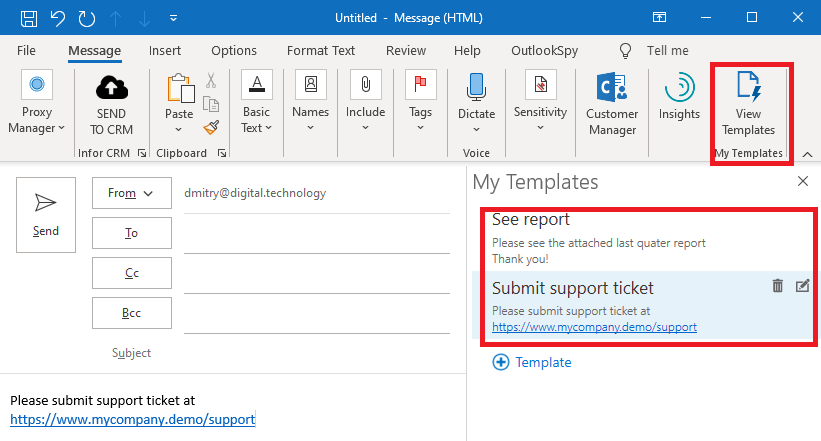
• Added RDOTemplates object (retuned by RDOSession.Templates and RDOExchangeMailboxStore.Templates) that exposes Outlook templates (Exchange specific). You can add, read, update, and delete Exchange templates.
|
|
Bug fixes
• Using RDOSession.GetRDOObjectFromOutlookObject or Safe*Item against an unsaved message could prevent that message from ever being saved and could raise an exception (Exceed maximum allowed of hooks) after GetRDOObjectFromOutlookObject was called a few times.
• Saving a plain text message in the HTML format (RDOMail.SaveAs(..., olHTML)) could sometimes produce a file without the message body with the message headers only.
• Reading RDOMail.HTMLBody property or saving in the HTML format could produce "Unbalanced stack or queue operation" exception for some corrupted messages with invalid RTF-encoded HTML body.
• RDOFolder2.GetActivitiesForTimeRange and RDORecurrencePattern.GetOccurrence did not correctly handle locales where the week starts on Monday (rather than Sunday) when calculating weekly recurrence patterns.
• RDOAddressEntry.GetPicture method sometimes returned null in the cached mode even if the picture was available on the server.
• Releasing a Redemption object (such as SafeMailItem or RDOSession) in the Explorer.InlineResponseClose event could sometimes make Outlook crash (it would attempt to close the inline response editor twice). This problem is also fixed in Outlook 16.0.13617.10000, the updated version of Redemption will work around the problem in the older versions of Outlook as well.
• Saving an appointment or a meeting request/response in the MIME format now adds both plain text and text/calendar parts. Previously, the EML file contained only the text/calendar part.
• Saving a message with reply recipients in the MIME (EML) format could corrupt the Reply-To MIME header if the entries were GAL users rather than one-off SMTP entries.
• Outlook Object Model compatibility: setting RDOAppointmentItem.End property (without also setting the Start property) adjusted the Start property as well (leaving Duration intact). Doing the same in OOM left the Start property the same (thus only affecting Duration).
• RedemptionLoader (all languages) was updated to include the SafeApplication object introduced in version 5.25.
November 1, 2020
Version 5.25.0.5826
New features
• Added RDOFolders.OpenOrAdd and RDOFolders.OpenOrAddSearchFolder methods that open an existing folder (if it exists) or create a new one. These methods are more efficient (they are implemented on the store provider level) than the usual practice of first attempting to call RDOFolders.Add, catch the exception, and then retrieve the existing folder by name using RDOFolders.Item (or RDOFolders[]). See the sample script below for an example.
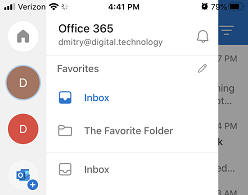
• Added support for
the favorite folders with the RDOSession.Favorites
and
RDOStore2.Favorites
collections.
RDOFavorites object allows to enumerate existing
favorite folders as well as add, edit, and delete folder favorites .
|
|
• New SafeApplication object. Like other Safe* objects, it exposes functionality not exposed through the native OOM object (Outlook.Application). ApplicationPath and Bitness properties are exposed as well as BeforePrint event.
Note that unlike the
Safe*Item objects,
SafeApplication object is not MAPI based and
hence can be used even if the bitness of the calling process (and Redemption)
does not match the bitness of Outlook.
The example below intercepts the
BeforePrint event (not exposed in the Outlook Object Model) and
displays a warning if it finds a string that looks like a Social Security Number
in the body of the message to be printed.
|
private Redemption.SafeApplication _safeApplication; private Outlook.Application _application;
public TestForm() { _application = new Outlook.Application();_safeApplication = new SafeApplication();_safeApplication.Item = _application; _safeApplication.BeforePrint += _safeApplication_BeforePrint; }
private void _safeApplication_BeforePrint(object Item){ Outlook.MailItem mailItem = Item as Outlook.MailItem;if (mailItem != null) { string body = mailItem.Body; body = body.Replace( "\r", "").Replace("\n", "");Match ssnMatch = new Regex(@"(?<!\d)\d{3}([- ])\d{2}\1\d{4}(?!\d)").Match(body); if (ssnMatch.Success) { //unfortunately, the event is not cancelable MessageBox.Show("The message you are about to print appears to contain a "+ "Social Security Number.\n" + "Please destroy the printout when you are done.", "Printing from Outlook", MessageBoxButtons.OK, MessageBoxIcon.Warning); } } } |
• Added RDOExchangeMailboxStore.GetOutOfOfficeAssistantWithCredentials method that allows to explicitly specify the credentials to be used by the returned RDOOutOfOfficeAssistant object. for its EWS calls.
• Added
RDOExchangeMailboxStore.PrimaryStore
and
RDOExchangePublicFoldersStore.PrimaryStore properties.
The property returns an instance of the
RDOExchangeMailboxStore
object that represents the primary Exchange mailbox in the given Exchange
account. E.g.. if an Exchange account has 4 stores (primary mailbox M1, delegate
mailboxes D1 and D2, and a Public Folders store P1), PrimaryStore
property for all these stores will return the primary mailbox M1.
The property was introduced to avoid the need to access RDOStore.StoreAccount property. RDOAccount object returned by RDOStore.StoreAccount. wraps the IOlkAccount MAPI object, which has thread affinity and can raise an exception if accessed on a secondary thread. To avoid the cross-thread access exceptions, one can, for example, use RDOExchangeMailboxStore.PrimaryStore.Owner.SMTPAddress in place of RDOExchangeMailboxStore.StoreAccount.CurrentUser.SMTPAddress.
Bug fixes
• Releasing an instance of the RDOMail object created on top of an MSG file (RDOSession.GetMessageFromMsgFile / CreateMessageFromMsgFile) in a 64 bit application (including Outlook) could sometimes cause a crash.
• Using RDOSession.GetRDOObjectFromOutlookObject against an inline response message (Explorer.ActiveInlineResponse) could sometimes prevent Outlook from correctly updating the original message being replied to (e.g. the reply icon might be missing).
• Reading RDOMail.HTMLBody property or exporting to the MIME or MHTML file format from a message created on top of an MSG file (RDOSession.GetMessageFromMsgFile / CreateMessageFromMsgFile ) could sometimes corrupt Unicode / Emoji characters and/or HTML styles and list bullets as well as insert superfluous line breaks.
• Simultaneously exporting multiple RTF-formatted messages to the MIME or MHTML formats in parallel threads could sometimes cause a lock.
• Importing or exporting meeting requests or responses (VCALENDAR) in the MIME or iCal formats could sometimes skip location, start, and recipients as well import the the calendar item as RDOAppointmentItem rather than RDOMeetingItem.
• Saving a message with a category in the HTML or MHTML format could produce a file that Microsoft Word showed without spaces between some words.
• Setting the RDOMail.Sent property on an unsaved message after importing an MSG file using RDOMail.Import(..., olMsg) could sometimes raise the MAPI_E_COMPUTED exception.
• Deleting a MAPI property using RDOMail.Fields[] (by setting it to null) on a message opened on top of an MSG file could sometimes leave the property intact if the property tag or the DASL property name did not specify the property type (e.g. "http://schemas.microsoft.com/mapi/string/{00020386-0000-0000-C000-000000000046}/content-type").
• Documentation: RDOMail.CreateConversationIndex method was not documented.
August 1, 2020
Version 5.24.0.5736
New features
• All Safe*Item objects (SafeMailItem, SafeContactItem, etc.) now expose the new Commit method. The method commits all pending changes that only exist in the Outlook internal cache without actually saving the item. Previously, an Outlook object must have been saved (by calling the Save method) to make pending changes made through the Outlook Object Model or Outlook UI visible to Extended MAPI and Redemption. Calling Save can be undesirable as it persists the item and makes it visible to the end user (e.g. in the Drafts folder), which can require the saved item to be tracked and deleted. Moreover, after calling Save ,Outlook would no longer prompt the user to save the pending changes.
Commit method preserves the unsaved state of the item while making all the latest changes visible to Redemption without actually persisting the item. If the item has no pending changes, Commit does nothing.
RDOSession.GetRDOObjectFromOutlookObject now also silently commits the changes at the time of the call before returning an RDO object corresponding to the Outlook object passed as the parameter.
|
'create new message, modify it without saving
set newMailItem =
Application.CreateItem(0)
newMailItem.Recipients.Add("test@dimastr.com")
'access the newly created unsaved item using Redemption
set sItem = CreateObject("Redemption.SafeMailItem")
sItem.Item = newMailItem
MsgBox
"# of recipients before Commit:" & vbCrLf & sItem.Recipients.Count
'after calling Commit, Redemption can see pending changes
'without saving the item
sItem.Commit
MsgBox
"# of recipients after Commit:" & vbCrLf & sItem.Recipients.Count |
• Added RDOExchangeMailboxStore.IsArchive property. Since both delegate and archive Exchange stores are represented by the RDOExchangeMailboxStore object and the StoreKind property returns skDelegateExchangeMailbox for both kinds of mailboxes, IsArchive property allows to distinguish between delegate mailboxes that belong to another user and an archive mailbox owned by the current user.
|
foreach (RDOStore store
in session.Stores)
{
RDOExchangeMailboxStore exStore = store
as RDOExchangeMailboxStore;
if ((exStore !=
null)
&& (!exStore.IsArchive))
{
//only process primary and delegate
Exchange mailboxes that are not online archives
}
else
{
MessageBox.Show($"Skipped store '{store.Name}'");
} } |
• Added RDOSession.GetCachedSharedMailbox and GetCachedSharedDefaultFolder methods that allow to access delegate stores and folders cached in the primary account's OST file. Accessing shared stores is a lot more efficient then using RDOSession.GetSharedMailbox and GetSharedDefaultFolder methods as there is no reason to retrieve the auto-discover XML to construct the delegate store entry id and then open the store in the online mode.
|
//try to open a cached delegate Inbox first //if that fails, try to open the online version
RDOFolder folder =
null;
try
{
folder = session.GetCachedSharedDefaultFolder(mailboxName,
rdoDefaultFolders.olFolderInbox);
}
catch(COMException e)
{
if (e.ErrorCode != (int)MAPICode.MAPI_E_NOT_FOUND)
throw;
else
{
//could not find the cached folder, try its online version
folder = session.GetSharedDefaultFolder(mailboxName,
rdoDefaultFolders.olFolderInbox);
}
}
RDOItems items = folder.Items;
MessageBox.Show(items.Count.ToString());
Marshal.ReleaseComObject(items);
Marshal.ReleaseComObject(folder); |
• Added RDOExchangeAccount.CachedDelegateStores property that lists all cached delegate stores in the given local Exchange account. The property is a subset of the RDOExchangeAccount.DelegateStores (which lists all delegate mailboxes in the account regardless of the cached/online state). The collection will be empty if delegate mailboxes are not cached or if there are no delegate mailboxes for the primary mailbox.
|
StringBuilder sb =
new StringBuilder();
foreach (RDOAccount account
in session.Accounts)
{
RDOExchangeAccount exAccount = account
as
RDOExchangeAccount;
if (exAccount !=
null)
{
sb.AppendLine($"Exchange account
{exAccount.Name}");
foreach(IRDOStore store
in exAccount.CachedDelegateStores)
{
sb.AppendLine($" cached delegate
mailbox:
{store.Name}");
}
}
}
MessageBox.Show(sb.ToString()); |
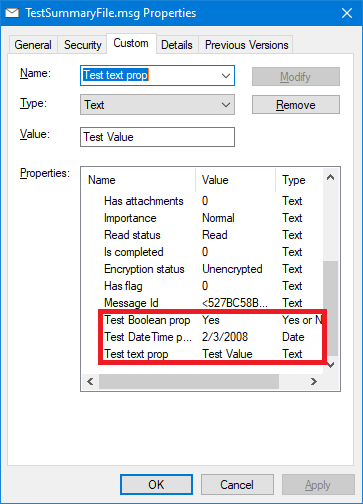
• Saving messages
in the olMsgWithSummary format now exposes user properties
(that is, custom properties added using RDOMail.UserProperties.Add
or MailItem.UserProperties.Add) in the Custom tab of the file
properties dialog in Windows Explorer.
• RDOSession.CacheAutodiscoverXml now allows to pass an Autodiscover Url instead of XML. The given url will later be used to retrieve the Autodiscover XML for the specified SMTP address whenever Redemption will need it (GetSharedDefaultMailbox, LogonHostedExchangeMailbox, etc.) thus avoiding the need to probe multiple Autodiscover urls (some of which can take a considerable amount of time to return or timeout).
• Performance optimization - accessing standalone MSG file using IStream COM interface (RDOSession.CreateMessageFromIStream and RDOSession.GetMessageFromIStream) and importing/exporting using the IImportExport interface is now at least 50% faster.
Bug fixes
• Saving in the MSG format (RDOMail.SaveAs(..., olMsg)) under Exchange Online could crash after June 30, 2020 (when Exchange online started stamping the messages with the KeyPhraseScores named property) if the MAPI message or its parent MAPI session had to be marshaled between different threads or different processes due to a bug in the MAPI marshalling code that could not handle PT_MV_I8 type MAPI properties. The current version of Redemption skips all PT_MV_I8 properties.
• Setting
RDOMail.Sent
property after importing an MSG file using RDOMail.Import
could raise Error in Set_Sent: MAPI_E_COMPUTED exception.
The same problem manifested itself in the RDOMail.CopyTo
method (some properties could become corrupted, the attachments could be
missing, etc.).
• Saving a file in the olMsgWithSummary format caused Windows Explorer to display the Due Date column with a time offset instead of just date.
• Creating Redemption objects (such as RDOSession) raised an exception (Catastrophic failure (Exception from HRESULT : 0x8000FFFF (E_UNEXPECTED))) under Outlook builds 16.0.12730.20206 and 16.0.12624.20520 due to an access violation in msmapi32.dll when calling MAPIInitialize.
• Calling RDOSession.LogonHostedExchangeMailbox without credentials could result in an error.
• When importing some EML files directly into MSG files, some HTML special characters could become corrupted and displayed in the resulting message, e.g. """ could becomes "quot;".
• Exporting in the MIME format might not preserve the first line of the existing MIME headers (stored in the PR_TRANSPORT_MESSAGE_HEADERS property) if the header was wrapped to the next line.
• RDOSession.Stores.AddDelegateExchangeMailBoxStore sometimes failed to properly check if the given delegate mailbox has already been added to the profile, resulting in a duplicate store.
• Accessing RDOStore2.QuickSteps in an IMAP4 or PST store could sometimes produce Error in IMAPIFolder.CreateFolder: MAPI_E_COLLISION exception.
• RDOSelectFoldersDialog on new profiles could sometimes display no stores or folders at all.
• Saving some MSG files in the HTML or MHTML format, HTML list items could be prefixed with the "*" character.
April 22, 2020
Version 5.23.0.5664
New features
• Added support for accessing MSG files using IStream interface rather than file (in case the data resides in memory etc. rather than file system). Use RDOSession.GetMessageFromIStream to open RDOMail object on top of an existing MSG-formatted IStream and RDOSession.CreateMessageFromIStream to create a brand new RDOMail object on top of an IStream COM object (see example below).
• RDOMail object now allows to export/import to/from
various file formats using
IStream
COM interface rather than the file system. Cast
RDOMail
object (and objects derived from it, such as
RDOContactItem, RDOAppointmentItem,
etc.) to the IImportExport interface .
|
//the example below uses a sample FileIStream class that implements the IStream COM interface //Download FileIStream implementation. //The code below is the same as // msg = session.CreateMessageFromMsgFile(@"c:\temp\647_ImportExport\new.msg");// msg.Import(@"c:\temp\647_ImportExport\sample.fts", rdoSaveAsType.olFTS); // msg.Save(); //Create a new MSG file - new file, r/w access using (FileIStream msgFileStream = new FileIStream(@"c:\temp\ImportExport\new.msg", true, true)){ msg = session.CreateMessageFromIStream(msgFileStream as IStream); IImportExport importExport = msg as IImportExport;//open existing file with read-only access. You can create a memory based (or any other) stream instead< using (FileIStream fileStream = new FileIStream(@"c:\temp\ImportExport\sample.fts", false, false)) { importExport.Import(fileStream as IStream, rdoSaveAsType.olFTS); } msg.Save(); ((IDisposable)msg).Dispose(); msg = null;} |
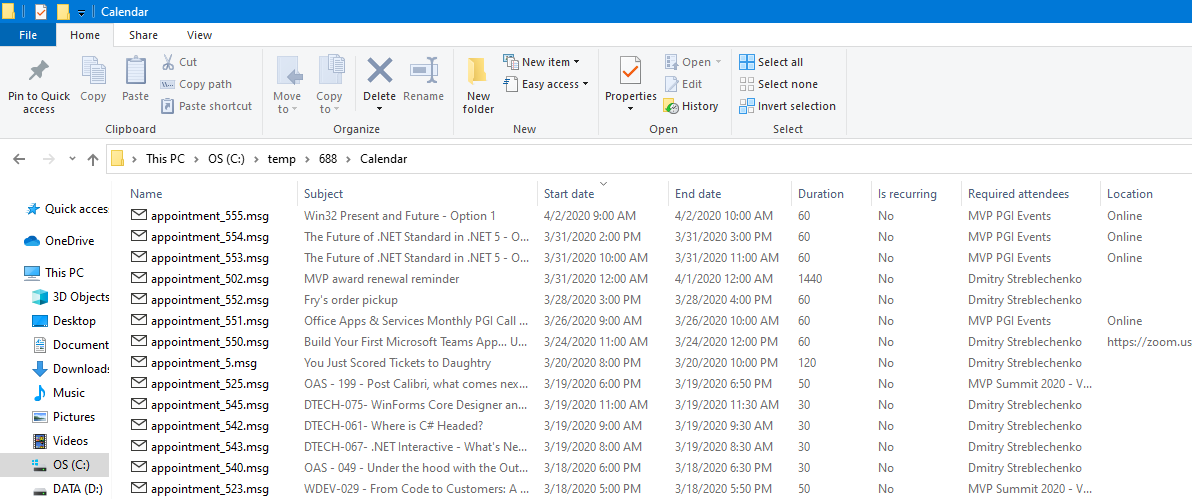
• Added olMsgWithSummary (1035) file format. The format is fully compatible with the olMsg and olMsgUnicode formats, but adds a few dozen properties that Windows Explorer and SharePoint can understand and display as separate columns in the Details view.
Redemption adds properties common to all items (such as Subject, Date Received, Sender Name, etc.) as well as properties specific to contacts, tasks, and appointments.
|
Set Session = CreateObject("Redemption.RDOSession")Session.MAPIOBJECT = Application.Session.MAPIOBJECT Set Item = Session.GetMessageFromID(Application.ActiveExplorer.Selection(1).EntryID)Item.SaveAs "c:\temp\688\test.msg", &H40B |
• Added RDOAccounts.AddLDAPAccount method that allows to add an LDAP account to the active profile.
|
set Session =
CreateObject("Redemption.RDOSession")
Session.MAPIOBJECT = Application.Session.MAPIOBJECT set
"www.zflexldap.com", 389, _
|
• Added RDOLDAPAccount.Password and EnableBrowsing properties.
• Support for the store display order in the Outlook folder pane. Added RDOStore2.DisplayOrder property and RDOStores.GetDisplayOrder() method (returns RDOStoresDisplayOrderList collection, which allows to retrieve and set the order):
|
RDOPstStore store = session.Stores.AddPSTStore( @"c:\temp\important.pst", Missing.Value, "Most important store");(store as RDOStore2).DisplayOrder = 2; //second store, show after the primary mailbox - the property is 1 based |
• RDOMail.SetProps method now allows to delete multiple properties as well as set multiple properties. To delete a property, set its corresponding value in the values array to null or a variant of type error.
• Expanded support
for multiple Exchange accounts in a profile - previously,
RDOAddressEntry.Details could sometimes display an empty
details dialog, and some
RDOAddressEntry properties could be empty, etc..
Added RDOExchangeAccount.GetAddressEntryFromID
/
GetAddressListFromID methods.
Address book objects returned from the message store objects (such as
RDOMail.Sender
/ SentOnBehalfOf /etc.) are now Exchange account aware.
• Improved handling of the non-standard values of the Importance, X-Priority, X-MSMail-Priority MIME headers and improved parsing of the non-standard SMTP addresses by the Redemption MIME importer.
Bug fixes
• Using Redemption
in an Outlook COM addin could sometimes cause Outlook to display authentication
prompts for the RPC and RPC-over-HTTP Exchange Server connections.
It could also cause Outlook search to return no results until Outlook is
restarted.
• Redemption could sometimes cause an access violation on the parent process shutdown.
• Some embedded message attachments could be skipped by the Redemption MIME importer.
• RDOMail.HTMLBody property of a message opened on top of an MSG file (e.g. using RDOSession.GetMessageFromMsgFile) could sometimes include RTF control words , such as \intbl, \qc, etc. The same problem manifested itself when an EML (MIME) file was created from a standalone MSG file.
• Importing MIME files with inline attachments and printing them using Outlook could result in Outlook listing embedded (inline) attachments alongside regular attachments in the printout.
• Redemption MIME Importer could not correctly parse some "Content-Type" MIME header parameters.
• Under Outlook 2007, RDOSession.Logoff sometimes caused "Not logged on. Please log on first" exception if RDOSession.Accounts collection was used prior to the call.
• Saving in the Fast Transfer Stream (FTS) format (RDOMail.SaveAs(..., olFTS)) produced a exception for the messages with the by-value attachments if the PR_ATTACH_DATA_BIN MAPI property was missing.
• Calling RDOSession.GetArchiveMailbox could raise an exception (Could not convert variant of type (Error) into type (Integer)) if the archive mailbox was located in a different domain.
• RDOFolderSynchronizer.SyncItems could raise "Error in IExchangeExportChanges::Synchronize: MAPI_E_CALL_FAILED" exception if a restriction was used and it included a named property (such as Categories).
• Setting RDOMail.Sender or RDOMail.SentOnBehalfOf properties to a one-off RDOAddressEntry object with a Unicode name could mangle the RDOMail.SenderName and RDOMail,SentOnBehalfOfName properties.
• RDOExchangeMailboxStore.IsCached could sometimes return false even if the store was cached.
• RDOSession.PickFolder and RDOSession.GetSelectFoldersDialog sometimes did not show the stores in the same order shown by Outlook.
• RDOFolders.Sort only allowed to pass as a parameter an integer property tag or an array of integers, but not a DASL name (string) or an array of strings.
• Importing MSG or Fast Transfer Stream (FTS) files (RDOMail.Import(..., olMsg / olFTS)), did not import the read/unread state and (for the unsaved messages) send/unsent state.
• Importing in the vCard or iCal formats ((RDOMail.Import(..., olVCard / olICal))) did not set sent and received times (REV field in vCard and DTSTAMP field in iCal).
December 24, 2019
Version 5.22.0.5498
New features
• Added RDOSession.IsAttachmentBlocked method (a wrapper for the IAttachmentSecurity MAPI interface). Returns True if the given filename is blocked by Outlook and False otherwise.
|
set Session = CreateObject("Redemption.RDOSession")Session.MAPIOBJECT = Application.Session.MAPIOBJECT MsgBox Session.IsAttachmentBlocked( "MyHarmlessFile.txt") |
• Added RDORecipients / RDORecipient.ExpandDL method that allows to replace Distribution Lists in a message recipient list with the members of that list. You can expand the distribution lists recursively and/or limit the expansion to only private distribution lists - MAPIPDL distribution lists can only be accessed locally since they do not have an externally meaningful address and only exist in the context of the store that contains the corresponding RDODistListItem object.
• AuthKey property (available on the creatable Redemption objects) is deprecated and is now ignored. Please use RedemptionLoader to restrict access to the Redemption objects.
Bug fixes
• Standalone applications that use Redemption could experience a crash in jitv.dll on shutdown in November 2019 builds of Outlook due to a bug in jitv.dll.
• RDOSession.LogonHostedExchangeMailbox failed in the latest builds of Outlook (which always attempt to use an OAuth token even if Basic credentials are supported by the Exchange mailbox and supplied by LogonHostedExchangeMailbox).
• Decrypted message (returned from RDOEntryptedMessage.GetDecryptedMessage) body would sometimes contain no line breaks and saving the decrypted message as an MSG file could produce a message with no visible body.
• Importing MIME files with a TNEF (winmail.dat) part sometimes corrupted RTF body wiping out embedded OLE objects.
• Importing MIME files with a with a plain text only body using the Redemption MIME converter (olRfc822_Redemption) sometimes produced messages in the HTML format.
• Some MSG files created by saving an embedded message attachment (returned from RDOAttachment.EmbeddedMsg) by calling RDOMail.SaveAs(..., olMsg) displayed an empty body when opened by Outlook.
• Folders displayed by RDOSession.PickFolder, might be shown unsorted if none of the subfolders have ever been explicitly rearranged by a user
• RDOMail.Account property sometimes returned null even if an account was explicitly assigned to the item.
• Importing MIME (EML) files using Redemption MIME converter (olRfc822_Redemption) could sometimes raise an exception for some EML files with specially formatted RFC2231-style wrapped MIME headers.
• EML files produced by saving in the MIME format messages or attachments with a large number of spaces (ASCII 0x20), were excessively large if quoted-printable encoding was used for the particular MIME part
• 64 bit only: reading RDOMail.HTMLBody property from a message returned by RDOSession.GetMessageFromMsgFile sometimes returned an empty string.
• Calling RDOAppointmentItem.Send sometimes raised MAPI_E_OBJECT_CHANGED exception under the latest versions of Exchange in the online mode.
• RDOSession.GetArchiveMailbox / GetSharedMailBox / GetSharedDefaultFolder / AddDelegateExchangeMailBoxStore under latest versions of Outlook could cause heap corruption (resulting in abnormal process termination) if an ambiguous name was passed as a parameter.
• For MIME messages imported using the Outlook MIME converter (olRfc822_Outlook), RDOAttachment.Hidden could erroneously return True for the regular visible attachment's
July 27, 2019
Version 5.21.0.5378
New features
• Added RDOFolders.Find / FindNext / Restrict / Sort methods. These methods are similar to the methods exposed by the RDOItems collection, but folder level methods were never exposed by Redemption or the Outlook Object Model. Using these methods is more efficient than iterating over all subfolders, especially if the parent folder is in the online mode and/or has a large number of child subfolders.
|
set Session = CreateObject("Redemption.RDOSession")
Session.MAPIOBJECT = Application.Session.MAPIOBJECT set IPMRoot = Session.Stores.DefaultStore.IPMRootFolder set vFolders = IPMRoot.Folders vFolders.Sort "Name", false set vFolder = vFolders.Find("Name LIKE 'C%' ") while not (vFolder is Nothing) Debug.Print(vFolder.Name) set vFolder = vFolders.FindNext wend |
• Added support for removing/undoing appointment exceptions to restore the original recurrence pattern either for the whole series or a particular occurrence: RDORecurrencePattern.Exceptions.Clear to remove all exceptions and RDOExceptions.Restore / RDOException.Restore to undo a particular exception.
|
set Session = CreateObject("Redemption.RDOSession")
Session.MAPIOBJECT = Application.Session.MAPIOBJECT set appt = Session.GetMessageFromID(Application.ActiveExplorer.Selection(1).EntryID) appt.GetRecurrencepattern.Exceptions.Restore(#7/9/2019#) appt.Save |
• Performance enhancement: faster load times - Redemption lazy-loads time zone definitions form the registry when it accesses a date-time property for the first time. Loading localized time zone names could be slow since doing so requires loading Windows resource dlls. In the current version, the localized time zone names are only loaded when they are needed.
Bug fixes
• Some Fast Transfer Stream (FTS) files created by RDOMail.SaveAs(..., olFTS) could not be uploaded to Exchange using the UploadItems EWS operation ("Data is corrupt., End of buffer reached prematurely." error was returned).
• Importing some Fast Transfer Stream (FTS) files using RDOMail.Import(..., olFTS) could raise an exception (Unexpected property type) if the file contained properties of type PT_SVREID. (such as the PidTagSentMailSvrEID property).
• New all-day appointments created by Redemption (RDOAppointmentItem returned from RDOFolder.Items.Add(olAppointmentItem)) would sometimes be shown incorrectly by the mobile versions of Outlook (iOS and Android) due to the missing start and end time zone blobs (only the legacy time zone blob was present).
• RDOSession.Nicknames or RDOExchangeMailboxStore.Nicknames sometimes returned stale (or no) data under Outlook 2013 or newer if accessed before Outlook flushed the latest data from its temporary cache to a hidden item in the Inbox folder.
• Attaching an EML file created by Redemption to an Outlook message and converting that message to MIME format could produce a corrupted file since the MIME boundary generated by Redemption might not be unique enough.
• Importing MIME (EML) files into standalone MSG files (returned by RDOSession.CreateMessageFromMsgFile or GetMessageFromMsgFile) under Outlook 2010 or older sometimes either damaged HTML body or was shown corrupted when replying to or forwarding the message.
• Importing MIME (EML) files using Redemption MIME converter (olRfc822_Redemption) sometimes could erroneously pick HTML message body from an embedded message attachment (if it existed) if the primary message did not have the HTML part.
• Exporting in the MIME (EML) format using Redemption MIME converter (olRfc822_Redemption) could sometimes create a duplicate BCC header if the original MIME headers already contained a BCC header.
• .Net runtime compatibility: if a Redemption event that passed an empty string parameter (e.g. ParentEntryID parameter in the RDOStore.OnMessageModifiedEx event) was invoked, the .Net event handler would not be executed.
• Setting HTMLBody property on a standalone MSG file returned by RDOSession.CreateMessageFromMsgFile or GetMessageFromMsgFile sometimes could result in a damaged HTML body.
• RDOAttachment.HIdden returned false for the images referenced by the HTML body by the file name rather than content id or location.
• RDOTimezone.NameLocalized / DaylightDesignationLocalized / StandardDesignationLocalized properties returned non-localized time zone names under the latest builds of Windows 10.
• If HTML body data mistakenly specified UTF-16 as the codepage, RDOMail.HTMLBody property returned corrupted text.
• Accessing RDOMail.SaveSentMessageFolder property before accessing any other property could have produced an error.
• Passing Office 365 Teams/Groups folder to RDOMail.CopyTo / Move raised MAPI_E_NO_ACCESS exception.
March 23, 2019
Version 5.20.0.5298
New features
• Added ForwardAsAttachment and NewMeeting events to the SafeMailItem object. These events are exposed by Outlook on the low level (IConnectionPointContainer / IConnectionPoint / etc.), but they are not defined in the type library, making it impossible to use them in VBA / VB Script and non-trivial in the .Net languages.
The events are similar to the MailItem.Reply / ReplyAll / Forward events in the Outlook Object Model.
|
private SafeMailItem _sItem; private MailItem _oItem;... _oItem = _application.ActiveExplorer().Selection[1]; _sItem = new SafeMailItem();_sItem.Item = _oItem; _sItem.ForwardAsAttachment += OnForwardAsAttachment; ... private void OnForwardAsAttachment(object Forward, ref bool Cancel){ MailItem newMessage = (MailItem)Forward; if (OlSensitivity.olConfidential == _oItem.Sensitivity) { MessageBox.Show( $"Confidential message '{_oItem.Subject}' cannot be forwarded");Cancel = true;} else { newMessage.Subject = _oItem.Subject; newMessage.Body = $"Please see the attached message '{_oItem.Subject}'.";} } |
• Outlook Object Model parity: added content indexer support to the search queries used by RDOItems.Restrict and MAPITable.ExecSQL. You can now use ci_phrasematch and ci_startswith operators instead of / in addition to = and LIKE operators. Make sure the store supports content indexing by checking the new RDOStore2 / RDOPSTStore / RDOExchangeMailbox / RDOEASStore.IsInstantSearchEnabled property first. Keep in mind that these operators only work on queries returning multiple matches, which means RDOItems.Find / FindNext will not work.
|
Set Session = CreateObject("Redemption.RDOSession")Session.MAPIOBJECT = Application.Session.MAPIOBJECT Set store = Session.Stores.DefaultStorequery = ""If store.IsInstantSearchEnabled Thenquery = "Subject ci_phrasematch 'Redemption'"Debug.Print "Instant search is enabled"Else query = "Subject like '%Redemption%'"Debug.Print "Instant search is NOT enabled"End IfSet folder = Store.GetDefaultFolder(olFolderInbox) Set items = folder.Items Set result = items.Restrict(query)Debug.Print result.Count & " matches found" |
Bug fixes
• Setting RDOAppointmentItem.Start / End / Duration properties could lead to unexpected errors on machines with missing time zone MUI files.
• Saving in the MSG file format (RDOMail.SaveAs and Safe*Item.SaveAs) sometimes produced MSG files in plain text even if the original message was HTML.
• RDOSignature.ApplyTo could corrupt Unicode signature characters if the signature character set (as specified in the HTML header) was different from the current system code page and the Unicode characters were not HTML-encoded.
• RDOSession.GetAutodiscoverXml did not respect the value of the RDOSession.MAPITimeoutShort and always used a short timeout.
• SafeExplorer.ActiveInlineResponseDiscard and ActiveInlineResponsePopOut actions were reversed under some older builds of Outlook.
• Importing MIME files with an attachment without an extension using Redemption MIME converter (olRfc8222_Redemption), a default extension ".dat" was added.
• Exporting in the MIME format using Redemption MIME converter (olRfc8222_Redemption), Message-ID header was not exported if PR_INTERNET_MESSAGE_ID property was missing even if the message id was present in the PR_TRANSPORT_MESSAGE_HEADERS property.
• Importing an iCal file (RDOAppointmentItem.Import or RDOFolder2.Import) would not mark the imported appointment as all-day if DTEND field was not present.
• Importing a vCard file (RDOAppointmentItem.Import or RDOFolder2.Import) raised an exception if the image specified in the vCard file was invalid / unrecognizable rather than ignoring the error.
January 28, 2019
Version 5.19.0.5248
This version is a hotfix for the appointment issues (version 5.19.0.5238 specific)
Bug fixes
• Setting RDOAppointmentItem.Start / End / Duration properties could lead to unexpected errors.
• Reading RDOAppointmentItem.Start and End properties returned from RDOFolder2.GetActivitiesForTimeRange for a folder with free/busy-only access rights raised MAPI_E_NO_ACCESS exceptions.
• The interop dlls (Interop.Redemption.dll and Interop.Profman.dll) were signed, but not strongly named.
January 22, 2019
Version 5.19.0.5238
New features, bug fixes, Windows 10, Outlook 2016/2019 and Outlook Centennial (Windows Store) compatibility
New features
• Added the ability
to export and import items in the Fast Transfer Stream format (used by
the Exchange Server and its Exchange Web Services API - ExportItems
and UploadItems
operations).
This makes it possible to upload and download full fidelity Exchange items
using Exchange Web Services (EWS) - Fast Transfer Stream uses format
similar to the MSG files and preserves all MAPI properties without conversion to
or from MIME - you can convert data downloaded from EWS to MSG or PST format or
upload MSG or PST files to an Exchange mailbox through EWS.
All Redemption methods capable of exporting or importing data (RDOMail.SaveAs / Import, Safe*Item.SaveAs / Import, RDOFolder2.Import) now support this new format through the new rdoSaveAsType.olFTS enum (1034).
|
Set Session = CreateObject("Redemption.RDOSession")Session.MAPIOBJECT = Application.Session.MAPIOBJECT Set Folder = Session.GetFolderFromID(Application.ActiveExplorer.CurrentFolder.EntryID) Set item = Folder.Items.Additem.Sent = trueitem.Import "c:\temp\test.fts", olFTSitem.Save |
• Added RDOExchangeMailboxStore.IsConsumerAccount property. Returns true for a free outlook.com mailbox, and false otherwise.
• Outlook 2016 / 2019 compatibility: Added RDOAppointmentItem.DoNotForwardMeeting / DoNotAllowProposeNewTime properties.
• Saving messages in the MSG format (RDOMail.SaveAs(..., olMsg)) performance was improved by as much as 90% in case of an online Exchange store.
• The performance of importing MSG files (RDOMail.Import(..., olMsg)) into an online Exchange store was improved by as much as 50%.
• The performance of the RDOFolder2.GetActivitiesForTimeRange method was improved by 50% - 80%.
• Accessing
RDOMail.Sender, RDOMail.SentOnBehalfOf,
RDOMail.ReplyRecipients,
RDODistListItem.OneOffMembers,
RDORecipient.AddressEntry
properties no longer requires an active MAPI session (e.g. if an MSG file is
opened using RDOSession.GetMessageFromMSGFile
without calling Logon or setting the MAPIOBJECT
property) as long as the address is a one-off SMTP address.
Bug fixes
• Creating any Redemption object (such as RDOSession or SafeMailItem) under Outlook 2016 November 2018 update could crash if an older version of mso.dll was already loaded by the parent process, e.g. when running under an older (2010/2013) version of msaccess.exe or if an older Access OLEDB provider was loaded in the process address space prior to using Redemption.
• Creating any Redemption object (such as RDOSession or SafeMailItem) under Windows 10 with no Outlook installed could cause a crash in mmgaclient.dll (Windows 10 bug).
• RDOSession.GetArchiveMailbox did not use auto discover XML cached by RDOSession.CacheAutodisocverXml.
• RDOSession.Stores.AddDelegateExchangeMailBoxStore required Outlook restart after a delegate mailbox was added under Outlook 2016 or 2019.
• RDOMail.Delete failed to delete the message if the message was opened in the online mode (e.g. using MAPI_NO_CACHE flag) and the parent cached folder did not contain the message (e.g. if it was outside of the time range cached by the OST store).
• MAPIUtils.HrArrayToString method could be slow for large arrays
• RDOFolder2.Import method could be slow with large EML files if the Redemption MIME converter (olRfc822_Redemption) was used.
• RDOMail.SaveAs created an MSG file with only the message body and recipients populated for some corrupted messages in PST stores.
• Importing iCalendar (ICS) files using RDOAppointmentItem.Import or RDOFolder2.Import, if the meeting organizer was listed as both the organizer and as an attendee, the organizer was not marked as such in Outlook.
• Accessing SafeRibbon.Controls collection under Outlook 2016/2019 sometimes raised "Could not convert variant of type (OleStr) into type (Int64)" exception.
• When the ribbon was compacted under Outlook 2016/2019, SafeExplorer.ActiveInlineResponseDiscard and ActiveInlineResponsePopOut actions were reversed - ActiveInlineResponseDiscard was popping the inline response instead of discarding it, and ActiveInlineResponsePopOut was discarding the inline response instead of showing the inline response in a new inspector.
October 6, 2018
Version 5.18.0.5142
New features, bug fixes, Windows 10, Outlook 2019 (beta) and Outlook Centennial (Windows Store) compatibility
• Added RDOFolder2.Import method. The method allows to import from a file, IStream COM interface, or from a variant array (of byte or of variant). All import formats supported by RDOMail.Import are supported by RDOFolder2.Import. Since RDOMail.Import method signature cannot be changed to support an import source other than a file (a frequently requested Redemption feature), this method can be used instead.
The method allows to import iCal files with multiple events or vCard files with multiple contacts. For all other formats, a single new item is created. The method returns RDOItems collection with the newly created items. To retrieve RDOFolder2 interface, cast any RDOFolder object to RDOFolder2.
|
Set Session = CreateObject("Redemption.RDOSession")Session.MAPIOBJECT = Application.Session.MAPIOBJECT Set Folder = Session.GetDefaultFolder(olFolderCalendar) Set items = Folder.Import("c:\temp\MultipleItems.ics", olICal) For Each item In itemsdebug.Print item.Subject Next |
• RDOMail.Import and Safe*Item.Import methods now support olTxt format (olRtf and olHTML formats were supported before). In case of the file based data, Import is an easier and more reliable option that setting the RTFBody, HTMLBody, or Body properties as the file contents would not have to be converted to a Unicode string first before setting the body properties.
• Specifying "Recipients / To / CC /BCC" in the RDOItems.Find/Restrict/etc. SQL queries, only searched the PR_DISPLAY_NAME and PR_EMAIL_ADDRESS MAPI properties in the recipient table. The latest version will also match on the PR_SMTP_ADDRESS recipient property.
Bug fixes
• Under Windows 10 October 2018 Update (1809), accessing any DateTime property resulted in the "System Error. Code: 18. There are no more files" exception when Redemption attempted to load the time zone definitions.
• RDOSignature.ApplyTo erroneously copied the signature to the clipboard wiping out any existing clipboard content.
• Accessing RDOSignature.HTMLBody property sometimes produced "No mapping for the Unicode character exists in the target multi-byte code page" exception.
• Under Outlook Centennial (Windows Store), calling RDOContactItem.AddPicture, passing RDOAttachment object to the RDOMail.Attachments.Add method, or reading the RDOAttachment.FileSize property resulted in the "Interface not supported" exception.
• Under Outlook Centennial (Windows Store), RDOSession.LogonPstStore crashed the calling process due to a bug in the HrValidateIPMTree MAPI function,
• Under Outlook Centennial (Windows Store), handling RDOItems or RDOFolders events could lead (after processing at least one event) to the MAPI system shutdown requiring application or mmgaserver.exe restart due to a bug in the ScCopyProps MAPI function.
• Some MSG files produced by Redemption (RDOMail.SaveAs(..., olMsg)) were missing parts of the message body when displayed by Outlook even if RDOMail.Body returned correct data.
• On some systems loading Redemption showed a message box with an error "Missing procedure entry point ShowBucketedString@8 could not be located"
• RDOItems.Sort could not handle quoted property names in the DASL format (unquoted property names worked as expected).
• RDOMail.Move failed to move the message if the message was opened in the online mode (e.g. using MAPI_NO_CACHE flag) and the parent cached folder did not contain the message (e.g. if it was outside of the time range cached by the OST store).
• Importing some iCal files with multiple attendees, one of which contained an invalid ("invalid:nomail") email, import sometimes causes MAPI_E_INVALID_PARAMETER exception from IMessage::ModifyRecipients.
• Importing MIME files with a plain text body only and double Unix-style line breaks (0x0D, 0x0D) using Redemption MIME converter (olRfc8222_Redemption) could corrupt the message body.
May 29, 2018
Version 5.17.0.5062
New features, bug fixes, Outlook Centennial (Windows App Store) compatibility
• Outlook Object Model parity - RDOAttachments.Add now supports adding web-by-reference (RDOAttachment.Type == olByWebReference (7)) attachments. The Source parameter must be a valid http or https url and Type parameter must be olByWebReference.
• Added new property - RDOSession.HeadersOnlyOnSlowConnection. Corresponds to "Send / Receive | Download | On Slow Connectiosn Download Only Headers" in the Outlook UI.
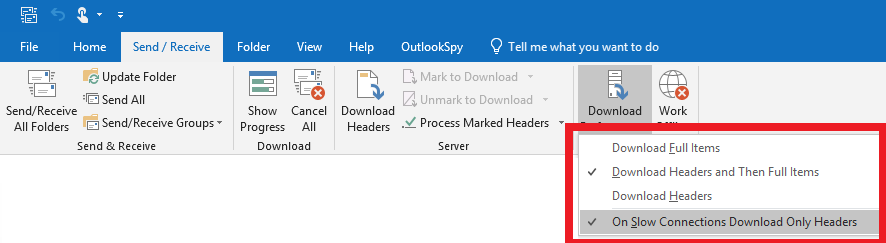
• RDOSession.ExchangeConnectionMode property can now be set (it was read-only previously). Not all rdoExchangeConnectionMode enum values are allowed: olCachedDisconnected (the same as setting the RDOSession.Offline property to true), olCachedConnectedHeaders, olCachedConnectedDrizzle, olCachedConnectedFull can be used (see the screenshot above)
• Added RDORecipient.AddressType property. This property was added to discourage the use of the RDORecipient.AddressEntry.Type property usage pattern- accessing RDORecipient.AddressEntry (which returns an instance of the RDOAddressEntry object) can be expensive, especially in the online mode.
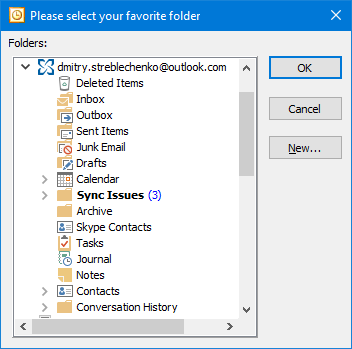
• RDOSelectFoldersDialog object (returned by RDOSession.PickFolder) icons were updated to match Outlook 2016 folder icons. When running under Outlook 2013 or older, old style icons are used to be consistent with the Outlook UI.
Bug fixes
• Under Outlook Centennial, retrieving items from the RDOFolder.Items collection failed (Error in PropCopyMore: MAPI_E_INVALID_PARAMETER) .
• Under Outlook Centennial, RDOAddressEntry object returned from RDOSession.CurrentUser had all properties empty .
• RDOStore.StoreKind property sometimes returned skEAS instead of skIMAP4 under Outlook Centennial.
• RDOSession.GetSharedMailbox failed under Outlook 2013 or older.
• RDOSearchFolder.SearchCriteria.AsSQL raised an exception under the latest builds of Outlook 2016.
• RDOSelectFoldersDialog object (returned from RDOSession.PickFolder) sorted the folders alphabetically, rather than in the order displayed by Outlook.
• RDOMail.BodyFormat property returned olFormatPlain and RDOSignature.ApplyTo inserted plain text signature for the new messages (Body / HTMLBody / RtfBody properties never set)
• Retrieving free/busy information failed under locales with a time separator other than ":".
• No properties could be set on existing recurring recurring appointment exceptions (setting properties on new exceptions worked properly).
• Setting RDORecurrencePattern.PatternEndDate property sometimes added one extra occurrence (as returned by the RDORecurrencePattern.Occurrences property).
• Redemption MIME exporter sometimes corrupted Unicode characters in the message body when exporting MIME files when quoted-printable MIME encoding was used.
• Redemption MIME importer did not import Categories and message flag if they were specified in an EML file.
• Redemption MIME importer replaced Unicode characters with "?" in the display names of embedded message attachments.
• Better RDOSession.GetSharedMailbox error handling - instead of raising a generic "Could not find the store DN" exception, the error now includes extra information that led to that error.
• Setting RDOMail.HTMLBody property on a standalone MSG file returned from RDOSession.GetMessageFromMsgFIle / CreateMessageFromMsgFIle sometimes resulted in Outlook displaying the MSG file in plain text.
• RDOMail.HTMLBody property returned garbage if the native HTML erroneously specified "unicode" as the content charset.
• RDOAddressListSearch.GetResults raised MAPI_E_END_OF_SESSION exception when used for the very first time in a session under Outlook 2016.
• Importing some malformed MSG files (RDOMail.Import(..., olMsg)) created by third-party software failed to import the message body.
February 19, 2018
Version 5.16.0.4972
New features and improvements
• Added support for the Windows Store version of Outlook 2016 . Previous versions of Redemption could not find and load the MAPI system (which is installed in a different location and the executables have different file names)
• Added RDOStore2.GetFolderFromPath method. Similar to the RDOSession.GetFolderFromPath method, but allows to open a folder by path on the per-store level. RDOStore2.GetFolderFromPath includes an optional parameter (CanCreate) that can be used to create the folders along the path if they do not already exist.. If the folder path includes the store name (prefixed with "\\"), it is ignored. This makes it possible to retrieve RDOFolder.FolderPath from a folder in one store and recreate the same path in another store.
|
RDOSession session = new RDOSession();session.Logon( "Test"); RDOStore store = session.Stores.DefaultStore; RDOStore2 store2 = store as RDOStore2; RDOFolder folder = store2.GetFolderFromPath(@"Inbox\Test folder", true); MessageBox.Show(folder.Name); |
• Added RDOExchangeMailboxStore.AutoDiscoverUrl / LastSyncTime (may not be present on all stores) / MAPIHTTPMailboxInternalUrl / MAPIHTTPMailboxExternalUrl / MAPIHTTPAddressbookInternalUrl / MAPIHTTPAddressbookExternalUrl properties.
• Added RDORecurrencePattern.FirstDayOfWeek property - recurrence pattern specific first day of week (can be different from the local setting).
• MAPITable.ExecSQL performance was greatly improved (especially against an online Exchange store). If a restriction was specified, the previous versions defaulted to using the MAPI equivalent of Find/FindNext retrieving one row at a time rather than using Restrict by default to retrieve multiple rows in a single call. This was previously done to mitigate Exchange Server performance issues when the server cached the queries; newer versions of Exchange handle restrictions much better now.
• Added RDOSyncMessageItem.Fields[] and RDOSyncMessageItem.PropList properties that allow to access the list of property tags and their values provided by the ICS API (especially if RDOFolderSynchronizer.IncludeSyncProperties was used to request extra properties) without opening the message using RDOSyncMessageItem.Item.
Bug fixes
• RDOMail.HTMLBody property and saving messages in the HTML format produced corrupted text for some codepages.
• Exporting messages in the MIME format using built-in Redemption MIME converter (RDOMail.SaveAs(..., olRfc822_Redemption)) sometimes corrupted Unicode characters HTML body in the exported MIME message if the code page specified in the HTML header did not match the actual data in the HTML body.
• When accessing a read-only MSG files opened using RDOSession.GetMessageFromMsgFile, Redemption returned empty values for named MAPI properties accessed using RDOMail.Fields[] and for properties based on named MAPI properties (e.g. RDOAppointmentItem.Location).
• When RDOMail object created on top of an MSG file was deleted or simply released while references to its child recipients or attachments were still alive, those references could cause an access violation later when the child objects were released (either explicitly or by the .Net Garbage Collector).
• Opening a folder in the online mode (using MAPI_NO_CACHE flag) sometimes caused its child messages (from the Items collection and Items event handlers) to return empty values for the named properties (such RDOMail.Mileage, RDOAppointmentItem.Start, etc.)
• Redemption MIME import/export sometimes did not correctly handle recipient/sender display names with special characters (such as ", <, >, etc.)
• Redemption MIME importer sometimes (if the code page was not explicitly specified) misidentified the message code page as UTF-7 if character sequences like "+1-" were present in the message body.
• Redemption MIME importer was slow when converting large (10 Mb+) text (or text based) attachments using quoted-printable encoding.
• RDOMail.ReplyRecipients collection sometimes mangled Unicode characters.
• Setting RDOMail.ReplyRecipients collection to that from another message or passing RDOMail.ReplyRecipients collection to RDOAddressBook.ShowAddressBook could cause memory corruption or crash.
• RDOExchangeAccount.User property under cached Office 365 profile sometimes returned RDOAddressEntry object with most fields blank.
• RDOSession.GetSharedDefaultFolder sometimes caused an access violation instead of raising a meaningful COM exception when a name that cannot be resolved was passed as a parameter.
• When saving HTML messages in the olHTML format (RDOMail.SaveAs), the date in the "Due By" header could be corrupted when running under a locale other than English.
• Importing ICS files (RDOAppointmentItem.Import(..., olICal)) with a present but empty ORGANIZER field could produce an exception.
• When setting RDOMail.Sender and RDOMail.SentOnBehalfOf properties, PR_SenderSimpleDispName and PR_SentRepresentingSimpleDispName MAPI properties were not being set, sometimes resulting in OWA showing empty sender name.
October 4, 2017
Version 5.15.0.4892
This version is a hotfix for the problem introduced in version 5.15.0.4886 when Redemption defaulted to the Japanese language (see below).
Bug fixes
• Instead of using the Outlook or system locale, Redemption defaulted to the Japanese language for its UI (RDOSession.PickFolder) and methods that required localizable stings (e.g. RDOMail.SaveAs(..., olTxt), RDOStore.ValidateIPMTree, etc.). This problem was version 5.15.0.4886 specific.
• RDOSession.OutlookVersion property sometimes retrieved the version information from the MAPI system (olmapi32.dll) rather than outlook.exe.
October 1, 2017
Version 5.15.0.4886
New features and improvements
• Added RDOFolderSynchronizer.IncludeSyncProperties collection that allows to specify which properties must be included by the sync, which can significantly reduce the network traffic during synchronization.
• Added enumerator support (foreach) to the PropList collection returned by the MAPIProp.GetPropList property (most Redemption objects are derived from the MAPIProp object - RDOMail, RDOFolder, RDOAttachment, etc.)
• Added RDOAddressBook. ResolveNameCheckOrder property (rdoResolveNameCheckOrder enum). Determines the order in which a name is resolved by the address book. Prior to multiple Exchange Server support in Outlook 2010, the order was always determined by the RDOAddressBook.SearchPath list. Starting with Outlook 2010, the order can change based on the currently selected store in Outlook.
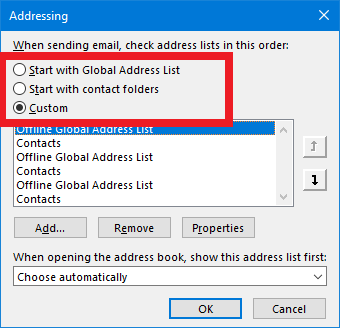
Bug fixes
• RDOMail.HTMLBody and Safe*Item.HTMLBody properties sometimes returned HTML body with Unicode characters corrupted if the message code page did not match the code page specified in the HTML body header.
• RDOSession.CurrentUser sometimes under cached Office 365 profile returned RDOAddressEntry object with most fields blank.
• Setting most RDONickName properties corrupted the property values.
• Outlook MIME converter (used by the olRfc822 and olRfc822_Outlook formats) sometimes produced as access violation when converting some Office 365 message stamped with a invalid property. Redemption now removes the invalid properties before using the Outlook MIME converter (IConverterSession). Note that the Redemption MIME converter (olRfc822_Redemption) was not affected.
• When retrieving autodicover XML, Redemption could hang in an infinite loop if one url was redirecting to another url redirecting to the first one (self-redirections were handled in the previous versions).
• RDOEncryptedMessage.GetDecryptedMesage could not handle signed messages with the message class of IPM.NOTE.SMIME (instead of the expected IPM.NOTE.SMIME.MultipartSigned)
• RDOSession.GetRDOObjectFromOutlookObject returned an error for some signed or encrypted Outlook messages with an invalid or missing certificate.
• For certain recurring appointment exceptions, the same RDOException object was returned for multiple items from the RDOExceptions collection.
• For some nicknames, RDONickName.SMTPAddress property returned an empty string.
• When Outlook 2007 was installed prior to installing Outlook 2016, Redemption sometimes loaded olmapi32.dll instead of msmapi32.dll resulting in an application crash.
• Safe*Item's Attachment object did not support OneDrive (Type == olOneDrive) attachments in Attachment.SaveAsFile method. RDOAttachment.SaveAsFile functioned properly.
• Redemption MIME converter exported recipients differently from the Outlook converter (IConverterSession) when converting an Outlook NDR to a MIME file.
• Redemption MIME sometimes failed to import MIME headers when malformed MIME files with mixed (0x0D, 0x0A) and (0x0D) line breaks were processed
• RDOSession.GetSharedMailbox sometimes returned the primary mailbox in the profile instead of the specified delegate mailbox.
• RDOSession.PickFolder dialog box was displayed in English for the Japanese and Chinese versions of Office.
• ProfMan library: Profile.OpenProfileSection did not raise an exception if an invalid GUID was specified and instead created a new profile section with a random GUID. Profile.OpenProfileSection now also allows to pass a hex sting representing the GUID (such as a hex string returned by RDOAccount.Fields[] for a PT_BINARY property or a hex string returned by MAPIUtils.HrArrayToString)
• Incremental Change Synchronization API (ICS): RDOSyncFolderItem.Item property raised MAPI_E_NOT_FOUND exception for the folders that were created in the online store but not yet downloaded to the cached local store.
• RDOAttachment.HIdden property was always true for the attachments of messages returned from the RDOEncryptedMessage.GetDecryptedMessage.method.
May 16, 2017
Version 5.14.0.4798 - a hot fix for the out-of-memory problem when accessing a large number of appointments.
• Accessing a large number of the RDOAppointmentItem objects was slow and could cause out-of-memory errors in 32 bit applications.
• Redemption could not handle cached Outlook autodiscover XML that only contained a redirect to another url.
May 07, 2017
Version 5.14.0.4776
New features and improvements
• Added RDOAddressBook.AllRooms and RDOExchangeAccount.AllRooms properties that returns an instance of the RDOAddressList object representing the Exchange "All Rooms" address book container
|
set Session = CreateObject("Redemption.RDOSession") Session.MAPIOBJECT = Application.Session.MAPIOBJECT set ABDialog = Session.GetSelectNamesDialog ABDialog.InitialAddressList = Session.AddressBook.AllRooms ABDialog.AllowMultipleSelection = false ABDialog.Caption = "Select a room" ABDialog.ShowOnlyInitialAddressList = true ABDialog.ForceResolution = true set roomRecipients = ABDialog.Display(true) |
• Added RDOTimezone.NameLocalized / StandardDesignationLocalized / DaylightDesignationLocalized properties that contain time zone names in the current Windows locale.
• Added two new values to the rdoDefaultFolders enumeration used by RDOSession.GetDefaultFolder / RDOStore.GetDefaultFolder - olFolderArchive (corresponds to the Archive default folder in Exchange mailboxes) and olFolderAllItemsSearch (corresponds to the "All Items" search folder containing all items in the given Exchange mailbox).
• Faster MIME import for messages with large number of recipients (hundreds or thousands)
• RDOSession.GetRDOObjectFromOutlookObject now supports the account object - given an Account Outlook object, it will return the matching RDOAccount object.
• RDOAttachments.Add method can now take another RDOAttachment object as a parameter
Bug fixes
• Date/time properties for the various Redemption objects (such as RDOMail,. RDOAppointmentItem, etc.) sometimes returned wrong values for the dates in the past if the Windows language was other than English - Redemption failed to locate the correct list of dynamic DSTs based on the localized time zone name.
This issue also caused RDOSession.Timezones.CurrentTimeZone property to return null on non-English versions of Windows.
• RDOSession.GetAutoDiscoverXML would sometimes fail with an error like "CheckSynchronize called from thread xyz, which is NOT the main thread". The same problem sometimes caused GetSharedMailbox to fail if used on a secondary thread.
• RDOAddressBook.GetAddressEntryFromStoreItem sometimes produced an access violation in the 64 bit version of Redemption.
• Recurring appointments created in a local time zone different from the appointment time zone (RDOAppointmentItem.StartTimezone / EndTimezone) were sometimes missing first or last occurrence.
• Signed messages in the EML format imported using Redemption MIME converter (olRfc822_Redemption) created an attachment with an invalid attachment type (0)
• RDOMail.PrintOut raised a generic MAPI_E_INVALID_PARAM error instead of an exception informing the caller that there is no active session for the messages with no active MAPI session (e.g. messages returned by RDOSession.CreateMessageFromMsgFile / GetMessageFromMsgFile ).
• Setting the RDORecurrencePattern.PatternEndDate property sometimes produced invalid results.
• Calling RDOSession.LogonHostedExchangeMailbox under Outlook 2016 with no credentials (if the user is running under the identity of the domain user who owns the specified mailbox) raised a MAPI_E_LOGON_FAILED error
•
RDORecipients.Add /
AddEx sometimes corrupted Unicode characters under the Hebrew locale
• Redemption sometimes failed to use autodiscover XML already cached by Outlook.
• RDOFolder2.GetActivitiesForTimeRange failed to return some activities.
• RDOSession.PickFolder would not allow to select the top level folder of any store (version 5.12 specific).
• Importing iCal files using (RDOAppointmentItem.Import(..., olICal) failed to import X-MS-OLK-SENDER field if it was different from the ORGANIZER field.
• Could not read RDOAppointmentItem.Start /End /AllDay properties for the private appointments in delegate mailboxes.
• Delay (several seconds) when calling RDOStore.StoreAccount when more than one version of Outlook is installed
• Could not load MAPI system under Outlook 2013 when running under a Local System account (e.g. in a Windows service)
• Redemption MIME importer could not correctly process some RFC2231 formatted attachment names.
• For the Office 365 mailboxes upgraded from outlook.com accounts, the MAPI session created by LogonHostedExchangeMailbox sometimes hanged when resolving message recipients.
• RDOAppointmentItem.GlobalAppointmentID property sometimes (depending on the start date and the time zone) returned different values before and after the instance was turned into an exception.
• Setting the RDOAppointmentItem.HTMLBody / RtfBody properties on an instance of a recurring appointment created the exception, but set the body on the master appointment instead of the specified occurrence.
January 09, 2017
Version 5.12.0.4674
Miscellaneous and Outlook 2013 / 2016 / Click-To-Run specific fixes.
New features and improvements
• Redemption MIME converter could not import RFC2231 formatted attachments with wrapped long file names. Note that Outlook (and Outlook MIME converter invoked when olRFC822_Outlook format is specified) does not handle attachments like that. To make sure Redemption converter is used, specify the olRFC822_Redemption format when calling RDOMail.Import.
Bug fixes
• RDONicknames.Add created duplicate entries and sometimes caused heap corruption resulting in a crash.
• RDOSignature.ApplyTo did not copy the HTML styles from the signature to the specified message resulting in the signature text with a wrong font .
• RDOSignature.ApplyTo sometimes missed images that had special characters or were located in custom folders.
• RDOSignature.ApplyTo corrupted the resulting message text if the signature contained extended Unicode characters and the original message body did not .
• Saving in the olHTMLEmbeddedImages format (RDOMail.SaveAs, the images in the HTML body are saved inside the <img> HTML tags) leaked memory and could result in the application running out of memory if called repeatedly.
• RDOSession.LogonHostedExchangeMailbox / GetAutodiscoverXml / etc. did not use HTTP proxy settings configured in the Internet Explorer.
• RDOAddressEntry object returned from RDOSession.CurrentUser sometimes returned empty strings for most of its properties for some on-prem Exchange servers.
• Saving a recurring appointment with exceptions created on top of an MSG file (RDOSession.GetMessageFromMsgFile)) in the ICS format (RDOAppointmentItem.SaveAs(..., olICal) produced "Error in IMessage.OpenAttach: MAPI_E_NO_ACCESS" exception.
• Saving an appointment in the MIME format (RDOAppointmentItem.SaveAs(..., olRfc822)) produced the "The parameter is incorrect" exception if the appointment was in a time zone that could not be recognized locally.
• RDOSession.Stores.AddDelegateExchangeMailBoxStore did not work with RPC-over-HTTP and MAPI-over-HTTP stores.
• Outlook Object Model compatibility fix: for the MAPI_P1 recipients, RDORecipient.Type returned 0 instead of MAPI_P1 (0x10000000).
• Calling RDOCategories.Add before accessing any other RDOCategories properties or methods caused RDOCategories object to skip populating the default categories if no categories were present in the store.
• Importing iCal, vTodo, and vCard files (RDOMail.Import) with UTT-8 encoded data under Japanese / Chinese / Korean locales sometimes resulted in corrupted data.
• Importing some ICS files (RDOMail.Import) produced by iPhone sometimes generated '$/R' is not a valid integer value exception.
• Setting RDOContactItem.Email1Address / Email2Address / Email3Address to an empty string sometimes produced invalid data
• Several Redemption methods that allow to pass HWND of the parent window (such as RDOAddressBook.ResolveName, RDOMail.Display, etc.) could not handle COM variants produced by .Net and could not use Explorer or Inspector Outlook objects passed as parameters.
• vCard files created by RDOContactItem.SaveAs(..., olVCard) encoded line returns in quoted-printable values as "\n" instead of of "=0D=0A".
• Folder selection dialog (RDOSession.PickFolder) could display an access violation error when expanding a folder that only contained subfolders inaccessible to the current user.
• Folder selection dialog (RDOSession.PickFolder) sometimes came up with an empty folder tree if there was an EAS store in the profile.
• RDOSesssion.AddDelegateExchangeMailboxStore raised an exception if autodiscover XML could not be retrieved instead of falling back to the pre RPC-over-HTTP logic.
• Importing EML (MIME) files using Redemption MIME converter (olRfc822_Redemption) placed all MIME headers into the message body if the message did not contain any MIME parts .and did not contain a terminating empty line.
• SafeInspector.Text and SelText properties returned an error if the inspector had a custom form region with a browser control.
• SafeInspector.WordEditor returned null instead of raising an exception if there was an exception returned by the Word editor.
• RDOTaskItem.MarkComplete / MarkCompleteEx did not remove the reminder from the completed instance of a recurring task and did not advance the reminder to the next instance for the recurring tasks.
• Setting RDOContactItem.Email1EntryID / Email2EntryID / Email3EntryID to a value with a Unicode SMTP address, produced ???? for the email display name.
• Setting RDORecurencePattern.Duration / StartTime / EndTime properties instead of RDOAppointmentItem.Duration / Start / End properties sometimes produced appointments with unexpected duration/start/end properties.
• RDOException.OriginalDate returned wrong value for all-day appointments.
• RDORecipient.SMTPAddress raised an exception instead of returning an empty string if there was no active MAPI session available (e.g. for the messages returned by RDOSession.GetMessageFromMsgFile which does not require a call to RDOSession.Logon or setting the RDOSession.MAPIOBJECT property).
• RDOAppointmentItem.Attachments collection for the RDOAppointmentItem objects representing exceptions or instances of recurring appointments sometimes returned attachments from the master appointment containing recurrence exceptions.
• RDOMail.BodyFormat property sometimes returned olFormatPlain for RTF (olFormatRichText) emails.
• RDOMail.BodyFormat property sometimes returned olFormatPlain for some HTML messages.
May 07, 2016
Version 5.11.0.4476
More Outlook 2016 and Click-To-Run fixes and tweaks as well as new features.
New features and improvements
• Creating. modifying, and saving new RDOContactItem, RDOAppointmenttItem and RDOTaskItem objects is now much faster (3-5 times) in the online Exchange mailboxes.
`
|
Inspector inspector = application.ActiveInspector(); MailItem mailItem = (MailItem)inspector.CurrentItem; if (string.IsNullOrEmpty(mailItem.Subject)){ SafeInspector safeInspector = new Redemption.SafeInspector(); safeInspector.Item = inspector; MessageBox.Show("The message must have a subject"); safeInspector.FocusControl( rdoOutlookAutomationControl.MailSubjectEdit);} |
• Added RDOSession.MAPIVersion and RDOSession.MAPIDllFileName properties. OutlookVersion and Version properties were implemented previously.
• Added RDOMail.MarkAsTask method (marks the item as a task and assigns a task interval for the object).
• Added RDOExchangeMailboxStore.MonthsToKeepOffline and DaysToKeepOffline properties.
• Support for the OneDrive attachments in Outlook 2016 - added olOneDrive value to the rdoAttachmentType enum used by the RDOAttachment.Type property. Note that OneDrive attachments saved by the RDOAttachment.SaveAsFile method are always saved as link files with the URL extension (even if a different extension is specified) for the consistency with the Outlook Object Model.
• cpEnterprise value was added to the rdoCredentialPersist enumeration (used by RDOCredentials.Add).
• Methods requiring EWS or autodiscover calls to an Exchange server (RDOSession.GetSharedMailbox, (RDOSession.GetAutodiscoverXml, etc.) can now use cached Outlook credentials saved when the user checks the "Remember my credentials" checkbox in the authentication prompt dialog in Outlook.
• RDOSession.PickFolder method and RDOSelectFoldersDialog object are now much faster in the profiles with a large number of stores, especially delegate Exchange mailboxes (the stores are no longer opened when the dialog is displayed).
Bug fixes
• Outlook 2016 installed in the click-to-run mode (C2R) sometimes caused Redemption to fail to load the MAPI system (missing api-ms-win-crt-string-l1-1-0.dll file).
• RDOAppointmenttItem.Respond sometimes caused a hard crash in ntdll.dll.
• November 19, 2015, update for Outlook 2013 (KB2975838) caused Redemption to crash when calling RDOSession.Logon / LogonExchangeMailbox / LogonHostedExchangeMailbox /LogonPstStore.
• RDOMail.SaveAs(..., olMsg) under Exchange 2016 saved RTF messages with embedded OLE attachments were sometimes created in a corrupted state.
• Setting a MAPI property using SafeRecipient.Fields sometimes caused application crash. The RDORecipient object functioned properly.
• RDOSearch.Delete raised 0x8000FFFF (Catastrophic failure) exception.
• RDOSession.CurrentUser.Name returned "?"s for the Unicode characters under POP3/SMTP and IMAP4/SMTP accounts (Outlook bug). Exchange accounts behaved properly.
• RDOAppointmenttItem.Send sometimes produced meeting requests with no body under the standalone version of MAPI.
• Installing the 64 bit version of Redemption (redemption64.dll) using Windows Installer (MsiExec) sometimes caused "Redemption64.dll failed to register. HRESULT -1066598274. Contact your support personnel" error to be displayed,.
• RDOFolder.OnMessageCreated event did not fire when a new message was created in the folder.
• RDOFolder.OnMessageCreated event fired when a message was deleted instead of the RDOFolder.OnMessageDeleted event (which never fired).
• RDOAccount.ReplySignature and RDOAccount.NewMessageSignature returned an error if the signature was reset to (none) in Outlook options.
• RDOSession.GetArchiveMailbox failed for the archive mailboxes in a different domain (e.g. an on-premise primary mailbox and an Office 365 hosted archive mailbox).
• Importing EML (MIME) files using Redemption MIME converter (olRfc822_Redemption) sometimes hanged for the EML files with only HTML (no plain text) message body.
• RDOOutOfOfficeAssistant ignored explicitly specified credentials (e.g. by the RDOAdrressEntry.GetOutOfOfficeAssistant method) when the settings were saved.
• Setting the RDOOutOfOfficeAssistant.OutOfOffice property would force the OOF state to be "Enabled" instead of "Scheduled" even if the State property was explicitly set.
• RDOAccount.AccountCategories property never returned the acStore (1) bit. Instead, acMail (2) bit was always returned.
• RDOAppointmenttItem.Parent property for the recurrence instance appointments returned by RDOFolder2.GetActivitiesForTimeRange or RDORecurrencePattern.Item pointed to the parent folder instead of the parent (master) appointment. This bug was introduced in version 5.10.
• Calling RDOAppointmenttItem.Save on a recurrence instance returned by RDOFolder2.GetActivitiesForTimeRange or RDORecurrencePattern.Item and deleted using RDOAppointmenttItem.Delete caused both deleted and modified exceptions to be created resulting in the recurrence instance staying intact.
• RDORecurrencePattern.GetOccurence sometimes raised "The activity does not occur on <date>" exception for the last instance of a recurring sequence depending on the end time and the time zone.
October 17, 2015
Version 5.10.0.4312
Hotfix: version 5.10.0.4294 released on October 5, 2015, created, upon registering with regsvr32.exe, an empty registry key (HKCR\TypeLib\{2D5E2D34-BED5-4B9F-9793-A31E26E6806E}\5.10) that can prevent .Net run-time from being able to create or use Redemption objects (TYPE_E_LIBNOTREGISTERED). The updated version will not create that key and will delete the erroneous key if it exists.
Bug fixes
• When registered with regsvr32.exe, version 5.10.0.4294 created an empty registry key HKCR\TypeLib\{2D5E2D34-BED5-4B9F-9793-A31E26E6806E}\5.10 sometimes causing .Net to raise a TYPE_E_LIBNOTREGISTERED exception. The updated version will not create that key and will remove it if present when the dll is installed using regsvr32.exe.
• RDOMail.Delete(dfMoveToDeletedItems) sometimes silently failed on IMAP4 stores without raising any errors.
• RDOMail.Reply / ReplyAll / Forward sometimes garbled new message headers under locale other than English.
• RDOMail.Reply / ReplyAll / Forward always created localized headers even if "Options | Advanced | Use English for message headers..." in Outlook was set.
• RDOMailboxDelegates.Save sometimes raised HTTP error 500.
October 05, 2015
Version 5.10.0.4294
This release focuses on Outlook 2016 support (released September 22, 2015).
Note: older versions of Redemption would cause a crash in the Outlook 2016 MAPI marshalling system when a MAPI object is marshaled out-of-proc, e.g. when setting the RDOSession.MAPIOBJECT property or when using SafeMailItem or MAPITable objects.
New features
• RDOSession.LogonHostedExchangeMailbox now fully supports Outlook 2016.
• Added RDOSession.UseEWSImpersonation property. If set to true, forces Redemption to add the ExchangeImpersonation header when making EWS calls (e.g. when retrieving free/busy range or mail tips).
• Added RDOMail.SetProps method that allows to set multiple properties in a single call (RDOMail.GetProps to read multiple properties was added in version 5.0)
|
dim tags(3) dim values(3) 'OOM property name tags(0) = "Subject" 'PR_SUBJECT_W 'DASL property names tags(1) = "http://schemas.microsoft.com/mapi/proptag/0x00390040" 'PR_CLIENT_SUBMIT_TIME tags(2) = "http://schemas.microsoft.com/mapi/proptag/0x0E060040" 'PR_MESSAGE_DELIVERY_TIME 'integer property tag tags(3) = &H1000001F 'PR_BODY_W values(0) = "Test subject" values(1) = #9/1/2015 2:00PM# 'This is UTC values(2) = #9/1/2015 3:00PM# 'This is UTC values(3) = "Test body" set Session = CreateObject("Redemption.RDOSession") Session.MAPIOBJECT = Application.Session.MAPIOBJECT set Folder = Session.GetDefaultFolder(olFolderDrafts) set Msg = Folder.Items.Add Msg.SetProps tags, values Msg.Save |
Bug fixes
• MAPI marshalling in Outlook 2016 was broken resulting in a crash when setting the RDOSession.MAPIOBJECT property to Namespace.MAPIOBJECT from Outlook or when using SafeMailItem or MAPITable objects in a process other than outlook.exe.
• RDOSession.LogonHostedExchangeMailbox did not work under Outlook 2016.
• The order of the autodiscover probes in the Active Directory was changed to test for the most often used configurations first thus eliminating the timeouts when attempting to connect to the non-existent LDAP servers.
• RDOSignatures collection sometimes could not find any signatures in the versions of Outlook with a locale other than English
• Messages created using RDOMail.Reply / ReplyAll / Forward sometimes corrupted Unicode recipient names.
• Importing MIME messages with TNEF attachments (such as those created by the Exchange server) using RDOMail.Import and the built-in Redemption converter (olRfc822_Redemption) imported the messages in the plain text format
• Importing MSG files in the RTF format using RDOMail.Import (.., olMsg) turned RTF messages into HTML messages.
• Importing vCard files using RDOMail.Import (.., olVCard) did not import addresses for the vCard files with field grouping (e.g. item1.ADR - some Apple products create vCard files like that).
• Exporting messages in the iCalendar format using built-in Redemption MIME converter (RDOMail.SaveAs(..., olICal)) did not export embedded message or OLE attachments. Note that the Outlook Object Model does not export such attachments.
• Exporting messages in the MIME format using built-in Redemption MIME converter (RDOMail.SaveAs(..., olRfc822_Redemption)) sometimes corrupted Unicode names in the Reply-To MIME header.
• Exporting vCard files using RDOMail.SaveAs (.., olVCard) sometimes did not correctly export the business address.
• RDOSelectFoldersDialog dialog did not update the values of the Left, Top, Width, Height properties during and after the folder selection dialog was shown.
• Importing iCalendar (olICal) or MIME (olRfc822_Redemption) with a calendar/text MIME part raised "End time must be greater than the start time" exception instead of defaulting to a duration of 15 minutes for appointments with the (invalid) end time less than the start time.
• RDOAddressEntry.GetFreeBusy did not respect the value of the RDOSession.SkipAutodiscoverLookupInAD property
• RDOAttachment.SaveAsFile method could not save embedded message attachments deeper than 14 levels.
• Customized versions of Redemption.dll did not use the custom type library name specified in customize.exe.
• RDOEncryptedMessage.GetDecryptedMessage sometimes raised MAPI_E_NO_ACCESS exception for the encrypted messages in one of the Public Folders store.
June 25, 2015
Version 5.9.0.4196
This release focuses on the upcoming Outlook 2016 support as well as performance improvements, especially when connected to a hosted remote online Exchange store.
New features
• RDOMail and the objects derived from it (RDOContactItem, RDOAppointmentItem, RDOTaskItem, etc) were revamped to minimize the number of RPC calls made when an item is created, modified, accessed or saved. In some cases, the number of RPC calls was cut down by a factor of 10, resulting in a greatly increased performance under an online Exchange store.
• Setting RDOMail.To / CC / BCC properties was slow for a large number of recipients. Version 5.9 speeds up setting these properties by up to a factor of 100 when setting hundreds of recipients.
• Improved MAPI event handling (RDOMail, RDOFolder, RDOStore, RDOItems, RDOFolders events). In the older versions, when a MAPI notification was received, Redemption would switch to the main thread (where the corresponding object was created) using SendMessage Windows API function, thus blocking the MAPI notification thread until the main thread finished processing the event. This degraded the performance, caused some events to be skipped, and sometimes caused hangs when the IMAP4 provider was used. The newest version of Redemption queues the notifications internally and returns immediately without blocking the MAPI notifications thread. The notifications are processed later (the order of events is preserved) when the main thread is idle.
• Added RDOAddressEntry.GetMailTips method that allows to retrieve Out-Of-Office text, max message size, etc. for an Exchange mailbox. See RDOMailTips object for more information.
|
set
Session = CreateObject("Redemption.RDOSession")
Session.MAPIOBJECT = Application.Session.MAPIOBJECT
Session.SkipAutodiscoverLookupInAD =
true
set
AdrEntry = Session.AddressBook.ResolveName("user@domain.demo")
set
mailTips = AdrEntry.GetMailTips("me@domain.demo",
"<My Password>")
'optional authentication parameters for EWS
MsgBox mailTips.MaxMessageSize
|
• Added RDOAddressEntry.GetOutOfOfficeAssistant method that allows to retrieve Out-Of-Office settings for an Exchange mailbox. OOF settings were previously implemented only through RDOExchangeMailboxStore.OutOfOfficeAssistant property, which required to open the mailbox first. Note that RDOAddressEntry.GetOutOfOfficeAssistant (unlike RDOAddressEntry.GetMailTips) requires impersonation privileges.
|
set
Session = CreateObject("Redemption.RDOSession")
Session.MAPIOBJECT = Application.Session.MAPIOBJECT
Session.SkipAutodiscoverLookupInAD =
true
set
AdrrEntry = Session.AddressBook.ResolveName("user@domain.demo")
set
oofSettings = AdrrEntry.GetOutOfOfficeAssistant("me@domain.demo",
"<My Password>")
'optional authentication parameters for EWS
MsgBox oofSettings.StartTime
|
• Added RDOSession.SkipAutodiscoverLookupInAD property. Normally, Redemption methods that require autodiscover XML (such as LogonHostedExchangeMailbox, GetSharedMailbox, free/busy methods, etc.) look (each in a separate thread) for the autodiscover XML in a few predetermined HTTP locations with a timeout of 5 seconds. A lookup in the Active Directory however, especially if the remote server cannot be contacted through LDAP, can take a long time to time out. Set SkipAutodiscoverLookupInAD property to true if you are connecting to a hosted Exchange server. Leave it as false if you are connecting to an on-premises Exchange serer that does not publish autodiscover through HTTP.
• Importing iCal files (RDOAppointmentItem.Impor(..., olICal) is now much faster for the appointments with a large (>100) list of attendees as attendees are now added in a single call.
• Added RDORecipient.SMTPAddress property - jumps through a few hoops to retrieve the SMTP address while trying to avoid opening the underlying address entry. Similar to RDOAddressEntry.SMTPAddress, but attempts to retrieve the data from the message recipient table avoiding expensive calls to open the underlying address book object.
|
set
Session = CreateObject("Redemption.RDOSession")
Session.MAPIOBJECT = Application.Session.MAPIOBJECT
set
Item =
Session.GetMessageFromID(Application.ActiveExplorer.Selection(1).EntryID)
for
each
Recip
in
Item.Recipients
Debug.Print Recip.SMTPAddress
next |
• Added RDOAddressBook.ExchangeAddressToEntryId method. It allows to open and use address entries hidden from GAL. E.g. you can read the legacyDN attribute from the Active Directory and use it to call RDOAddressBook.ExchangeAddressToEntryId, which can then be used to open the GAL address entry (RDOSession.GetAddressEntryFromId) even if it is hidden, and pass it to RDOSession.GetSharedMailbox.
|
set
Session = CreateObject("Redemption.RDOSession")
Session.MAPIOBJECT = Application.Session.MAPIOBJECT
userEntryId = Session.AddressBook.ExchangeAddressToEntryId("/O=EXCHANGELABS/OU=EXCHANGE
ADMINISTRATIVE GROUP
(FYDIBOHF23SPDLT)/CN=RECIPIENTS/CN=C17A89C6D494408699E52D8E6E676353-HOME
OFFICE")
set
addressEntry = Session.GetAddressEntryFromId(userEntryId)
set
delegateStore = Session.GetSharedMailbox(addressEntry)
MsgBox delegateStore.GetDefaultFolder(olFolderInbox).Items.Count |
Bug fixes
• Loading Redemption under Outlook 2016 (when running outside of the outlook.exe process space) displayed the "The operating system is not presently configured to run this application" message box. All Redemption objects were unusable.
• RDOFolder2..GetActivitiesForTimeRange would always skip the last occurrence of recurring appointments for the time zones east of Greenwich.
• RDOMail.Print would hang if used on a secondary thread that does not run the Windows message pump (GetMessage / TranslateMessage / DispatchMessage).
• RDOUserProperty.Delete raised an error (Access violation) in the 64 bit version of Redemption (32 bit version functioned properly).
• Reading the RDOMail.HTMLBody hanged for some HTML messages.
• RDOStores.UnwrapStore always returned the original store passed as the parameter. This problem was specific to version 5.8.
• Creating appointments (RDOAppointment object) that end at midnight UTC sometimes produced invalid appointments with the end time earlier than the start time.
• RDOContactItems.Birthday property behavior was inconsistent with the Outlook Object Model - if both PidLidBirthdayLocal and PidTagBirthday were present and contained different values, OOM returned PidTagBirthday while Redemption preferred PidLidBirthdayLocal.
• RDOAppointment object sometimes saved recurrence pattern with the pattern start and end dates one day off.
• VCF (vCard) files created by Redemption (RDOContactItem.SaveAs(..., olVCard)) did not specify the code page for the Western European languages.
• VCF (vCard) files created by Redemption (RDOContactItem.SaveAs(..., olVCard)) did not did not include the contact's picture if the contact was retrieved from an MSG file (RDOSession.GetMessageFromMsgFile).
• RDOEncryptedMessage.GetDecryptedMessage raised "Not logged in" exception if the encrypted message was opened using RDOSession.GetMessageFromMsgFile without calling RDOSession.Logon. Signed messages function properly.
• MAPIUtils.HrSetOneProp and Safe*Item.Fields[] etc. "dirtied" the underlying Outlook object by resetting the Subject property, which resulted in Outlook changing the ConversationIndex property. This version resets the MessageClass property, which does not seem to cause any side-effects.
• Redemption did not use locally cached autodiscover XML when PreferLocalXML registry value was set .
• RDOMail.Fields() did not understand some DASL property names in the urn:schemas:contacts.* namespace (such as urn:schemas:contacts:mailingpostaladdress).
• RDOMail.Fields() did not decode "%" encoded DASL property names (e.g. http://schemas.microsoft.com/mapi/string/{00020329-0000-0000-C000-000000000046}/Test%20Name).
• RDOSession.GetDefaultFolder(olFolderSentItems) sometimes raised an error when used on a secondary thread.
• RDOSignature.Apply sometimes truncated the signature
• RDOSelectFoldersDialog disabled the Ok button if both AllowMultipleSelection and ContainerClass were set and the user select the root store folder.
• Exporting messages with an empty body in the MIME format using built-in Redemption MIME converter (RDOMail.SaveAs(..., olRfc822_Redemption)) sometimes hanged.
• Exporting messages with a large (~100Mb) embedded messages attachments in the MIME format in 32 bit using built-in Redemption MIME converter (RDOMail.SaveAs(..., olRfc822_Redemption)) sometimes raised out-of-memory error.
• Accessing RDOAppointmentItem.End property for the exceptional appointments returned from the RDOException.Item property sometimes crashed the calling process with a stack overflow.
• RDOMail.SaveAs(.., olRfc822_Redemption) raised "Error in Storage.OpenStream: STG_E_FILENOTFOUND" for some RTF formatted messages.
• RDOMail.SaveAs(.., olRfc822_Redemption) sometimes corrupted sender and recipient names when saving in the Korean, Japanese, or Chinese code pages (other codepages including UTF-8 were not affected).
• RDOMail.SaveAs(.., olRfc822_Redemption) raised E_FAIL exception for the contacts (IPM.Contact) if there was no active MAPI session (e.g. RDOSession.Logon was not called and a message was opened using RDOsession.GetMessageFromMsgFile).
• RDOSearchFolder.SearchCriteria.AsSQL returned an empty string for brand new search folders before RDOSearchFolder.Start was called even if RDOSearchFolder.SearchCriteria.AsSQL was explicitly set before.
• RDOAppointmentItem.Import(.., olICal) did not set the Organizer / Sender / SentOnBehalfOf properties.
• RDOStore.ValidateIPMTree under German locate named "Sent Items" folder "Gesendete Objekte" instead of "Gesendete Elemente" used by Outlook 2010 and newer.
• Importing MIME messages using RDOMail.Import and the built-in Redemption converter (olRfc822_Redemption) imported the p7m attachment for the signed or encrypted messages twice .
• RDOMail.HTMLBody property was slow in 64 bit for the plain text messages with a large body and a large number of characters that must be HTML-encoded (such as <, >, &).
• When setting RDOMail.To / CC / BCC properties, Redemption would add everything following a double semicolon (;;) as a single recipient.
• RDOIMAPAccount.SaveSentMessageFolder sometimes returned the profile's default Sent Items folder rather than the IMAP4 store's folder.
11/29/2014
Version 5.8.0.4036
New features
• Added RDORecipients.AddMultiple method. Adding recipients one at a time can severely degrade the performance as the time it takes to add a single recipient is proportional to the number of existing recipients in a message. RDORecipients.AddMultiple allows to add hundreds of recipients in a single call with a performance improvement on the order of 100. RDORecipients.AddMultiple takes an array of string, RDORecipient, RDOAddressEntry, RDOContactItem or RDODistListItem objects..
|
dim
Recips(2)
Recips(0) =
"dmitry@dimastr.com"
Recips(1) =
"test@dimastr.com"
Recips(2) =
"redemption@dimastr.com"
set
Session = CreateObject("Redemption.RDOSession")
Session.MAPIOBJECT = Application.Session.MAPIOBJECT
set
Contacts = Session.GetDefaultFolder(olFolderContacts)
set
Drafts = Session.GetDefaultFolder(olFolderDrafts)
set
Msg = Drafts.Items.Add
Msg.Recipients.AddMultiple(Recips. olTo)
Msg.Recipients.ResolveAll
Msg.Subject =
"test"
Msg.Save |
• Added RDOAddressBook.GetAddressEntryFromStoreItem. Returns an instance of the RDOAddressEntry object from an RDOContactItem or RDODistListItem object. This is the counterpart of the GetContact and GetDistList methods implemented by the RDOAddressEntry object.
• Added SafeExplorer.ActiveInlineResponseDiscard and SafeExplorer.ActiveInlineResponsePopOut methods. Note that ActiveInlineResponsePopOut functionality is not exposed by the Outlook Object Model at all, and MailItem.Close cannot be used for the inline responses returned by the Explorer.ActiveInlineResponse property.
|
set
sExplorer = CreateObject("Redemption.SafeExplorer")
sExplorer.Item = Application.ActiveExplorer
sExplorer.ActiveInlineResponseDiscard |
• Added RDOSession.Signatures collection that allows to read, create, and modify Outlook signatures. See RDOSignatures and RDOSignature objects for more information.
|
set
Session = CreateObject("Redemption.RDOSession")
Session.MAPIOBJECT = Application.Session.MAPIOBJECT
for
each
Signature
in
Session.Signatures
Debug.Print Signature.Name
next |
• Added RDOAccount.ReplySignature and RDOAccount.NewMessageSignature properties.
|
set
Session = CreateObject("Redemption.RDOSession")
Session.MAPIOBJECT = Application.Session.MAPIOBJECT
set
Drafts = Session.GetDefaultFolder(olFolderDrafts)
set
Msg = Drafts.Items.Add
Msg.To =
"dmitry@dimastr.com"
Msg.Subject =
"testing signatures"
Msg.HTMLBody =
"<html><body>some <b>bold</b> message text</body></html>"
set
Account = Session.Accounts.GetOrder(2).Item(1)
'first mail account
if
Not
(Account
Is
Nothing)
Then
set
Signature = Account.NewMessageSignature
if
Not
(Signature
Is
Nothing)
Then
Signature.ApplyTo
Msg,
false
'apply at the bottom
End
If
End
If
Msg.Display |
• Added RDOExchangeMailboxStore.GetOwaNicknames property that exposes Exchange 2010 nicknames (Exchange 2013 uses the same nicknames list as Outlook). The current version of Redemption provides read-only access to the OWA nicknames.
• Added RDOCalendarOptions.TimeZone / WorkDays / WorkDayStart / WorkDayEnd properties. RDOCalendarOptions object can be accessed using the RDOExchangeMailbox.CalendarOptions property.
• Added RDOSession.MAPIFormMgr property (returns RDOMAPIFormMgr object) that exposes MAPI forms available in the current MAPI session. See RDOMAPIFormMgr, RDOMAPIFormContainer and RDOMAPIFormInfo objects for more details.
|
set
Session = CreateObject("Redemption.RDOSession")
Session.MAPIOBJECT = Application.Session.MAPIOBJECT
set
PersonaFormContainer = Session.MAPIFormMgr.OpenLocalFormContainer
for
each
FormInfo
in
PersonaFormContainer
Debug.Print
FormInfo.DisplayName
next |
• Added RDOFolder2.Rules property. Exchange server rules are already exposed on the store level (stored in the store's Inbox folder) through the RDOExchangeMailboxStore.Rules property. RDOFolder2.Rules adds support for rules on the folder level to support the Public Folders store, where rules can be set on any mail enabled folder.
• Added RDOSession.CacheAutodiscoverXml and RDOSession.GetAutodiscoverXml methods that allow to cache autodiscover XML instead of retrieving it each time it is needed. This allows to speed up Redemption methods that require autodiscover, such as RDOSession.LogonHostedExchangeMailbox, RDOSession.GetArchiveMailbox, , RDOSession.GetSharedMailbox, RDOOutOfOfficeAssistant,
• Redemption now retrieves autodiscover XML information from the Outlook cache (if available) first before attempting to download it from a remote server.
• Exposed RDOAccount.JunkEmailOptions property. Starting with Outlook 2010, Junk Mail options are stored on the per-account basis for the POP3/SMTP accounts.
• RDORule.RawConditions and RDORule.Actions properties are now settable (which means you can copy rules between two Exchange mailboxes). If any named property tags are used by the conditions or actions, they are properly reset to the appropriate named properties in the target mailbox.
• Added RDORule.ProviderData property.
• Exchange version of MAPI cannot handle Outlook Address Book (OAB) address entries (since it does not include the OAB provider). RDOSession.GetAddressEntryFromID can now handle such entries internally.
• Added MinHeight and MinWidth properties to the RDOSelectFoldersDialog object.
Bug fixes
• RDODistListItem.AddMember raised an error for the address entries pointing to address lists.
• Saving HTML messages with more than 60 images in the olHTMLEmbeddedImages format (RDOMail.SaveAs) sometimes hanged.
• MAPITable.ExecSQL sometimes raised an error (MAPI_E_CALL_FAILED) when both "TOP" and "WHERE" clauses were specified.
• Importing MIME messages using RDOMail.Import and the built-in Redemption converter (olRfc822_Redemption) failed to correctly import messages with mixed Windows (0xD,0xA) and Unix (0xA) line breaks.
• Exporting encrypted or signed MIME messages using built-in Redemption MIME converter (RDOMail.SaveAs(..., olRfc822_Redemption)) always specified smime-type=signed-data for both signed and encrypted messages.
• RDOMail.Display(true) sometimes raised "Error in IMAPISession.ShowForm: MAPI_E_INVALID_PARAMETER" exception when running under 64 bit version of Outlook under Windows 8.
• 64 bit version of Redemption raised E_UNEXPECTED exception instead of MAPI_E_USER_CANCEL from RDOAddressBook.ShowAddressBook when the address book dialog was cancelled.
• RDOException.OriginalDate / StartDateTime / EndDateTime properties returned invalid values for some appointments created by the older (Outlook 2002 or below) versions of Outlook.
• Importing MSG files (RDOMail.Import) without an RTF body (PR_HRML only) resulted in plain text messages under the online Exchange store (cached Exchange and PST stores were fine)
• RDOMail.Parent property for the messages retrieved from a search folder (RDOSearchFolder) returned the search folder rather than the actual parent folder (RDOFolder).
• If the IN operator was the only SQL operator used in MAPITable.ExecSQL / RDOItems.Find / RDOItems.Restrict (e.g. "Categories IN ('one', 'two')" ), Redemption raised an exception "Assertion failed: Number of fields == 1"
• RDOSession.GetMessageFromMsgFile always returned a generic RDOMail object instead of a more specific kind (e.g. RDOEncryptedMessage or RDOContactItem derived from RDOMail) for the Unicode MSG files under the standalone version of MAPI (Outlook version of MAPI always worked fine).
• RDOEncryptedMessage.GetDecryptedMessage raised "Not logged in" exception if the encrypted/signed message was opened using RDOSession.GetMessageFromMsgFile ;e without calling RDOSession.Logon.
• RDOTaskItem.MarkComplete / MarkCompleteEx sometimes set Start and DueDate properties one day too early.
• RDORecurrencePattern.PatternEndDate sometimes was 1 day off.
• Setting RDORecurrencePattern.PatternEndDate did not update the RDORecurrencePattern.Occurrences property.
• RDOMail.Send did not raise a COM exception if IMessage::SubmitMessage MAPI call returned an error (e.g. when trying to send on behalf of a wrong user).
• Creating a new appointment (RDOAppointmentItem) under online Office 365 mailbox store sometimes produced "Error in Set_ReminderSet: MAPI_E_INVALID_PARAMETER" exception.
• Sending a meeting request/update (RDOAppointmentItem.Send) under online Office 365 mailbox store sometimes produced "Error in IMessage::SaveChanges: MAPI_E_INVALID_PARAMETER" exception.
• RDOUserProperty.Delete or RDOUserProperty.Remove sometimes raised an access violation exception.
• Copying messages between Exchange and PST stores (RDOMail.CopyTo) sometimes did not preserve created / last modified dates.
• RDOAccounts.AddPOP3Account sometimes returned IOlkAccountManager.FindAccount: E_ACCT_NOT_FOUND exception
• RDOSession.LogonHostedExchangeMailbox raised E_UNEXPECTED exception when it was used with empty user name and password instead of using the current user's credentials.
• Unicode MSG files opened using RDOSession.GetMessageFromMsgFile under the standalone (Exchange) version of MAPI returned empty strings for the RDORecipient.Name / Address / etc. string properties.
• Saving modified recurrence data for the RDOAppointmentItem or RDOTaskItem objects always reset the pattern start date to the start date of the appointment or task.
06/30/2014
Version 5.7.0.3868
New features
• Added CloseOnDoubleClick and Left, Top, Width, Height properties to the RDOSelectFoldersDialog object.
• Added RDOEncryptedMessage.CertificateIssuerName property.
• Added RDOAddressList.Search property (returns RDOAddressListSearch object) that allows to set search criteria on a particular address list (represented by the RDOAddressList object). WARNING: among standard Outlook Address book providers, only the Exchange Address Book provider supports this feature. This method is necessary since most address book providers provide no or very little search support (unlike store providers).
|
set Session =
CreateObject("Redemption.RDOSession") |
• Added RDOFolder.OnProgress event. It fires when RDOFolder.CopyTo is called and reflects the progress of the folder copy operation.
• Added RDOAddressEntry.Owners property (corresponds to the ExchangeDistributionList.GetOwners method in the Outlook Object Model). This property is Exchange specific.
|
dim
Session, ae, vOwner
set
Session = CreateObject("Redemption.RDOSession")
Session.MAPIOBJECT = Application.Session.MAPIOBJECT
set
ae = Session.AddressBook.Resolvename("DL
List name>")
for
each
vOwner
in
ae.Owners
debug.print vOwner.Name next |
• Added SafeInspector.FocusEditor method. It allows to bring focus back to the editor from some other control (e.g. from a user control in an Inspector region).
|
set sInspector = CreateObject("Redemption.SafeInspector") sInspector.Item = Application.ActiveInspector sInspector.FocusEditor |
• Added SafeExplorer.ActiveInlineResponseSend method. Outlook Object Model does not allow to call MailItem.Send on a message returned by the Explorer.ActiveInlineResponse property. SafeExplorer.ActiveInlineResponseSend works around that limitation.
|
set oExplorer = Application.ActiveExplorer set Item = oExplorer.ActiveInlineResponse Item.UserProperties.Add("Redemption test", olText).Value = "test value" set sExplorer = CreateObject("Redemption.SafeExplorer") sExplorer.Item = oExplorer sExplorer.ActiveInlineResponseSend |
• Added RDOSearchFolder.IsContentIndexedSearch / IsStaticSearch properties (Exchange specific)
• Importing MIME messages using RDOMail.Import now auto detects the message code page is one is not specified in the MIME headers.
• Exporting MIME messages using built-in Redemption MIME converter (RDOMail.SaveAs(..., olRfc822_Redemption)) now exports contacts (MIME type text/vcard) and tasks (MIME type text/calendar). Appointments (MIME type text/calendar) were already exported before.
Bug fixes
• RDOSession.LogonHostedExchangeMailbox method sometimes displayed credentials prompt (if RDOSession.ParentWindows property was set) or returned an error when connecting to an Exchange 2010 mailbox.
• SafeAppointmentItem.Send sometimes caused memory heap corruption causing the application to crash. RDOAppointmentItem.Send functioned properly.
• Importing MIME messages using RDOMail.Import and the built-in Redemption converter (olRfc822_Redemption) sometimes corrupted MAPI memory heap resulting in an application crash.
• Importing MIME messages using RDOMail.Import and the built-in Redemption converter (olRfc822_Redemption) sometimes added ";" to the recipient email address.
• Importing MIME messages using RDOMail.Import and the built-in Redemption converter (olRfc822_Redemption) failed to correctly import the DRM protected messages.
• Importing MIME messages using RDOMail.Import sometimes failed to import sender related properties if only the sender email address was available.
• Importing MIME messages using RDOMail.Import sometimes failed to import MIME messages with a TNEF part. This problem was specific to version 5.6.
• Importing vCard files using RDOMail.Import raised an error if vCard included a PHOTO header with VALUE=URL attribute. The latest version downloads the image from the specified url and adds it as the contact picture.
• Importing vTodo files using RDOMail.Import did not correctly import the reminder time if it was specified in UTC time zone.
• Importing vTodo files using RDOMail.Import and saving vTodo files using RDOMail.SaveAs(..., olVTodo) did not correctly process the task's priority.
• Importing some EML files to a standalone MSG file sometimes caused Outlook to display the "The operation failed because of a registry or installation problem. Restart Outlook and try again. If the problem persists, reinstall." error message when opening the resulting MSG file.
• Exporting MIME messages using built-in Redemption MIME converter (RDOMail.SaveAs(..., olRfc822_Redemption)) failed to save existing empty headers stored in the PR_TRANSPORT_MESSAGE_HEADERS property.
• Exporting MHTML messages (RDOMail.SaveAs(..., olMHTML)) sometimes failed to save embedded images for the message that used to be in the RTF format with embedded OLE objects.
• Exporting iCal messages (RDOMail.SaveAs(..., olICal)) sometimes corrupted Unicode characters under non-Latin language operating systems (suck as Chinese versions of Windows).
• Exporting iCal messages (RDOMail.SaveAs(..., olICal)) sometimes did not correctly export exception dates (EXDATE iCal header) for the time zones east of GMT.
• Exporting HTML messages (RDOMail.SaveAs(..., olHTML)) sometimes raised Index out of bounds exception for the messages with binary (PT_BINARY) user properties.
• Exporting tasks in the vTodo format (RDOMail.SaveAs(..., olVToDo)) did not export the PERCENT-COMPLETE header if RDOTaskItem.PercentComplete property was 0.
• Exporting tasks in the vTodo format (RDOMail.SaveAs(..., olVToDo)) did not export the RRULE and DTSTART properties in the TIMEZONE part.
• RDOMail.Import did not correctly import monthly BYDAY recurrences with a modifier (e.g. RRULE:FREQ=MONTHLY;INTERVAL=1;BYDAY=3WE)
• RDOAppointmentItem.Start and RDOException.StartDateTime properties sometimes returned wrong values for the appointment exceptions created in a time zone different from the local time zone.
• RDORecurrencePattern.GetOccurence hanged for non-recurring appointments or tasks.
• RDOExchangeMailboxStore.IsCached / RDOExchangePublicFoldersStore.IsCached property always returned the value for the primary mailbox store in the profile even if there were multiple mailboxes in the profile.
• RDOReminders.Count sometimes returned 0 for the delegate Exchange stores.
• RDOSession.GetArchiveMailbox did not use the credentials passed to RDOSession.LogonHostedExchangeMailbox or set using RDOSession.ExchangeConnectionProperties.
• RDOSelectFoldersDialog did not adjust the position of the folder tree view if the RDOSelectFoldersDialog.LabelCaption property contained line breaks.
• Setting RDORecipient.Fields[] to an invalid value (e.g. setting a PT_BINARY property to a variant other than an array or a hex string) sometimes raised an access violation instead of throwing a meaningful error.
• RDOTaskItem.Send sometimes caused an access violation if one of the task recipients could not be resolved.
• Reading named MAPI properties using RDOMail.Fields[] raised an exception if the property did not exist instead of returning an empty variant for the read-only messages (e.g. messages created on top of read-only MSG files or opened in the read-only mode from an Outlook folder).
• Search folders created by Redemption (RDOStore2.Searches and RDOFolders.AddSearchFolder) did not include any results under Exchange 2013 online store. This was due to the NON_CONTENT_INDEXED_SEARCH flag used (still needed for Exchange 2010).
• Redemption cached the value of the local time zone on start up and did not refresh it even if the local Windows time zone was changed
• Retrieving RDOStore.Reminders sometimes caused an error.
• RDOSession.LogonHostedExchangeMailbox sometimes showed the credentials prompt even though the correct credentials were specified.
• SafeInspector.SelText property sometimes returned an empty string even if text was selected in the inspector.
• RDOSession.GetFolderFromPath sometimes returned errors if the store name contained encoded characters (such as %, \, etc.)
• Accessing RDOSession.Accounts property returned "Error in IOlkAccountManager.Init: 0x800C8001" exception under Outlook 2013 Click-To-Run if an older version of Outlook (e.g. 2007 or 2010) was also installed.
• RDOMail.Reply / ReplyAll / Forward always used Arial as the font for the new message even if a different font was specified in Outlook options.
• Accessing RDOSession.Accouns collection under a brand new profile (never used by Outlook) raised "Error in IOlkAccountManager.Init : MAPI_E_NOT_ENOUGH_MEMORY" exception under Outlook 2007. The same error was raised in other versions of Outlook if the global profile section was missing or corrupt.
12/28/2013
Version 5.6.0.3644
New features
-
RDOSession.LogonHostedExchangeMailbox method was revamped to support RPC-over-HTTP (ROH) under the latest standalone version of MAPI and Outlook 2010/2013, both for hosted and on-premises Exchange 2010 and 2013 Servers.
-
Exposed RDOExchangeMailboxStore.Delegates property (returns RDOMailboxDelegates object) that allows to manage delegates for an Exchange store (this functionality can be accessed in Outlook through File | Info | Account and Social Network Settings | Delegate Access).
-
Added RDOAccounts.AddPOP3Account method that allows to dynamically add and configure POP3/SMTP accounts.
set Session = CreateObject("Redemption.RDOSession")
Session.MAPIOBJECT = Application.Session.MAPIOBJECT
set Accounts = Session.Accounts
set POP3Account = Accounts.AddPOP3Account("Joe The User", _
                                          "address@domain.demo", _
                                          "Pop3Server.domain.demo", _
                                          "SmtpServer.domain.demo", _
                                          "LogonUserName@domain.demo", _
                                          "ThePassword!")
POP3Account.SMTP_UseAuth = true
POP3Account.SMTP_LogonKind = 0 'rdoSMTPLogonKind.lkSameAsIncoming
POP3Account.SMTP_Port = 1025
POP3Account.LeaveMessagesOnServer = true
POP3Account.DeleteFromServerAfterXDays = true
POP3Account.DaysBeforeDelete = 14
POP3Account.Save
-
Added the ability to set and retrieve POP3/SMTP/IMAP4 passwords - RDOPOP3Account.POP3_Password / SMTP_Password and RDOIMAPAccount.IMAP_Password / SMTP_Password properties were added.
set Session = CreateObject("Redemption.RDOSession")
Session.MAPIOBJECT = Application.Session.MAPIOBJECT
set Account = Session.Accounts("test@dimastr.com")
Account.POP3_Password = "MyNewPassword"
-
Added RDOEASAccount object (derived from the RDOMAPIAccount object) that exposes the EAS (Exchange Active Sync) specific account functionality.
-
Added RDOEASStore object (derived from the RDOStore2 object) that represents the EAS (Exchange Active Sync) specific store functionality
-
New RDOSession.SocialConnectors collection (RDOSocialConnectors object) that exposes Facebook and LinkedIn Social Connectors functionality in Outlook, including access to contact pictures, details and activities.
'update all contacts in the currently selected folder
'to include the contact's picture, title, name, etc.
set Session = CreateObject("Redemption.RDOSession")
Session.MAPIOBJECT = Application.Session.MAPIOBJECT
set SocialConnector = Session.SocialConnectors.Item("Linkedin")
set Folder = Session.GetFolderFromID(Application.ActiveExplorer.CurrentFolder.EntryID)
if not (Folder Is Nothing) Then
  for each item in Folder.Items
    if TypeName(item) = "RDOContactItem" Then 'we don't care about distribution lists
        strEmails = item.Email1Address
        if item.Email2Address <> "" Then
          if strEmails <> "" Then strEmails = strEmails & ";"
          strEmails = strEmails & item.Email2Address
        End If
        if item.Email3Address <> "" Then
          if strEmails <> "" Then strEmails = strEmails & ";"
          strEmails = strEmails & item.Email3Address
        End If
        if strEmails <> "" Then
          Debug.Print "Searching for " & strEmails
          set persons = SocialConnector.FindPerson(strEmails)
          for each person in persons
            'properties
            if item.JobTitle = "" Then item.JobTitle = person.Title
            if item.Companies = "" Then item.Title = person.Company
            if item.LastName = "" Then item.LastName = person.LastName
            if item.FirstName = "" Then item.FirstName = person.FirstName
            if item.WebPage = "" Then item.WebPage = person.WebProfilePage
            'picture
            if not item.HasPicture Then
              set pict = person.Picture
              if Not (pict Is Nothing) Then
                item.AddPicture pict.AsFile
              End If
            End If
            if Item.Modified Then item.Save
          next
        End If
    End If
  next
End If
-
Added Activate, Close, Maximize and Minimize methods and HWnd property to the SafeExplorer and SafeInspector objects.
-
Added unmanaged C++ version of the ProfManLoader utility.
-
RDOMail.Import and Safe*Item.Import now allow to import HTML files. Since HTMLBody property is a Unicode (double byte) property (like all strings in IDispatch-friendly COM), and HTML files are ANSI or multibyte, it is normally required to perform a conversion to double byte using the appropriate code page before the HTMLBody property can be set. The advantage of using the Import() method is that Redemption automatically performs all conversions and extracts the code page (if available) from the HTML data.
-
Outlook 2013 compatibility: Added rdoMeetingStatus.olMeetingReceivedAndCanceled enum value (used by the RDOAppointmentItem.MeetingStatus property).
-
Added olHTMLEmbeddedImages (1033) file type that can be used with RDOMail.SaveAs and Safe*Item.SaveAs. HTML files generated by this format embed images inside the <img> HTML tags. Embedded image attachments, remote images, and images converted from OLE objects (for RTF message) are inserted in the generated HTML. Note that HTML messages in Outlook are rendered by Word, not Internet Explorer, and MS Word does not render base64 images embedded in the <img> tags.
-
Updated RedemptionLoader (C#, VB.Net and C++) to raise a meaningful Win32Exception instead of a generic Exception in case of failure. The Delphi version of RedemptionLoader already raised the Win32 errors returned by Windows.
-
RDOMail object (and its descendants, such as RDOContactItem) passed as a parameter to the RDOItems.ItemAdd/ItemChange event handlers now allow to read the PR_INSTANCE_KEY property (normally accessible only in the folder contents table) through RDOMail.Fields[]. This allows to match the newly created/modified items with the source keys passed as a parameter to the RDOItems.ItemRemove event handler.
Bug fixes
-
Calling RDOAppointmentItem.SaveAs (for all formats) for the instances of recurring appointments exported data corresponding to the master appointment, not the recurrence instance.
-
Importing MIME messages using RDOMail.Import to an online Exchange store sometimes created recipients in an unresolved state.
-
Adding large message attachments using RDOAttachments.Add sometimes produces out-of-memory errors for very large files.
-
Accessing string properties from RDOMail objects in PST stores under the Exchange (standalone) version of MAPI sometimes returned E_UNEXPECTED.
-
RDOMail.EntryID property sometimes returned short term entry id for the messages in an Exchange store.
-
RDORecurrencePattern.GetOccurrence sometimes returned wrong dates for the weekly recurring activities with Interval > 1 when the activity spawned across multiple years.
-
RDOAppointment.Start returned 12/30/1899 instead of 1/1/4501 (that is what Outlook Object Model returns) for the appointments with no start date set.
-
Creating a new appointment (RDOAppointment) in a Zimra message store returned "Error in Set_UnRead: MAPI_E_NO_SUPPORT".
-
MAPITable.ExecSQL returned "List index out of bounds" error when used against an MDaemon message store.
-
RDOSession.GetSharedMailbox / GetSharedDefaultFolder returned MAPI_E_FAILONEPROVIDER for some profiles that used ROH (RPC-over-HTTP) connections.
-
ProfMan - "error in 'TPropertyBag.GetProps - Unsupported property type" error was raised if PT_BINARY properties were used to configure a profile.
-
RDOContactItem.AddPicture caused the paperclip icon to appear in Outlook in the list view.
-
Accessing RDOJunkMailOptions object on a secondary thread sometimes raised "Error in IMsgServiceAdmin::AdminProviders: MAPI_E_INTERFACE_NOT_SUPPORTED" exception.
-
RDOEncryptedMessage.GetDecryptedMessage sometimes raised "Error in CryptQueryObject: The requested object was not found." exception for large encrypted messages. Please make sure Windows Hot Fix (see KB2480994) is installed.
-
SafeRecipient.Delete sometimes corrupted local heap memory and caused application crash. The RDORecipient object functioned properly.
-
RDOFolder2.SetAsDefaultFolder(olJunkMail) did nothing.
-
RDOFolder2.SetAsDefaultFolder(olFolderInbox) functioned properly, but Outlook did not display the default Inbox icon for the folder.
-
vCard files created by Redemption were not correctly displayed by Outlook (due to an Outlook bug) if any of the addresses were longer than 70 characters.
-
Redemption did not unquote field aliases used in MAPITable.ExecSQL (e.g. SELECT FileAs AS "Speichern unter" FROM Folder ) and the returned recordset field names contained the quotes.
-
RDOSession.Accounts returned NULL if Outlook 2013 Click-To-Run (C2R) version was installed even if the C2R registry patch was applied.
-
iCalendar (*.ics) files created by Redemption did not include modified attachments and/or attendees for the appointment exceptions.
-
iCalendar (*.ics) files created by Redemption did not include DTSTART field for the appointment time zones.
-
iCalendar (*.ics) files created by Redemption sometimes used an invalid RRULE header for the appointment time zones.
-
iCalendar (*.ics) files created by Redemption did not include the end time zone (if different from the start time zone). DTEND field was always saved in the start time zone.
-
Importing all day iCal/vCal (ICS) files using RDOMail.Import did not mark the appointments as all day.
-
Importing iCalendar files using RDOMail.Import did not correctly import attendees with Unicode characters.
-
RDOMail.Import did not correctly import "Tentative" or "Working Elsewhere" free/busy status from the ICS (olICal) files.
-
RDOMail.Import did not correctly import iCal or vCard files in the Unicode (UTF-16) format or with the UTF-8 or UTF-16 BOM marker.
-
RDOMail.Import did not import CATEGORIES vCard header (olVCard format).
-
RDORecurrencePattern.StartTime returned wrong value for tasks (RDOTaskItem object)
-
MIME files created by the Redemption MIME converter (RDOMail.SaveAs(..., olRFC822_Redemption)) included both plain text an HTML parts for the plain text messages.
-
HTML files creates by Redemption (SaveAs(..., olHTML)) sometimes had mangled Categories header if the message category contained Unicode characters.
-
RDOSession.GetSharedMailbox did not work correctly in a mixed Exchange 2010/2013 environment when the primary and delegate mailboxes reside on different servers.
-
Setting HTMLBody property for the RDOContactItem, RDOAppointmentItem and RDOTaskItem objects (which only work with RTF and hence require conversion of HTML to RTF) resulted in non-functioning HTML links under some conditions.
-
Setting RDOContactItem.Anniversary property to 1/1/4501 did not delete the property.
-
RDOFolder.DefaultItemType returned olMailItem for the Lync Contacts folders.
-
Redemption MIME converter did not import the Thread-Index MIME header.
-
Redemption MIME converter ignored the Sender MIME header if it was different from the From MIME header.
-
Redemption MIME converter could not correctly import the Signed MIME (SMIME) messages.
-
Redemption MIME converter did not correctly import EML files with a BOM mark (e.g. UTF8 BOM mark). BOM marks are not valid for the EML files, but Redemption MIME converter accommodates and uses them regardless.
-
Redemption MIME importer sometimes created recipients in Outlook with an invalid address type causing problems when the message was replied to.
-
RDOIMAPAccount.Store property raised an exception (Error in IMsgServiceAdmin::AdminProviders: MAPI_E_INTERFACE_NOT_SUPPORTED) if RDOSession.MAPIOBJECT was set to an object from another process (e.g. to Namespace.MAPIOBJECT from Outlook when Redemption is running in a process other than outlook.exe) or if the MAPI session was created/retrieved on a different thread.
-
RDOTimezoneTransitionTime.DayOfWeek property returned wrong value.
-
RDOSelectFoldersDialog object ignored the SelectedFolder property if ShowStoresOnly property was set to true.
-
Setting the RDOAddressBook.DefaultAddressList property did not have any effect.
-
RDOFolder2.GetActivitiesForTimeRange skipped activities created by Outlook import from CSV files (they did not include the the duration MAPI property).
-
RDOMail.ReplyAll included the current current Outlook user in the returned message.
-
RDOSession.GetMessageFromMsgFile raised an error (File does not exist) if the specified file name referred to an MSG file in a symbolic link directory (e.g. "C:\Users\<user>\My Documents" instead of "C:\Users\<user>\Documents").
04/27/2013
Version 5.5.0.3218
This release mostly deals with Outlook 2013 support as well as general bug fixes.
Note that if you are using Outlook 2013 click-to-run (C2R) setup (e.g. Office 2013 downloaded from outlook.com), you may receive errors when using Safe*Item objects or when setting the RDOSession.MAPIOBJECT property in a process other than outlook.exe. To fix these MAPI marshalling errors, please download Outlook_2013_C2R_fix.ZIP.
New features
-
Added RDOSession.LogonHostedExchangeMailbox method to support connections to hosted Exchange Servers (2010 and 2013) via RPC-over-HTTP (ROH) . Note that Exchange Server 2013 only allows ROH connections and the old LogonExchangeMailbox method will not work with Exchange 2013. Since the user name and password are explicitly specified, no authentication prompt will be displayed under Outlook 2010 and 2013. Under Outlook 2007, the prompt is still shown. the Exchange (standalone) version of MAPI is not supported by LogonHostedExchangeMailbox when connecting to Exchange 2013.
set Session = CreateObject("Redemption.RDOSession")
Session.ParentWindow = SomeHWND
 Session.LogonHostedExchangeMailbox "user@mydomain.onmicrosoft.com", _
                                    "user@mydomain.onmicrosoft.com", _
                                    "<thePassword>"
Set oRDOFolder = Session.GetDefaultFolder(olFolderInbox)
for each item in oRDOFolder.Items
    debug.print item.subject
next
- Added Weather Services support (RDOSesssion.WeatherServices
and RDOStore2.WeatherServices)
for Outlook 2013.
Weather services are not limited to the Weather toolbar in the Calendar folder in Outlook 2013 - they can be used in any version of Outlook to display weather conditions for any location, e.g. for a given Contact's address. The sample script below displays the weather for the current user.
See RDOWeatherServices for more details.
set Session = CreateObject("Redemption.RDOSession")
Session.MAPIOBJECT = Application.Session.MAPIOBJECT
set CurrentUser = Session.CurrentUser
strCity = CurrentUser.City
if strCity <> "" Then 'we need to have at least the city for the weather
strState = CurrentUser.StateOrProvince
strCountry = CurrentUser.Country
strLocation = strCity
if strState <> "" Then strLocation = strLocation & ", " & strState
if strCountry <> "" Then strLocation = strLocation & ", " & strCountry
set WeatherServices = Session.WeatherServices
set locations = WeatherServices.ResolveLocation(strLocation)
if locations.Count = 0 Then
MsgBox "Unable to resolve location " & strLocation
Else
'todo: check if there is more than one match
set objLocation = locations(1)
'if the location is not yet added to list of locations in the current mailbox, add it (but we don't have to do that)
if (WeatherServices.Locations.Item(objLocation.Code) Is Nothing) Then
WeatherServices.Locations.Add(objLocation)
WeatherServices.Save
End If
'display the current weather for the mailbox owner
set CurrentConditions = objLocation.GetCurrentConditions
strCurrentWeather = "Weather for " & CurrentConditions.LocationName & vbCrLf & _
"Temperature: " & CurrentConditions.Temperature & vbCrLf & _
"Wind: " & CurrentConditions.WindDisplay & vbCrLf & _
CurrentConditions.SkyText & vbCrLf
for each objForecast in CurrentConditions.Forecast
strCurrentWeather = strCurrentWeather & vbCRLF & _
objForecast.Day & " (" & objForecast.Date & ")" & _
". Low: " & objForecast.Low & ", High: " & objForecast.High & ", " & _
objForecast.SkyText
next
MsgBox strCurrentWeather
End If
End If
-
Added RDOAccount.CurrentUser property that returns the user identity of the account. Since all other account objects are derived from the RDOAccount object, RDOPOP3Account, RDOIMAPAccount, RDOMAPIAccount and RDOExchangeAccount objects also expose the CurrentUser property. Note that some accounts (such as RDOPSTAccount or RDOLDAPAccount) do not provide user identity and return null for the CurrentUser property.
set Session = CreateObject("Redemption.RDOSession")
Session.MAPIOBJECT = Application.Session.MAPIOBJECT
set Accounts = Session.Accounts
for each Account in Accounts
Debug.Print Account.Name & " (" & TypeName(Account) & ")"
set user = Account.CurrentUser
if (user Is Nothing) Then
Debug.Print " <no identity>"
Else
Debug.Print " " & user.Name & " (" & user.Address & ")"
End If
next
-
Added time zone DST adjustment rules support similar to TimeZoneInfo.GetAdjustmentRules in .Net. See RDOTimezoneAdjustmentRules object for more information.
set Session = CreateObject("Redemption.RDOSession")
for each Timezone in Session.Timezones
Debug.Print Timezone.Name
set adjustments = Timezone.AdjustmentRules
if adjustments.Count = 0 Then
Debug.Print " there are no adjustment rules"
Else
for i = 1 to adjustments.Count
set objAdjustment = adjustments(i)
Debug.Print " Rule # " & i
Debug.Print " Start Date : " & objAdjustment.DateStart
Debug.Print " End Date : " & objAdjustment.DateEnd
Debug.Print " Time change: " & Hour(objAdjustment.DaylightDelta) & " hours"
set transitionStart = objAdjustment.DaylightTransitionStart
Debug.Print " Annual Start: "
if transitionStart.IsFixedDateRule Then
Debug.Print " On month " & transitionStart.Month & ", day " & transitionStart.Day & ", at hour " & Hour(transitionStart.TimeOfDay)
Else
Debug.Print " On month " & transitionStart.Month & ", week " & transitionStart.Week & ", day of week " & transitionStart.DayOfWeek & _
", at hour " & Hour(transitionStart.TimeOfDay)
End If
set transitionStart = objAdjustment.DaylightTransitionEnd
Debug.Print " Annual End: "
if transitionStart.IsFixedDateRule Then
Debug.Print " On month " & transitionStart.Month & ", day " & transitionStart.Day & ", at hour " & Hour(transitionStart.TimeOfDay)
Else
Debug.Print " On month " & transitionStart.Month & ", week " & transitionStart.Week & ", day of week " & transitionStart.DayOfWeek & _
", at hour " & Hour(transitionStart.TimeOfDay)
End If
next
End If
Debug.Print " ------------------------------------------------- "
next
-
RDOAttachments.Add can now create embedded OLE attachments (olOLE). The attachment source can be either a string (file name ) or a variant array of bytes.
'the RTF body must have the "\objattph" attribute for the embedded image to show up
strRtfBody = _
"{\rtf1\ansi\ansicpg1252\fbidis \deff0{\fonttbl" & vbCrLf & _
"{\f0\fswiss Arial;}" & vbCrLf & _
"{\f1\fmodern Courier New;}" & vbCrLf & _
"{\f2\fnil\fcharset2 Symbol;}" & vbCrLf & _
"{\f3\fmodern\fcharset0 Courier New;}}" & vbCrLf & _
"{\colortbl\red0\green0\blue0;\red0\green0\blue255;}" & vbCrLf & _
"\uc1\pard\plain\deftab360 \f0\fs20 test RTF \objattph text\par" & vbCrLf & _
"}"
AttachSource = "c:\temp\ole.bin" 'AttachSource can also be a byte array
set Session = CreateObject("Redemption.RDOSession")
Session.MAPIOBJECT = Application.Session.MAPIOBJECT
set Msg = Session.GetDefaultFolder(olFolderDrafts).Items.Add
Msg.Subject = "test OLE object"
Msg.RtfBody = strRtfBody
'either a file name or an array of bytes can be passed as a parameter
Msg.Attachments.Add AttachSource, olOLE
Msg.Save
-
RDOAttachments.Add now
allows to pass IStream and IStorage COM interfaces as a parameter when
creating a new attachment.
-
Added
RDOAttachment.AsStream
property that returns IStream COM interface. This way the attachment does
not need to be saved to a file to access its contents.
-
Added
RestrictionCount object that wraps the RES_COUNT
MAPI restriction (Outlook 2007 or higher).
-
Added new TxStoreKind enumerations returned by the
RDOStore.StoreKind property:
skIMAP4, skHotmail, skEAS.
-
Added RDODistListItem.RemoveMemberEx
method that allows to remove one or multiple distribution list members by
the member address, name, entry id or index.
- Added RDODistListItem.Clear method (deletes all members of the distribution list)
Bug fixes:
-
IMAPITable related events (RDOItems, RDOFolders, RDOStores, etc.) sometimes caused a crash under Outlook 2010/2014 64 bit and Windows 8 64 bit.
-
Zero length string MAPI properties returned as COM variants (e.g. from RDOMail.Fields[] or RDOUserProperty.Value) were treated as nulls by .Net languages instead of strings of length 0. VB and VBA correctly treated such values as strings.
-
Redemption sometimes failed to register itself when loaded by regsvr32.exe if it was being installed in a folder with certain Unicode characters.
-
Outlook Template (OFT) files created by Redemption (SaveAs(..., olTemplate) behaved differently from the OFT files created by Outlook - when dragged to Outlook, they created regular Outlook messages instead of the IPM.Document.Outlook.File.oft.* messages.
-
Modifying existing appointment exceptions (RDOAppointment objects retrieved from RDORecurrencePattern.GetOccurrence) did not save the new modifications (RDOAppointment.Save).
-
Setting a MAPI property using SafeRecipient.Fields or setting the SafeRecipient.Type property sometimes caused application crash. The RDORecipient object functioned properly.
-
RDOException.OriginalDate / OriginalStartDate properties returned the date in the time zone of the appointment organizer rather than the local time zone.
-
Importing iCal/vCal (ICS) files using RDOMail.Import created attendees with an empty display name unless the CN attribute was present for the attendee
-
RDOSesssion.GetArchiveMailbox, RDOSesssion.GetSharedMailbox, RDOSesssion.AddDelegateExchangeMailboxStore raised an error if an SMTP address of a GAL user was passed as a parameter. This problem was specific to version 5.4.
-
RDOTaskItem.MarkComplete/MarkCompleteEx did not create a new task representing the completed instance unless the recurring task was set to be regenerated.
-
RDOContactItem.AddPicture did not resize large JPG files. This problem was specific to version 5.4.
-
Messages exported in the HTML format sometimes did not set the "charset" attribute in the HTML header.
-
Importing some MIME messages with an HTML part that contained a script sometimes hanged Redemption.
-
RDOAttachment.SaveAsFile / FileName did not extract file data from the embedded OLE attachments (RTF format) if the attachment was a Windows Metafile (WMF) or if the file was created by the Windows COM packager. Note that Outlook Object Model does not handle such attachments at all.
-
RDOMail.AbortSubmit sometimes raised MAPI_E_INVALID_ENTRYID for the messages in an Exchange store.
-
RDOItems.Sort(Property, Descending) ignored the Descending parameter if the Property parameter was passed as a string (integer property tags worked correctly).
-
RDOMail.AlternateRecipientAllowed property returned false if the PR_ALTERNATE_RECIPIENT_ALLOWED property was missing. Outlook Object Model returns true by default.
-
RDOExchangeMailboxStore.Owner failed if RDOSession.MAPIOBJECT was set to an object from another process, e.g. to Namespace.MAPIOBJECT from Outlook when Redemption is running in a process other than outlook.exe.
-
RDOExchangeMailboxStore.OstPath property always returned the path of the primary mailbox store in the profile even if there were multiple mailboxes in the profile each with its own OST file.
-
Importing or exporting iCalendar/vTodo/vCard files (RDOMail.Import/SaveAs) with large body or attachments was very slow.
-
Some RTF messages caused Redemption to hang when saving in the MIME format (RDOMail.SaveAs) under Japanese or Korean locales.
-
Redemption.dll could not be loaded under Windows 2000 due to an explicit dependency on winhttp.dll (WinHTTP is only available in Windows XP or newer).
-
After saving Junk mail options (RDOJunkMailOptions), the last trusted sender/recipient in the list were removed when Outlook loaded the list.
-
Saving appointments in the iCalendar format did not correctly extract third-party appointment ids to the UID iCal attribute.
-
RDOException.Deleted sometimes erroneously returned false for the deleted recurrence instances.
-
RDOExchangeAccount.PrimaryStore raised an error in Outlook 2007 or older.
-
Importing MHTML files created by MS Word as MIME files (RDOMail.Import(..., olRfc822_)) sometimes caused embedded HTML images to be invisible.
-
Importing MIME messages (RDOMail.Import(..., olRfc822_)) with no MIME parts and only one attachment put the attachment data into the imported message body
-
RDOItems.GetPrevious / GetNext sometimes returned a valid object (instead of null) even if the cursor already was at the first / last row correspondingly, resulting in an infinite loop if the caller was assuming GetPrevious / GetNext will return null after hitting the first / last row.
-
RDOMail/Safe*Item.SaveAs(..., olRfc822_Outlook) did not raise an error if Outlook converter (IConverterSession) failed to create a MIME file, instead returning a zero length file.
-
RDOMail/Safe*Item.Fields[] could not set PT_I8 (64 bit integer) properties. Reading was working properly.
-
RDOSesssion.PickFolder and RDOSelectFoldersDialog showed an error message box if a user attempted to expand a folder that could not be opened.
-
RDONicknames object did handle NK2 files created in Outlook 2007 or older.
-
RDONicknames.Add method returned an error if the nicknames collection was empty.
-
MIME files created by the internal Redemption MIME converter (RDOMail.SaveAs(..., olRfc822_Redemption)) could be completely missing To/CC/BCC headers if Unicode messages (e.g. Unicode MSG files) were processed before ANSI messages.
-
RDODistListItem.UpdateMembers erroneously treated contacts deleted and moved to the Deleted Items folder as valid contacts instead of treating them as deleted.
-
Setting RDOMail.HTMLBody property to a string with Unicode characters for an existing message sometimes resulted in Outlook displaying "?" for the Unicode characters.
-
RDOUserProperty.Value returned a ";" separated string for the olKeywords user properties instead of an array of string the way Outlook Object Model returns such user properties.
-
RDOMail.Forward did not preserve last modified and creation dates of the attachments copied to the new message
-
"Junk Mail" default folder created by RDOPSTStore.ValidateIPMTree later caused an error when the folder was retrieved using RDOSession/RDOStore.GetDefaultFolder(olFolderJunkMail).
-
Resetting the RDOTaskItem.DueDate property to 1/1/4501 to remove the task due date, did not remove the ClipEnd MAPI property, which resulted in Outlook Web Access (OWA) displaying the old due date..
-
RDOOutOfOfficeAssistant.StartTime/EndTime properties returned wrong time - the values were converted to the local time zone twice.
-
RDOMail.Reply / ReplyAll sometimes included image attachments from the original message even if they were not used by the HTML body.
-
RDOSesssion.CreateMessagefromMsgFile created Unicode MSG files even if mffAnsi was explicitly specified as the FileFormat parameter to create a Unicode MSG file.
-
RDOFolderSynchronizer.SyncFolders sometimes returned "IMAPIFolder.OpenProperty(PR_HIERARCHY_SYNCHRONIZER) returned MAPI_E_INTERFACE_NOT_SUPPORTED" when the store is in the cached mode.
-
RDOUserProperties.AddDefaultFormProperties did not add user properties exposed by the custom form unless the same instance of RDOUserProperties collection was later explicitly modified.
September 2, 2012
Version 5.4.0.2922
New features:
-
Added RDOSesssion.GetArchiveMailbox and RDOStores.GetArchiveMailbox methods that allow to open user's Archive mailbox (Exchange 2010 or newer only):
set Session = CreateObject("Redemption.RDOSession")
Session.MAPIOBJECT = Application.Session.MAPIOBJECT
set AddressEntry = Session.CurrentUser
set ArchiveStore = Session.GetArchiveMailbox(AddressEntry)
for each Folder in ArchiveStore.IPMRootFolder.Folders
Debug.Print Folder.Name
next
-
Added the ability to create/modify/delete RSS feeds (RDORssFeeds).
The previous versions of Redemption provided read-only access to the RSS
feeds. Since RSS feeds can be accessed on both the session (RDOSesssion.RssFeeds)
and the store (RDOStore2.RssFeeds)
levels, the feeds can be modified for the current profile as well as a
delegate mailbox of another Exchange user.
set Session = CreateObject("Redemption.RDOSession")
Session.MAPIOBJECT = Application.Session.MAPIOBJECT
set RssFeed = Session.RssFeeds.Add("http://stackoverflow.com/feeds/tag?tagnames=mapi&sort=hot%23")
RssFeed.LocalFolder = Session.GetDefaultFolder(olFolderInbox) 'deliver to the Inbox - by default the feeds are delivered to an "RSS Feeds" subfolderRssFeed.LocalName = "Stack Overflow - MAPI questions" 'if not set, the name will default to the remote name
RssFeed.Save
-
RDONickNames collection (autocomplete cache) can now be modified (add/modify/delete entries). Nicknames can be modified both in the current session context (RDOSesssion.GetNicknames) and in the store context (RDPstStore.GetNicknames and RDOExchangeMailboxStore.GetNicknames), which means it possible to modify nicknames of a delegate Exchange mailbox.
set Session = CreateObject("Redemption.RDOSession")
Session.MAPIOBJECT = Application.Session.MAPIOBJECT
set Nicknames = Session.GetNicknames
set NickName = Nicknames.Add("Joe The User <test@dimastr.com>")
Nicknames.Save
-
Added RDOTaskItem.MarkCompleteEx method that completes the task and, if the current task is recurring and is set to regenerate itself on completion, returns the newly created task representing the current instances and advances the task to the next occurrence.
set Session = CreateObject("Redemption.RDOSession")
Session.MAPIOBJECT = Application.Session.MAPIOBJECT
set Task = Session.GetMessagefromID(Application.ActiveExplorer.Selection(1).EntryID)
set CompletedTask = Task.MarkCompleteEx
MsgBox "The entry id of the completed task is " & CompletedTask.EntryID
-
Added RDOExchangeMailboxStore.QuotaReceive, QuotaSend, QuotaWarning, MaxSubmitMessageSize and MessageSize properties (Exchange 2007 and 2010 only)
skPrimaryExchangeMailbox = 3
skDelegateExchangeMailbox = 4
set Session = CreateObject("Redemption.RDOSession")
Session.MAPIOBJECT = Application.Session.MAPIOBJECT
set NewMsg = Session.GetDefaultFolder(olFolderOutbox).Items.Add
NewMsg.Subject = "testing size"
NewMsg.To = "dmitry@dimastr.com"
NewMsg.Save
set Store = Session.Stores.DefaultStore
Cancel = false
if (Store.StoreKind = skPrimaryExchangeMailbox) or (Store.StoreKind = skDelegateExchangeMailbox) Then
if Newmsg.Size >= 1024 * Store.MaxSubmitMessageSize Then
MsgBox "The outgoing message size exceeds the maximum allowed size for this mailbox"
Cancel = true
End If
End If
if Not Cancel then
NewMsg.Send
End If
-
Added RDOExchangeAccount object (accessible through the RDOSession.Accounts collection).
RDOExchangeAccount object is useful in case of multiple Exchange servers in a profile; it separates multiple Exchange stores and address lists into collections exposed through a particular Exchange account.
RDOExchangeAccount exposes User, PrimaryStore, Inbox, PublicFoldersStore, AllStores, DelegateStores, GAL and AllAddressLists properties.set Session = CreateObject("Redemption.RDOSession")
Session.MAPIOBJECT = Application.Session.MAPIOBJECT
set Accounts = Session.Accounts
for each Account in Accounts
if Account.AccountType = 3 Then 'atExchange - we have RDOExchangeAccount object
Debug.Print ""
Debug.Print "========================="
Debug.Print "Exchange account: " & Account.Name
Debug.Print "========================="
Debug.Print "======= Primary Store: " & Account.PrimaryStore.Name
set PublicStore = Account.PublicFoldersStore
if (PublicStore Is Nothing) Then
Debug.Print "======= Public Folders: <None>"
Else
Debug.Print "======= Public Folders: " & PublicStore.Name
End If
Debug.Print "======= All Stores ======="
for each store in Account.AllStores
Debug.Print store.Name
next
Debug.Print "======= Deletegate Stores ======="
for each store in Account.DelegateStores
Debug.Print store.Name
next
Debug.Print "======= GAL: " & Account.GAL.Name
Debug.Print "======= Address Lists ======="
for each AL in Account.AllAddressLists
Debug.Print AL.Name
next
end if
next
-
Added RDOPSTAccount object (accessible through the RDOSession.Accounts collection). RDOPSTAccount object exposes the Store property.
set Session = CreateObject("Redemption.RDOSession")
Session.MAPIOBJECT = Application.Session.MAPIOBJECT
set Accounts = Session.Accounts
for each Account in Accounts
if Account.AccountType = 7 Then 'atPST - we have RDOPSTAccount object
Debug.Print Account.Store.PstPath
end if
next
-
Unmanaged Visual C++ version of RedemptionLoader is now available:
CComPtr<Redemption::IRDOSession> session = RedemptionLoader::new_RDOSession();
BSTR version;
if (session->get_Version(&version) == S_OK)
{
MessageBoxW(GetForegroundWindow(), version, L"Redemption version", MB_OK);
}
-
When an appointment is saved in the MIME format using the Redemption MIME
converter (RDOAppointmentItem.SaveAs(..,
olRfc822_Redemption), Redemption will create a MIME message with a single
VCALENDAR part instead of treating the appointment as a regular message.
- When vCalendar, iCalendar, vTodo and vCard files are imported, all the custom headers that Redemption does not directly use or support (such as X-IRMC-LUID or X-CALENDAR headers used by iPhone or Android) will be stored as named properties. When appointments/tasks/contacts are exported, these headers will be restored.
Bug fixes:
-
Redemption implementation of Autodiscover (used by RDOOutOfOfficeAssistant, RDOAddressEntry.GetFreeBusy etc.) did not look for the autodiscover URLs in the Service Connection Points (SCP) in the Active Directory.
-
Setting the RDOOutOfOfficeAssistant.OutOfOffice
property for Exchange 2007 or higher always set the OOF state to TRUE, even
if FALSE was specified. Note that the
RDOOutOfOfficeAssistant.State
property worked properly.
-
When RDOAddressEntry.GetAutodiscoverXml was called for multiple addresses in the same domain, it always returned the (cached) XML data for the very first address in that domain.
-
When Redemption was installed in the registry (using regsvr32.exe or an installer), Power Point 2007 could not display "Insert Object" dialog (Insert -> Object -> "Create from file", then right click -> “Packager Shell Object” -> Convert)
-
Files created by exporting in the vTODO, vCalendar, iCalendar and vCard formats did not properly wrap Unix style line breaks (0xA) in the plain text and HTML bodies.
-
RDOCategories and MAPITable.ExecSQL could not handle some Unicode characters (such as U+3068 (と) under the Japanese locale).
-
SafeRibbon.Tabs and SafeRibbon.ActiveRab returned NULL in some localized versions of Outlook.
-
Some all day appointments created by Redemption (RDOAppointmentItem) spawned multiple days.
-
Saving embedded message attachments (RDOAttachment.EmbeddedMsg.SaveAs) of messages created on top of read-only MSG files (RDOSesssion.GetMessageFromMSGFile) produced "Error in IAttach.SaveChanges: MAPI_E_NO_ACCESS" exception.
-
Some clear-signed RDOEncryptedMessage messages raised "Unexpected number of attachments" exception.
-
For the Outlook distribution lists with a large number of members, RDODistListItem.Members and RDODistListItem.OneOffMembers returned a list with a single entry with the name equal to "This contact group has been edited with a newer version of Outlook and contains too many members to display". Note that RDODistListItem.GetMember method was functioning properly.
-
RDOAppointmentItem.Send sometimes raised E_UNEXPECTED error.
-
iCalendar files created by Redemption for the monthly recurring activities with no end date included the "COUNT=1" header.
-
RDORecurrencePattern.GetOccurence sometimes returned appointments with wrong dates for the weekly recurring appointments with occurrence week days spawning separate weeks (e.g. Saturday and Sunday) recurring more than 1 week apart.
-
Various RDORecurrencePattern methods returned errors for some recurring weekly tasks set to occur on Sundays.
-
RDOMail.CopyTo or RDOMail.SaveAs(..., olMsg) failed for the messages with invalid named properties (where IMessage::GetNamesFromIDs returned an error).
-
MSG files created by Redemption (RDOMail.SaveAs(..., olMsg)) sometimes were displayed in plain text when replied to or forwarded under Outlook 2007.
-
Built-in Redemption MIME converter (olRfc822_Redemption) sometimes hanged when processing Multipart/Digest MIME messages.
-
RDOSession.GetRDOObjectFromOutlookObject method sometimes raised "Unsupported value of PR_OBJECT_TYPE" exception.
-
RDOMail.Move sometimes raised "Error in IMsgServiceAdmin::AdminProviders: MAPI_E_INTERFACE_NOT_SUPPORTED" error if the RDOSession.MAPIOBJECT property was set to an IMAPISession object from another process (such as outlook.exe).
-
Importing iCalendar/vCalendar (*.ICS) appointments (RDOMail.Import) with an attendee that is an Exchange Distribution List resulted in an error "RDORecipients.Add: unxpected value of PR_OBJECT_TYPE: 8".
-
Importing iCalendar/vCalendar (*.ICS) appointments with an "UNTIL" recurrence pattern sometimes produced "End time must be greater than the start time" exception.
-
Calling RDOContactItem.AddPicture for a PNG file or importing a vCard (RDOMail.Import) with PNG image resulted in an error "Invalid contact image size".
-
Redemption did not include the "Organizer' field when exporting appointments in the TXT, RTF and HTML formats.
-
Redemption produced invalid HTML files (SaveAs(..., olHTML)) for the messages encoded using the UTF-7 codepage.
03/24/2012
Version 5.3.0.2696
New features:
-
New object: SafeExplorer. This new object exposes functionality not available through the Outlook.Explorer object, such as access to the Reading Pane and the Ribbon controls (also see SafeInspector.Ribbon below).
'retrieve selected text from the Reading Pane of an active Outlook Explorer
set sExplorer = CreateObject("Redemption.SafeExplorer")
sExplorer.Item = Application.ActiveExplorer
MsgBox sExplorer.ReadingPane.SelText
-
Added SafeInspector.Ribbon property that provides access to the controls on the Inspector's Ribbon. Only read access to the Ribbon is provided.
'simulate a click on the Meeting button of an active Inspector
set sInspector = CreateObject("Redemption.SafeInspector")
sInspector.Item = Application.ActiveInspector
set Ribbon = sInspector.Ribbon
oldActiveTab = Ribbon.ActiveTab
Ribbon.ActiveTab = "Message"
set Control = Ribbon.Controls("Meeting")
Control.Execute
Ribbon.ActiveTab = oldActiveTab 'restore the active tab
-
SafeInspector and SafeExplorer objects now implement the IWin32Window interface used by .Net, so you can pass SafeInspector and SafeExplorer objects as a parameter to the Form.Show or Form.ShowDialog() methods in your .Net code:
Application app = new Application();
SafeExplorer sExplorer = new SafeExplorer();
sExplorer.Item = app.ActiveExplorer();
ChildForm childForm = new ChildForm();
childForm.ShowDialog((IWin32Window)sExplorer);
-
RDOOutOfOfficeAssistant object now uses Exchange Web Services API (EWS, Exchange 2007 or higher) and allows to set separate internal/external replies, external audience, time range, etc. For the older versions of Exchange (2003 and older), RDOOutOfOfficeAssistant object falls back to using Extended MAPI.
The example below sets separate internal/external OOF replies and specifies the OOF time range.
set Session = CreateObject("Redemption.RDOSession")
Session.MAPIOBJECT = Application.Session.MAPIOBJECT
Session.Credentials.Add "*.myserver.com", "Domain\UserName", "MyPassword"
set OofAssistant = Session.Stores.DefaultStore.OutOfOfficeAssistant
OofAssistant.BeginUpdate 'make sure the changes are saved only when EndUpdate is called
OofAssistant.StartTime = #12/21/2011#
OofAssistant.EndTime = #01/03/2012 9:00#
OofAssistant.State = 2 'rdoOofScheduled
OofAssistant.ExternalAudience = 1 'rdoOofAudienceKnown
OofAssistant.OutOfOfficeTextInternal = "<html><body>I am on vacation from 12/21/2001 until 01/03/2012. Please contact " & _"<a href=""mailto:Joe.User@MyCompany.com"">Joe User</a>" & _
" if you have any questions</body></html>"
OofAssistant.OutOfOfficeTextExternal = "<html><body>I am on <b>vacation</b> until next year. </body></html>"
OofAssistant.EndUpdate 'save the changes
-
New object : RDOSelectFoldersDialog. Similar to the RDOSelectNamesDialog, it allows to select one or multiple folders and supports wide customization capabilities - programmatically determining which folders are shown, modifying button captions, etc. The old RDOSesssion.PickFolder method can still be used of course.
set Session = CreateObject("Redemption.RDOSession")
Session.MAPIOBJECT = Application.Session.MAPIOBJECT
set SelectFoldersDialog = Session.GetSelectFoldersDialog
if SelectFoldersDialog.Display Then
set Folder = SelectFoldersDialog.SelectedFolder
MsgBox "selected folder: " & Folder.Name
End If
-
Redemption can now import and export VTODO files.
set Session = CreateObject("Redemption.RDOSession")
Session.MAPIOBJECT = Application.Session.MAPIOBJECT
set Task = Session.GetDefaultFolder(olFolderTasks).Items.Add
Task.Import "c:\Temp\test.ics", 1029 'olVToDo
Task.Save
- Added olRFC822_Redemption (0x407) and
olRFC822_Outlook
(0x406) constants to the rdoSaveAsType
enum. Using these constants will force Redemption to always use its internal
or Outlook's (IConverterSession) MIME converter respectively when
RDOMail.SaveAs or
RDOMail.Import are called.
The old (olRFC822) constant will force Redemption to attempt to use
Outlook's converter (IConverterSession) is available, otherwise try to use
Redemption internal MIME converter.
- Added
RDOTaskItem.Assigners
collection that contains the stack of task assigners.
set Session = CreateObject("Redemption.RDOSession")
Session.MAPIOBJECT = Application.Session.MAPIOBJECT
set Task = Session.GetMessageFromID(Application.ActiveExplorer.Selection(1).EntryID)
for each AE in Task.Assigners
Debug.Print AE.Name & ": " & AE.Address
next
- Added
RDOFolder.OnMessageCreated
/ OnFolderCreated / OnMessageDeleted /
OnMessageModified / OnFolderModified
events. These events are Exchange cached store specified; the PST provider
does not fire them. Note that unlike the
RDOItems.ItemDeleted
event,
RDOFolder.OnMessageDeleted
event passes the entry id of the deleted message to the event handler.
-
RDORecipients.Add can now take an RDOContactItem or an RDODistListItem object (or even ContactItem or DistListItem from Outlook) as a parameter. Previously, it can only take a string (name or e-mail address), or an RDOAddressEntry or RDORecipient object.
When an RDOContactItem object is passed to RDORecipients.Add, Redemption will attempt to add Email1 if available, and if not, it will also try Email2, Email3, Fax1, Fax2, and Fax3.
-
Added RDOTaskItem.GlobalTaskID and RDOTaskRequestItem.GlobalTaskID properties.
-
Added Profile.Copy method (Profman library) that allows to make a copy of a given profile.
- Added
RDOAddressEntry.Country
property.
- RDOAttachment.SaveAsFile
/
FileName are now smart enough to handle embedded OLE
attachments in the RTF messages. The file data is extracted from the
IStorage attachment object for the Bitmap (BMP), Windows Meta File
(WMF/EMF), Excel, Word, PowerPoint, WordPad, and Adobe PDF file formats.
- Normally, Outlook only supports RTF editor when working with
appointments, contacts and tasks. Setting the HTMLBody property for these
objects will result in a loss of the formatting when the item is shown in
Outlook.
RDOContactItem, RDOAppointmentItem and RDOTaskItem will now convert HTML to RTF dynamically when the HTMLBody property is set.set Session = CreateObject("Redemption.RDOSession")
Session.MAPIOBJECT = Application.Session.MAPIOBJECT
set ContactsFolder = Session.GetDefaultFolder(olFolderContacts)
set Contact = ContactsFolder.Items.Add
Contact.Email1Address = "test@dimastr.com"
Contact.FirstName = "Dmitry"
Contact.LastName = "Streblechenko"
Contact.HTMLBody = "<html><body>" & _
"This contact was created by " & _
"<b><a href=""http://www.dimastr.com/redemption"">Redemption</a></b><br>" & _
"<img width=""100px"" height=""103px"" src=""http://www.dimastr.com/redemption/redemption_small_logo.png"" " & _"style=""border-width:0px"">" & _
"</body></html>"
Contact.Save
Bug fixes:
-
RDOQuickSteps object could not handle creating Quick Steps with Unicode names (reading was fine). The names shown in the Outlook UI would be mangled and sometimes cause Outlook to crash. after creating a new Quick Step with a Unicode name
-
Adding a new category using RDOCategories when no custom categories were present (e.g. a brand new PST store or an Exchange mailbox) resulted in only the custom categories present. The default categories would never be added even if modified through the Outlook UI.
-
Setting RDOMail.HTMLBody property to a string with characters from the upper half of the ASCII table and/or Unicode characters sometimes produced garbage characters.
-
Setting RDOMail.HTMLBody property on a message with an existing HTML and RTF bodies sometimes left the old RTF body intact resulting in Outlook showing the old content.
-
RDOEncryptedMessage.GetDecryptedMessage sometimes returned an empty message for some encrypted and especially encrypted and signed messages.
-
Exporting messages in the MSG format (RDOMail.SaveAs)
sometimes tool a long time for online Exchange stores with a high latency.
-
Exporting and importing iCalendar/vCalendar (*.ICS) appointments (RDOMail.Import / Export) did not export/import the categories.
-
Saving a message in the MHTML format (RDOMail.SaveAs) saved all attachments that had the Content-ID or Content-Location MIME header set, resulting in a larger than necessary MHTML file.
-
When internal Redemption MIME converter was used (standalone version of MAPI or HKEY_CURRENT_USER\Software\Redemption\UseInternalMIMEConversion set to "1"), "Sensitivity" MIME header was not imported or exported.
-
When internal Redemption MIME converter was used (standalone version of MAPI or HKEY_CURRENT_USER\Software\Redemption\UseInternalMIMEConversion set to "1"), characters from the upper half of the ASCII table and/or Unicode characters were sometimes incorrectly imported.
-
Saving in the olRtf or olRTFNoHeaders formats did not preserve embedded images.
-
RDOAppointmentItem Start and End properties for the exception instances of a recurring appointment sometimes returned wrong values for the all day appointments.
-
vCard files created by RDOContactItem.SaveAs(..., olVCard), did not export Email2 and Email3 addresses.
-
vCard files created by RDOContactItem.SaveAs(..., olVCard) did not convert EX type addresses to SMTP.
-
Redemption did not import VCARD:NOTE field (RDOContactItem.Import(..., olVCard))
-
For some appointments accepted by calling RDOAppointmentItem.Respond(olMeetingAccepted), Outlook displayed "Conflicts with another appointment" even if there were no conflicts.
-
RDOSession.PickFolder returned null and raised no error if it could not properly initialize itself (e.g. if it could not open the default store).
-
RDOSession.PickFolder dialog sometimes took a long time to refresh after a new folder was created using the "New..." button
-
For the hosted Exchange mailboxes, RDOSession.GetSharedFolder / GetSharedMailbox sometimes raised "Error in IExchangeManageStore::CreateStoreEntryID - /o=NT5/ou=00000000000000000000000000000000 MAPI_E_INVALID_PARAMETER" error.
-
Messages copied (using RDOMail.CopyTo) from a PST store created under the standalone (Exchange) version of MAPI or by the "New-MailboxExportRequest" Exchange cmdlet sometimes had no recipients.
-
Modifying an instance of a recurring activity sometimes raised "Error in _HrGetIDsFromNames - IMAPIProp == NULL".
-
vCard files created by Redemption did not properly encode line breaks in the contact description.
-
Setting RDOSession.MAPIOBJECT property after it was already set or after calling Logon / LogonExchangeMailbox / LogonPstStore, raised an error.
-
RDOCategory.Name property sometimes returned a garbled result for the Unicode category names.
-
Some yearly recurring appointments created by Outlook caused RDOAppointmentItem object to incorrectly read the pattern start month, returning occurrences on wrong dates.
-
RDOItems and RDOAddressEntries GetFirst/GetLast/GetNext/GetPrevious returned null in case of an error (network connection etc.) making it appear that there were no more items in the collection instead of raising an exception.
-
iCal and vCal files created by Redemption had VALARM part even if the appointment reminder was turned off.
-
Monthly or yearly recurring tasks created by Redemption sometimes stored a wrong starting date.
-
RDORecipients.Add raised MAPI_E_BAD_CHARWIDTH error in older versions of Outlook (2002 or older) if an instance of the RDOAddressEntry object was passed as a parameter.
-
If Exchange Web Services API was used to retrieve the free/busy data (Exchange 2007 or higher), an error was returned if the server certificate was invalid, not trusted, or expired.
-
RDOContactItem.AddPicture did not resize and/or compress the specified JPEG file if its dimensions exceeded 314 pixels and/or its size exceeded 50,000 bytes.
-
Accessing RDOMail.Body property or saving the message in the text format (RDOMail.SaveAs(..., olTxt)) produced an empty string or sometimes even caused an access violation for the messages with HTML body only (such as standalone MSG file with only PR_HTML property available, and no PR_BODY or PR_RTF_COMPRESSED).
-
RDOTaskItem.GetAssociatedTask sometimes raised MAPI_E_NO_SUPPORT error.
-
Specifying Sent, Unread, Submitted properties in the MAPITable.ExecSQL method returned the value of the PR_MESSAGE_FLAGS property (integer) instead of a boolean value.
-
Setting properties on a message recipient table (RDORecipient.Fields) leaked memory.
10/11/2011
Version 5.2.0.2486
Bug fixes:
-
Incremental Change Synchronization: Accessing items in the RDOSyncMessagesCollection and RDOSyncFoldersCollection collection raised an error. This was a version 5.2.0.2482 specific problem.
10/08/2011
Version 5.2.0.2482
New features and major stability improvements in the 64 bit version and under the RedemptionLoader.
New features:
-
Redemption can now import iCalendar/vCalendar (appointments) and vCard (contacts) files. Previously it could only export in these formats:
set Session = CreateObject("Redemption.RDOSession")
Session.MAPIOBJECT = Application.Session.MAPIOBJECT
set Appt = Session.GetDefaultFolder(olFolderCalendar).Items.Add
Appt.Import "c:\temp\appointment.ics", olICal
Appt.Save
-
Added RDODocumentItem object that
represents files added to an Outlook folder. A document can be added either
by passing a fully qualified file name to
RDOItems.Add
or by calling
RDOItems.Add("IPM.Document")
and then calling RDODocumentItem.SetDocument,
which will add the specified file as an attachment and import all the
document specific properties (Author, Comments, etc).
set Session = CreateObject("Redemption.RDOSession")
Session.MAPIOBJECT = Application.Session.MAPIOBJECT
set Folder = Session.GetDefaultFolder(olFolderDraft)
set Doc = Folder.Items.Add("IPM.Document")
Doc.SetDocument("C:\Temp\image001.jpg")
Doc.Save
set AnotherDoc = Folder.Items.Add("C:\Temp\document.doc")
AnotherDoc.Save
-
Added RDOCredentials object (returned from RDOSession.Credentials). This method allows to cache credentials used by RDOAddressEntry.GetFreeBusy (see below) and RDOSession.LogonExchangeMailbox methods. In the future versions, the credentials will also be used when accessing Exchange Out-Of-Office settings, mail tips, managing delegates, etc.
The example below caches user credentials for an Office 365 account and retrieves the free/busy information for an address from that domain.
set Session = CreateObject("Redemption.RDOSession")
Session.Credentials.Add "*.onmicrosoft.com", "test@MySite.onmicrosoft.com", "MyPassword"Session.Credentials.Add "*.outlook.com", "test@MySite.onmicrosoft.com", "MyPassword" ' "*.outlook.com" is needed for Office 365 (redirection)
userEntryId = Session.CreateOneOffEntryID("Test User", "SMTP", "test@MySite.onmicrosoft.com", false, true)
set AddressEntry = Session.GetAddressEntryFromId(userEntryId)
MsgBox AddressEntry.GetFreeBusy(#07/01/2011#, 30, True)
-
RDOAddressEntry.GetFreeBusy method now uses the Exchange Web Services API to retrieve the free/busy data (Exchange 2007 or higher). If the autodiscover information cannot be retrieved for the given address, the method falls back to the old (Exchange 2003 and below) Public Folders based free/busy information. If the current user does not have the right to access the autodiscover or free/busy information on the Exchange server, the credentials for this method can specified by calling RDOSession.Credentials.Add (see above).
-
Added RDOSession.CreateOneOffEntry method - functionally equivalent to RDOAddressBook.CreateOneOffEntry, but does not require an active MAPI session (created when Logon / LogonExchangeMailbox / LogonPstStore are called or when the MAPIOBJECT property is set).
RDOSession.GetAddressEntryFromID now does not require an active MAPI session for the one-off entry ids either, which makes it possible to open a one-off RDOAddressEntry object without an active session. and call its methods (such as RDOAddressEntry.GetAutodiscoverXml, see below).
-
Added
RDOAddressEntry.GetAutodiscoverXml
method. This method can be called without an active MAPI session
(see above). The user name and password can either be specified explicitly
though the optional parameters, or the current user identity can be used.
Credentials can be also specified using the
RDOSession.Credentials
object.
set Session = CreateObject("Redemption.RDOSession")
userEntryId = Session.CreateOneOffEntryID("Test User", "SMTP", "test@MySite.onmicrosoft.com", false, true)
set AddressEntry = Session.AddressBook.GetAddressEntryFromId(userEntryId)
MsgBox AddressEntry.GetAutodiscoverXml("test@MySite.onmicrosoft.com", "MyPassword")
-
Added Business card related properties/methods to the RDOContactItem object: BusinessCardLayoutXml, BusinessCardType, AddBusinessCardLogoPicture, ResetBusinessCard.
set Session = CreateObject("Redemption.RDOSession")
Session.MAPIOBJECT = Application.Session.MAPIOBJECT
set Contact = Session.GetDefaultFolder(olFolderContacts).Items.Add("IPM.Contact")
Contact.Email1Address = "test@dimastr.com"
Contact.FirstName = "Dmitry"
Contact.LastName = "Streblechenko"
Contact.BusinessCardLayoutXml = _
"<card xmlns=""http://schemas.microsoft.com/office/outlook/12/electronicbusinesscards"" ver=""1.0"" layout=""left"" bgcolor=""ffffff"">" & _
"<img xmlns="""" align=""fit"" area=""50"" use=""cardpicture"" />" & _
"<fld xmlns="""" prop=""name"" align=""left"" dir=""ltr"" style=""biu"" color=""000000"" size=""10"" />" & _
"<fld xmlns="""" prop=""org"" align=""left"" dir=""ltr"" color=""000000"" size=""8"" />" & _
"<fld xmlns="""" prop=""title"" align=""left"" dir=""ltr"" color=""000000"" size=""8"" />" & _
"<fld xmlns="""" prop=""dept"" align=""left"" dir=""ltr"" color=""000000"" size=""8"" />" & _
"<fld xmlns="""" prop=""blank"" size=""8"" />" & _
"<fld xmlns="""" prop=""telwork"" align=""left"" dir=""ltr"" color=""000000"" size=""8"" />" & _
"<fld xmlns="""" prop=""email"" align=""left"" dir=""ltr"" color=""000000"" size=""8"" />" & _
"<fld xmlns="""" prop=""addrwork"" align=""left"" dir=""ltr"" color=""000000"" size=""8"" />" & _
"</card>"
Contact.Save
-
Added RDOItems.CopyMultiple / RemoveMultiple methods that take an array of entry ids or messages or a CR/LF or comma separated list of entry ids and allow to copy or move multiple messages in a single call: This methods are a lot more efficient than copying /moving messages one at a time.
set Session = CreateObject("Redemption.RDOSession")
Session.MAPIOBJECT = Application.Session.MAPIOBJECT
set Folder = Session.GetFolderFromID(Application.ActiveExplorer.CurrentFolder.EntryID)
Dim Messages()
set Selection = Application.ActiveExplorer.Selection
Redim Messages(Selection.Count)
for i = 1 to Selection.Count
Messages(i-1) = Application.ActiveExplorer.Selection(i).EntryID
next
Folder.Items.CopyMultiple Messages, Session.GetDefaultFolder(olFolderInbox)
-
Added RDORssFeeds object (returned by the RDOSession.RssFeeds property) that provides access to the RSS feeds in Outlook. The current version only allows read-only access to the RSS feeds through the RDORssFeed object. Future versions will also allow to create, modify and delete RSS feeds.
set Session = CreateObject("Redemption.RDOSession")
Session.MAPIOBJECT = Application.Session.MAPIOBJECT
for each RssFeed in Session.RssFeeds
Debug.Print RssFeed.LocalName & " - " & RssFeed.RemotePath
next
-
ProfMan: Added Service.UID property (corresponds to the PR_SERVICE_UID MAPI property).
-
Added pffShowStoresOnly (16) enum to rdoPickFolderFlags used by RDOSession.PickFolder. Using that flag will result in the PickFolder dialog showing only the list of the message stores (but not folders) in the profile.
-
Previously, named MAPI properties in the "string" namespace specified in the DASL format (e.g. "http://schemas.microsoft.com/mapi/string/{00020329-0000-0000-C000-000000000046}/MyIntegerUserProperty") were always assumed to be of string type (PT_UNICODE or PT_STRING8). It is now possible to explicitly specify the property type, e.g. PT_LONG (=3) : "http://schemas.microsoft.com/mapi/string/{00020329-0000-0000-C000-000000000046}/MyIntegerUserProperty/0x00000003"
-
RDOAttachments.Add can now take a fully qualified URL (starting with http:// or https://) as a parameter. The previous versions allowed to pass a file name, variant array or a message as a parameter.
set Session = CreateObject("Redemption.RDOSession")
Session.MAPIOBJECT = Application.Session.MAPIOBJECT
set Drafts = Session.GetDefaultFolder(olFolderDrafts)
set Mail = Drafts.Items.Add
Mail.Subject = "attachments from the web"
Mail.Attachments.Add "http://col.stb.s-msn.com/i/FD/FAD2DF6E1DD69ABF5867957EE6C263.jpg"
Mail.Save -
RDOAppointmentItem.ForceUpdateToAllAttendees is now functional (it previously raised "Not implemented" exception).
set Session = CreateObject("Redemption.RDOSession")
Session.MAPIOBJECT = Application.Session.MAPIOBJECT
set Appt = Session.GetMessageFromID(Application.ActiveExplorer.Selection(1).EntryID)
Appt.Recipients.Add "user@domain.demo"
Appt.ForceUpdateToAllAttendees = false
Appt.Send -
RDOTaskItem.Respond is now implemented (it previously raised "Not implemented" error).
-
Added RDOEncryptedMessage.CertificateSerialNumber and PublicKey properties.
Bug fixes:
-
Accessing instances of recurring activities returned from RDOFolder2.GetActivitiesForTimeRange sometimes raised E_UNEXPECTED error.
-
The following Redemption methods that handle recipient/name resolution did not correctly process Unicode names:
RDORecipients.ResolveAll
RDORecipient.Resolve
RDOMail.ReplyRecipients.Add
RDOMail.SentOnBehalfOfName (when set explicitly and then used by RDOMail.Send)
Recipients.ResolveAll (Safe*Item objects)
Recipient.Resolve (Safe*Item objects)
Safe*MailItem.SentOnBehalfOfName (when set explicitly and then used by Safe*MailItem.Send)
-
Redemption could not extract plain text body for some messages (64 bit only).
-
RDORecipients collection was slow for messages with a large (>500) number of recipients.
-
RDOSyncMessageItem.Item (ICS) sometimes returned an error (MAPI_E_NOT_FOUND) for the items that were not yet synced to the local cached store.
-
MSG files created by Redemption (SaveAs(..., olMsg)) under the standalone (Exchange) version of MAPI sometimes appeared with an empty body.
-
MSG files created by Redemption (SaveAs(..., olMsg)) sometimes produced an empty body when the message was replied to or forwarded under Outlook 2007.
-
RDOSession.ResolveName sometimes corrupted MAPI memory heap if the name was ambiguous.
-
MAPITable.ExecSQL and RDOItems.Find/Restrict complained if wildcard "%" was present in a string in a WHERE clause (% wildcard position for the LIKE operator is not supported. Only use "VALUE%" or "%VALUE%"), even if wildcard "%" was used in a condition other than LIKE. The latest version will not process "%" in the "=" conditions. In a LIKE condition, "%" that is part of a query can be escaped with the "\" prefix, e.g. Subject LIKE '%100\%%' will select messages with '100%' anywhere in the subject.
-
Saving a contact as a vCard did not include several contact phone numbers.
-
Accessing Out-Of-Office message (RDOOutOfOfficeAssistant) raised "Error in IMAPIFolder.OpenProperty(PR_RULES_TABLE): MAPI_E_INTERFACE_NOT_SUPPORTED" error in Outlook 2010 for a delegate mailbox if it was cached.
-
For appointments created by Redemption (RDOAppointmentItem), Reminders window in Outlook 2007 or below sometimes showed the reminder time as the appointment start time.
-
Redemption SQL parser (ExecSQL, Find, Restrict) did not support PT_CLSID type properties.
-
When internal Redemption MIME converter was used (HKEY_CURRENT_USER\Software\Redemption\UseInternalMIMEConversion set to "1"), sometimes characters from the upper half of the ASCII table were lost or misrepresented.
-
When internal Redemption MIME converter was used (HKEY_CURRENT_USER\Software\Redemption\UseInternalMIMEConversion set to "1"), importing TNEF messages (Content-Type: application/ms-tnef) resulted in messages with no body and no attachments.
-
64 bit only: when internal Redemption MIME converter was used (HKEY_CURRENT_USER\Software\Redemption\UseInternalMIMEConversion set to "1"), importing large MIME files sometimes failed with an OS error.
-
RDOAttachment.Filename / DisplayName / PathName / ContentID / ContentLocation properties could not be set for the messages in PST stores and standalone MSG files under the standalone version of MAPI.
-
Appointments saved in the iCalendar format (RDOAppointmentItem.SaveAs(..., olICal)) did not include the alarm (VALARM part).
-
MIME and MHTL files created by Redemption sometimes did not set the Content-Location MIME header resulting in embedded HTML images being invisible.
-
For some recurring end-by-date appointments, modifying any appointment property would cause RDOAppointmentItem.RecurrencePattern.EndTime property to return a wrong value.
-
Redemption could not set multivalued (MV) properties of type PT_MV_R4, PT_MV_R8, PT_MV_I2, PT_MV_CURRENCY, PT_MV_SYSTIME, PT_MV_APPTIME, PT_MV_I8, PT_MV_CLSID.
-
64 bit only: setting the RDOSession.Offline property raised "IMAPIOfflineMgr is not available" error.
-
RDOSession.PickFolder was slow, especially for the online Exchange stores.
-
Importing standalone MSG files using RDOMail.Import or RDOMail.CopyTo under the Exchange version of MAPI sometimes produced empty messages.
-
Outlook items displayed by Redemption (RDOMail.Display) did not support deletion (Delete button in Outlook displayed "Not Implemented" error when clicked).
-
Redemption sometimes produced debug output using OutputDebugString (visible in the debugger) during its normal execution.
-
Specifying "IsRecurring" property name in MAPITable.ExecSQL, RDOItems.Find/Restrict or RDOMail.Fields[] for the Calendar folders or appointments did not return a value.
-
RDOMail.Reply / ReplyAll / Forward sometimes returned a message with no body.
-
RDORecipient.AddressEntry no longer blindly fails if the value of the recipient's PR_ENTRYID property cannot be used in the current session. Redemption now also tries PR_RECIPIENT_ENTRYID, and if that fails too, it constructs a one-off entry id for the SMTP recipients.
- Messages modified using RDOMail.Import and RDOMail.CopyTo sometimes produced MAPI_E_CALL_FAILED when RDOMail.Save was called under the online Exchange store.
-
Google Apps Outlook Sync:
RDOAddressEntry.SmtpAddress returned an empty string for the Google addresses.
RDOPstStore.PstPath returned an empty string for the Google store.
03/26/2011
Version 5.1.0.2342
New features:
-
Added RDOSession.GetRDOObjectFromOutlookObject method. Normally, to retrieve an RDO object from an Outlook object, it is necessary to call RDOSession.GetMessageFromID. That call however opens another instance of the message, and if modifications are made to both objects, saving them can produce a conflict error. GetRDOObjectFromOutlookObject method will use the MAPIOBJECT property exposed by the Outlook objects in the same manner used by the Safe*Item objects.
set Session = CreateObject("Redemption.RDOSession")
set Msg = session.GetRDOObjectFromOutlookObject(Application.ActiveInspector.CurrentItem, true)
MsgBox Msg.SaveAs "c:\temp\test.msg", olMsg -
Added RDOEncryptedMessage object (derived from RDOMail) that wraps encrypted and signed messages and provides access to the decrypted message contents as well as the encryption specific properties and methods.
set Session = CreateObject("Redemption.RDOSession")
set Msg = Session.GetMessageFromMsgFile("c:\Temp\Encrypted.msg ")
set DecryptedMsg = Msg.GetDecryptedMessage
MsgBox DecryptedMsg.Body -
Added RDOStores.UnwrapStore method. IMAP4 (and some other) stores are wrappers on top of the PST stores. Accessing messages in such stores can trigger sync with the remote server. If you want to access only locally available objects in the store, call UnwrapStore to return the original store object that does not trigger the sync:
set Session = CreateObject("Redemption.RDOSession")
Session.Logon
set Stores = Session.Stores
for each Store in Stores
set UnwrappedStore = Stores.UnwrapStore(Store)
Debug.Print "-- " & UnwrappedStore.Name & " --"
set Inbox = UnwrappedStore.GetDefaultFolder(olFolderInbox)
for each Msg in Inbox.Items
Debug.Print " " & Msg.Subject
next
next -
Added RDOSelectNamesDialog object. Similar to the SelectNamesDialog object in the Outlook 2007 (or higher) Object Model, but also allows to display the address book dialog modelessly (as well as modally) and exposes the ActiveRecipientSelector property. The old RDOAddressBook.ShowAddressBook method can still be used of course.
set Session = CreateObject("Redemption.RDOSession")
Session.MAPIOBJECT = Application.Session.MAPIOBJECT
set ABDialog = Session.GetSelectNamesDialog
ABDialog.ActiveRecipientSelector = olBCC
set Contacts = Session.GetDefaultFolder(olFolderContacts)
if (not (Contacts Is Nothing)) and (Contacts.ShowAsOutlookAB) Then
ABDialog.InitialAddressList = Contacts.GetAddressList
End If
ABDialog.ShowOnlyInitialAddressList = True
if ABDialog.Display Then
for each recip in ABDialog.Recipients
Debug.Print recip.Name & ": " & recip.Address
next
End If -
Added RDOSession.GetWindowsUser method that returns an RDOAddressEntry object corresponding to the specified name, which can be a display name, primary SMTP address, NT style user name (domain\user), etc. GetWindowsUser (just like RDOSession.CurrentWindowsUser) does not require an active MAPI session and can be called without calling Logon or LogonExchangeMailbox.
ADS_NAME_TYPE_NT4 = 3
ADS_NAME_TYPE_DISPLAY = 4
ADS_NAME_TYPE_USER_PRINCIPAL_NAME = 9
set Session = CreateObject("Redemption.RDOSession")
set AddressEntry = Session.GetWindowsUser("LITWAREINC\Bob", ADS_NAME_TYPE_NT4)
MsgBox AddressEntry.Name & ": " & AddressEntry.SmtpAddress -
Added RDOACL.BatchMode property and Save method. Previously, ACL was saved automatically when an ACE (RDOACE object) was modified. Modifying a large number of ACEs in a folder thus represented a major performance problem. When BatchMode property is set to true, ACL will be saved only when RDOACL.Save method is called.
ROLE_PUBLISH_EDITOR = &H4FB
set Session = CreateObject("Redemption.RDOSession")
Session.MAPIOBJECT = Application.Session.MAPIOBJECT
set Folder = Session.GetFolderFromID(Application.ActiveExplorer.CurrentFolder.EntryID)
set ACL = Folder.ACL
ACL.BatchMode = true
for each ACE in ACL
ACE.Rights = ROLE_PUBLISH_EDITOR
next
ACL.Save
-
Added RDOFolder2.GetAddressList method, which returns RDOAddressList object corresponding to the given Contacts folder (see example above). This method is the counterpart of the RDOAddressList.GetContactsFolder method.
-
Added RDODistListItem.UpdateMembers method that updates changed distribution list members, (optionally) removes deleted members and can search for the matching contacts if the original contact cannot be found.
'Open the currently selected distribution list and update its members
set Session = CreateObject("Redemption.RDOSession")
Session.MAPIOBJECT = Application.Session.MAPIOBJECT
set DL = Session.GetMessageFromID(Application.ActiveExplorer.Selection(1).EntryID)
If DL.UpdateMembers(true, true, true, Application.ActiveExplorer) > 0 Then
DL.Save
End If -
Added RDOSession.Offline property and RDOSession.OnOfflineStateChange event that wrap the "Work Offline" functionality in Outlook. Note that to affect the Offline state in Outlook, you must use the MAPI session returned from Namespace.MAPIOBJECT property in OOM and run in the outlook.exe address space (which means your code must be in an Outlook COM add-in or a VBA script).
set Session = CreateObject("Redemption.RDOSession")
Session.MAPIOBJECT = Application.Session.MAPIOBJECT
Session.Offline = true -
Added RDOPOP3Account.SMTP_EncryptionType, RDOIMAPAccount.IMAP_EncryptionType and RDOIMAPAccount.SMTP_EncryptionType properties (None, SSL, TLS, Auto).
-
Redemption now fully support multithreaded access to the RedemptionLoader utility class.
-
Added a Delphi / FPC (32/64 bit) version of the RedemptionLoader class that allows to instantiate Redemption objects without registering the dll in the registry or modifying the application manifest to support registry-free COM.
-
Added RDOUserProperties.AddDefaultFormProperties method. Previously, RDOUserProperties object opened the MAPI form responsible for the custom message class and read its default properties. RDOItems.Add performed similar steps when a message with a custom class was created. MAPI forms represent a significant performance and stability problem, hence that code was moved to an explicit RDOUserProperties.AddDefaultFormProperties method.
-
Added RDOItems.RemoveMultiple method that takes an array of entry ids or messages and allows to delete multiple messages in a single call:
set Session = CreateObject("Redemption.RDOSession")
Session.MAPIOBJECT = Application.Session.MAPIOBJECT
set Folder = Session.GetFolderFromID(Application.ActiveExplorer.CurrentFolder.EntryID)
Dim Messages()
Redim Messages(Application.ActiveExplorer.Selection.Count)
for i = 1 to Application.ActiveExplorer.Selection.Count
Messages(i-1) = Application.ActiveExplorer.Selection(i).EntryID
next
Folder.Items.RemoveMultiple(Messages) -
Added RDOSession.MAPITimeoutShort property (used when by RDOSession.Logon or RDOSession.LogonExchangeMailbox).
-
Added RDOStore.OnMessageMoved3 and RDOStore.OnFolderMoved3 events that add an extra parameter: the old message/folder entry id.
-
Added RDOAddressEntry.GetDistList method - similar to the RDODistListItem.GetContact method, GetDistList returns RDODistListItem for the address entries created on top of the distribution lists in one of the Outlook Contacts folders.
set Session = CreateObject("Redemption.RDOSession")
Session.MAPIOBJECT = Application.Session.MAPIOBJECT
set item = Session.GetMessageFromID(Application.ActiveExplorer.Selection(1).EntryID)
for each recip in item.Recipients
set AE = recip.AddressEntry
if not (AE Is Nothing) Then
set Contact = recip.AddressEntry.GetContact
if not (Contact Is Nothing) Then
Debug.Print "Contact name: " & Contact.FileAs
End If
set DL= recip.AddressEntry.GetDistList
if not (DL Is Nothing) Then
Debug.Print "DistList name: " & DL.DLName
End If
End if
next
Bug fixes:
-
RDOFolder2.GetActivitiesForTimeRange sometimes returned "range check error" for some activities with a corrupted recurrence blob.
-
RDOSession.PickFolder did not display IMAP4 folders if the display was limited to the Mail item folders (AllowedFolderType parameter = olMailItem)
-
EML files produced by RDOMail.SaveAs..., olHTML under either Exchange version of MAPI or when forced to use internal Redemption MIME converter (HKEY_CURRENT_USER\Software\Redemption\UseInternalMIMEConversion set to "1"), always had HTML MIME part base64 encoded.
-
RDORssItem.FullArticle property did not handle HTTPS links.
-
64 bit only - internal RTF converter caused an access violation for the following methods: SaveAs(..., olRtf / olRtfNoHeaders), SaveAs(..., olHTML / olICal) for the RTF-only messages, Reply / ReplyAll / Forward for the RTF-only messages, Import(.., olRFC822) for the plain-text only messages.
-
64 bit only - importing MIME messages with no plain text or an empty plain text MIME part produced an access violation when internal Redemption MIME converter was used (HKEY_CURRENT_USER\Software\Redemption\UseInternalMIMEConversion set to "1").
-
64 bit only - importing MIME messages with HTML only body part produced an access violation when internal Redemption MIME converter was used (HKEY_CURRENT_USER\Software\Redemption\UseInternalMIMEConversion set to "1") for some MIME messages.
-
Certain messages saved in the RTF format (SaveAs(..., olRtf)) contained "!@#$PLACEHOLDER%^&*" placeholder in the header.
-
HTML messages returned by RDOMail.Reply / ReplyAll did not include embedded images from the original message.
-
Setting multivalued Unicode string properties (PT_MV_UNICODE) using RDOMail.Fields[] produced garbage.
-
The 64 bit version of Redemption did not expose the IImportExport interface (used for converting messages to/from MIME streams) by the RDOMail and Safe*Item objects.
-
When returning string properties (e.g. RDOMail.Subject) from ANSI MSG files or non-Unicode aware messages stores (Outlook 2002 and below PST files), Redemption dropped some characters if the original data contained invalid code points.
-
Retrieving the message body property (RDOMail.Body) on older versions of Windows (Windows 2000/NT) under ANSI stores or MSG files worked only once, and returned an empty string on all subsequent calls.
-
Accessing instances of the recurring appointments or tasks (RDOFolder2.GetActivitiesForTimeRange and RDORecurrencePattern.GetOccurence) leaked MAPI object resulting in errors after accessing 100s of objects (running out of RPC channels) or leaking memory even after logging from the session.
-
RDODistListItem.DLName returned an empty string for the distribution lists created under Outlook 2002 or older.
-
Redemption sometimes produced an error when a recurring appointment (fischerkerrn) opened on top of an MSG file (RDOSession.CreateMessageFromMsgFile or RDOSession.GetMessageFromMsgFile) was released.
-
Appointment exceptions created by Redemption sometimes were displayed by Outlook at a wrong time if the appointment time zone was different from the local time zone.
-
RDOFolder.ShowAsOutlookAB property sometimes erroneously returned true.
-
Recurring appointment exceptions created from .Net languages were sometimes shown by Outlook one minute off (e.g. 15:59 instead of 16:00).
-
Accessing RDOIMAPAccount.SaveSentMessageFolder property sometimes produced as error message that the folder is invalid or missing and reset that property in the account properties.
-
RDOCategory.Name property sometimes returned a garbled result for the Unicode category names. Modifying any category would then persist the garbled result.
-
RDOContactItem did not honor Outlook setting of the FileAs order option.
-
RDOMail.Reply / ReplyAll added the Sender as a recipient rather than SentOnBehalfOf.
-
RDORecipients.ResolveAll, RDORecipient.Resolve, RDOAddressBook.ResolveName, RDOAddressBook.ResolveNameEx did not display the ambiguous name dialog even though the parent window handle for the dialog was passed as a parameter and there was an ambiguous name.
-
RDOUserProperties collection sometimes returned no items (Count = 0) even if there was at least one user property defined for that particular message.
-
RDOMeetingItem.GetAssociatedAppointment always looked for the matching appointment in the default Calendar folder rather than the store where the meeting request resided.
-
RDOMeetingItem.GetAssociatedAppointment sometimes raised MAPI_E_INVALID_PARAMETER when it tried to create an appointment.
-
RDOExchangeManageStore.GetMailboxTable and GetPublicFolderTable methods returned MAPITable object that could only return PR_DISPLAY_NAME and PR_EMAIL_ADDRESS properties. Other properties (such as PR_LAST_LOGON_TIME, PR_MESSAGE_SIZE, etc.) always returned MAPI_E_NOT_FOUND.
-
RDOTaskItem.RecurrenceState always returned olApptNoRecurring for the tasks that are instance of a recurring task (retrieved from RDORecurrencePattern.GetOccurrence).
-
RDOContactItem object with only fax numbers (business, home, other) sometimes showed up as empty entry (no name) when viewed in the address book dialog.
-
RDOFolder2.FindPFFavoritesCopy failed if the folder was retrieved from the RDOFolders collection (and hence had a short term entry id).
-
For the read-only MSG files, RDOSession.GetMessageFromMsgFile now uses non-transacted mode to prevent the COM system from creating temporary files (which can be a performance impediment).
-
RDOStores.AddPSTStoreWithPassword sometimes failed to open a password protected PST file even when a correct password was specified.
-
Appointment invitations/updates created by RDOAppointmentItem.Send sometimes has the reminder set even if the original appointment did not.
-
RDORecurrencePattern.PatternEndDate property was one day off for the all day appointments, both when reading and setting the property.
-
RDOItems.Sort dud not use folder fields when processing the property names.
-
SQL returned by RDOFolderSearchCriteria.AsSQL and RDORule.ConditionsAsSQL did not quote the Boolean values of the Sent/UnRead/Submitted properties.
-
SQL returned by RDOFolderSearchCriteria.AsSQL did not correctly handle (the SQL could not be reused) the condition of the "Unread Mail" search folder.
-
RDOSearch.TemplateID property always returned 0.
-
RDORecipients.Add could not handle distribution lists (represented by the RDOAddressEntry object) passed as a parameter. Strings and RDOAddressEntry objects representing mail users were not affected.
-
Modifying recurring appointment exceptions sometimes resulted in exceptions being displayed on a wrong date.
-
"Daily every weekday" appointments created by Redemption in locales where the first day of week is not Sunday resulted in an appointments that Outlook refused to show and complained about an invalid recurrence pattern.
-
New messages created by hitting Reply/Reply All/Forward buttons in a message displayed by calling RDOMail.Display, were created in the parent folder of the original message instead of the Drafts folder.
-
RDONickNames collection returned errors (reading past EOF, etc) in rare cases.
-
RDOSession.CurrentUser returned the old RDOAddressEntry object even after logging off (RDOSession.Logoff) and logging to a different profile (Logon/LogonExchangeMailbox).
-
RDOSession.GetFolderFromPath sometimes returned errors under the standalone (Exchange) version of MAPI for the folders in the Public Folders store.
-
ProfMan: ProfSect.Item could only set PT_LONG/PT_STRING8/PT_UNICODE/PT_BINARY properties.
-
RDOLink.Item sometimes returned MAPI_E_INVALID_ENTRYID or MAPI_E_UNKNOWN_ENTRYID.
-
Redemption could not set PT_CLSID type properties
PT_CLSID = 72
set Session = CreateObject("Redemption.RDOSession")
Session.MAPIOBJECT = Application.Session.MAPIOBJECT
set msg = Session.GetMessageFromID(Application.ActiveExplorer.Selection(1).EntryID)
Pr_CLSID_PROP = msg.GetIdsFromNames("{00020329-0000-0000-C000-000000000046}", "TestClsIdProp") Or PT_CLSID
msg.Fields(Pr_CLSID_PROP) = "{74632363-0993-4837-9B14-212FD48F6048}"
Msg.Save
09/06/2010
Version 5.0.0.2174
New features:
-
64 bit is here! Redemption now includes the 64 bit versions of Redemption.dll and ProfMan.dll for use with the 64 bit version of Outlook 2010.
Both 32 and 64 bit versions of Redemption can be customized using the customize.exe tool (included with the distributable version only) or used without registering the dlls in the registry (a-la registry-free COM) or even using a manifest - see Directly loading Redemption for more information.
- Added RDOQuickSteps
collection representing Quick Steps in Outlook 2010:
'Add a quick step that marks the selected message "Due Tomorrow"
qakFlagMessage = 10
set Session = CreateObject("Redemption.RDOSession")
Session.Logon
set QuickSteps = Session.Stores.DefaultStore.QuickSteps
set QuickStep = QuickSteps.Item("Tomorrow")
if QuickStep Is Nothing Then
set QuickStep = QuickSteps.Add("Tomorrow")
set Action = QuickStep.Actions.Add(qakFlagMessage)
Action.Flag = olMarkTomorrow
QuickStep.Save
End If
-
Added the ability to set the account order (RDOAccountOrderList.SetItem)
-
Added RDOReminders.EnableStoreReminders method that verifies that the Reminders search folder exists and recreates it if necessary.
-
Added RDOSession.ConnectEncryptData property. Setting this property to true will allow RDOSession.LogonExchangeMailbox to connect to an Exchange server that might require data encryption (on by default in Exchange 2010).
-
Added RDOMail.GetProps method that allows to retrieve multiple MAPI properties in a single call. Other RDOMail-derived objects (RDOContactItem, RDOAppointmentItem etc) also expose this method:
set Session = CreateObject("Redemption.RDOSession")
Session.MAPIOBJECT = Application.Session.MAPIOBJECT
set Msg = Session.GetMessageFromID(Application.ActiveExplorer.Selection(1).EntryID)
Dim Tags(2)
'Subject
Tags(0) = "http://schemas.microsoft.com/mapi/proptag/0x0037001F"
'Sender name
Tags(1) = "http://schemas.microsoft.com/mapi/proptag/0x0C1A001F"
'Sender e-mail address
Tags(2) = "http://schemas.microsoft.com/mapi/proptag/0x0C1F001F"
Values = Msg.GetProps(Tags)
Debug.Print "Subject: " + Values(0)
Debug.Print "Sender Name: " + Values(1)
Debug.Print "Sender Address: " + Values(2)
-
RDOAddressEntry.CopyTo now allows to pass either an RDOMail object (or any of its descendants, such as RDOContactItem) or an RDOFolder object as a parameter to export the address entry to a contact or a distribution list.
-
Added olRtf format to the list of supported import formats for the RDOMail.Import and Safe*Item.Import. methods. Unlike setting the RtfBody property, importing from a file ensures that the data does not get truncated at the very first 0x0 byte (which can happen if RTF contains embedded binary objects).
-
Added RDOFolderSynchronizer.OnProgress event.
-
Added RDORecurrencePattern.CalendarType property.
-
Added RDOException.StartDateTime / EndDateTime / OriginalStartDate / OverrideXyz and ModifiedXyz properties (where Xyz are Subject, MeetingType, ReminderDelta, ReminderSet, Location, BusyStatus, Attachment, SubType, AppointmentColor). These properties allow to retrieve some commonly used properties from the exception blob without having to open the exception appointment itself.
-
RDOExchangeMailboxStore.ServerVersion and ServerName properties now fully support Outlook 2010 (which allows multiple Exchange servers to be used in the same profile).
-
Added RDOExchangeMailboxStore.GetNicknames and RDOPstStore.GetNicknames to support Outlook 2010 (which stores nicknames in the default message store in the profile).
-
RDOSession.GetNicknames method now allows to pass an RDOStore object as a parameter (besides previously supported profile or file name).
-
Added ShowSenderPhoto method to the SafeInspector object.
Bug fixes:
-
Search folders created by Redemption (RDOStore2.Searches and RDOFolders.AddSearchFolder) were always static under Exchange 2010.
-
Outlook sometimes showed Exchange stores added using RDOStores.AddDelegateExchangeMailBoxStore as "Microsoft - Exchange information store"
-
RDOStores.AddDelegateExchangeMailBoxStore did not support Unicode names passed as an argument.
-
Tasks created by Redemption (RDOTaskItem) did not display Due Date in OWA (Outlook Web Access).
-
Recurring tasks creates by Redemption (RDOTaskItem will not display recurring icon in Outlook.
-
Special characters from the upper half of the ASCII table were removed from the RDOMail.HTMLBody property.
-
Redemption could not generate recurring tasks (RDOTaskItem) with the weekly recurrence pattern and RDORecurrencePattern.Regenerate = TRUE.
-
RDORecurrencePattern.MonthOfYear returned incorrect value for the yearly occurring appointments with Interval > 1.
-
Redemption could not create, modify or delete recipients from an instance of a recurring activity:
set Session = CreateObject("Redemption.RDOSession")
Session.Logon
'create a recurring appointment
set Appt = Session.GetDefaultFolder(olFolderCalendar).Items.Add
Appt.Subject = "Test Redemption Appointment"
Appt.Body = "Test Appt Body"
Appt.Start = #01/08/2010 2:00 PM#
Appt.Recipients.Add("dmitry@dimastr.com")
Appt.Recipients.Add("test@dimastr.com")
Appt.Recipients.ResolveAll
Set Pattern = Appt.GetRecurrencePattern
Pattern.RecurrenceType = olRecursDaily
Pattern.Occurrences = 3
Pattern.Interval = 1
Appt.Save
'create an exception by deleting a recipient from one instance
set Occur = Pattern.GetOccurence(2)
Occur.Recipients.Remove(2)
Occur.Save -
Accessing RDOExchangeStore.ServerDN property sometimes produced an error.
-
HTMLBody property returned by several Redemption objects (RDOMail, SafeMailItem, etc) sometimes returned HTML with black-on-black text for the messages in the plain text or RTF formats.
-
RDOFolder.CopyTo method created messages in the unsent state when copying between different stores.
-
RDOLinks.Remove method did not update the underlying parent message.
-
Setting multivalued Unicode string properties (PT_MV_UNICODE) using RDOMail.Fields[] produced garbage.
-
RDOAppointmentItem.AllDayEvent property returned true even though appointment duration was not an an even multiplier of 1440 (the number of minutes in a day). This change was made to be consistent with the Outlook Object Model.
-
RDOSession.GetSharedMailbox sometimes raises "Could not find the store DN" error when accessing mailboxes hosted on the Exchange 2007/2010.
-
RDOOutOfOfficeAssistant.OutOfOfficeText property sometimes did not match what was displayed by the Outlook OOF assistant if there were other rules triggered in the Out-Of-Office state.
-
RDOAppointmentItem objects created by Redemption did not have the GlobalAppointmentID property set immediately after the creation.
-
RDOCategory.Color property was off by 1 - e.g. instead of olCategoryColorRed (1) it returned olCategoryColorOrange (2), etc.
-
RDOCategories.Add raised an error if the name of the new category contained a dot (".").
-
DateTime properties retrieved from or set by Redemption were rounded up to the nearest millisecond due to the way FILETIME type (used by MAPI) was converted to/from the DateTime type used by COM.
-
RDOUserProperties collection failed to load and process any properties that had large length (>255) formula or validation formula. All subsequent properties in the collection were ignored.
-
GetSharedMailboxEx method was missing from the RDOSession object. It was still present on the RDOStores object.
-
SafeMailItem.ReplyRecipients.AddEx did nothing.
-
RDOAppointmentItem.MeetingStatus sometimes returned 7 (which is not one of the valid rdoMeetingStatus enums) instead of olMeetingCanceled (5).
-
RDODistListItem object could not handle large distribution lists created or modified by Outlook 2007 SP2 or Outlook 2010.
-
Opening PST files through RDOSession.LogonPstStore or RDOStores.AddPstStore leaked a handle to the folder where the PST file resides, making it impossible to delete the folder until the application terminated.
-
Changes to e-mail filtering options made by the RDOJunkEmailOptionsobject were not visible in Outlook 2010.
-
Changes made to the start/end dates of instances of a recurring appointment (exceptions) were off by 1 hour if DST switch occurred between the first start date of the appointment and the start date of the instance.
-
Adding attachments to the instances of recurring activities resulted in attachments with no file name and/or no file data.
-
Accessing any recurrence related properties on the RDOTaskItem object randomly produced an error.
01/03/2010
Version 4.8.0.1184
New features:
-
Added RDOCategories object to the RDOSession and RDOStore2 objects. Note that since categories are exposed both on the session and store level, this allows to manage other Exchange user's categories using a store retrieved from RDOSession.GetSharedMailbox.
'Enumerate all categories defined in the default store
set Session = CreateObject("Redemption.RDOSession")
Session.Logon
set Categories = Session.Stores.DefaultStore.Categories
for each Category in Categories
Debug.Print Category.Name
next
-
Exposed RDOJunkEmailOptions object through the RDOSession.JunkEmailOptions and RDOExchangeMailboxStore.JunkEmailOptions properties that represents Junk E-mail settings for either a MAPI session (profile-wide) or for a particular Exchange mailbox.
In case of the profile settings (returned by RDOSession.JunkEmailOptions), the data is stored locally in the registry (profile section) and, if the primary store in the profile is an Exchange mailbox, in the Exchange mailbox as an extended rule.
RDOExchangeMailboxStore.JunkEmailOptions returns Exchange mailbox specific settings that can be different from the settings for the current user in case of a delegate mailbox (see the example below).
The example below prints all blocked sender addresses and domains in the current profile.
set Session = CreateObject("Redemption.RDOSession")
Session.MAPIOBJECT = Application.Session.MAPIOBJECT
set JunkOptions = Session.JunkEmailOptions
for each address in JunkOptions.BlockedSenders
Debug.Print address
nextThe example below opens the mailbox owned by another Exchange user and adds a domain to the list of trusted senders.
set Session = CreateObject("Redemption.RDOSession")
Session.MAPIOBJECT = Application.Session.MAPIOBJECT
set Store = Session.Stores.GetSharedMailbox("OtherUser")
set JunkOptions = Store.JunkEmailOptions
JunkOptions.TrustedSenders.Add "@ReallyImportantClient.com"
JunkOptions.Save -
Added RDOSession.ParentWindow property, which can be set either to a window handle (HWND) or to an object that supports the IOleWindow interface (such as Explorer or Inspector objects in the Outlook Object Model). Setting that property allows MAPI to display dialog boxes when needed, for example when logging to a profile (Logon, LogonExchangeMailbox), opening a message store (LogonPstStore, AddPstStoreWithPassword, GetStoreFromID, GetSharedMailbox) or when resoling names (ResolveName, Resolve, etc).
set Session = CreateObject("Redemption.RDOSession")
Session.ParentWindow = Application.ActiveExplorer
Session.MAPIOBJECT = Application.Session.MAPIOBJECT
set AdrrEntry = Session.AddressBook.ResolveName("d") -
Added MAPITags enum with over 5000 symbolic MAPI tags:
RDOMail
msg;...
string headers =
(string)msg.get_Fields(MAPITags.PR_TRANSPORT_MESSAGE_HEADERS_W);
MessageBox.Show(headers);
-
Added MAPICode enum with about 70 symbolic MAPI error codes:
RDOAddressEntry
addressEntry;try
{
addressEntry = rdoSession.AddressBook.ResolveName("dmitry", false, 0);
}
catch(COMException e)
{
string errorMsg;
if (e.ErrorCode == (int)MAPICode.MAPI_E_AMBIGUOUS_RECIP) errorMsg = "The name is ambiguous";
else if (e.ErrorCode == (int)MAPICode.MAPI_E_NOT_FOUND) errorMsg = "The name cannot be found";
else errorMsg = "the name could not be resolved";
MessageBox.Show(errorMsg, "Error", MessageBoxButtons.OK, MessageBoxIcon.Error);
}
-
Added RDOExchangeManageStore object exposed through the RDOExchangeMailboxStore and RDOExchangePublicFoldersStore objects (ExchangeManageStore property). This object wraps the functionality of the IExchangeManageStore, IExchangeManageStore3 and IExchangeManageStore4 Extended MAPI objects and allows, among other things, to retrieve the list of mailboxes hosted by a particular Exchange server.
The example below retrieves the list of mailboxes hosted on the same Exchanger server as the default store in the current profile.
skPrimaryExchangeMailbox = 3
set Session = CreateObject("Redemption.RDOSession")
Session.MAPIOBJECT = Application.Session.MAPIOBJECT
set Store = Session.Stores.DefaultStore
if (Store.StoreKind = skPrimaryExchangeMailbox) Then
set XMS = Store.ExchangeManageStore
set Table = XMS.GetMailboxTable("") 'use the current store's server DN
set Recordset = Table.ExecSQL("SELECT ""http://schemas.microsoft.com/mapi/proptag/0x3001001E"" AS PR_DISPLAY_NAME, " & _
" ""http://schemas.microsoft.com/mapi/proptag/0x3003001E"" AS PR_EMAIL_ADDRESS from Table")
while not Recordset.EOF
Debug.Print(Recordset.Fields("PR_DISPLAY_NAME").Value & " - " & Recordset.Fields("PR_EMAIL_ADDRESS").Value)
Recordset.MoveNext
wend
End If -
Added pffHidePublicFoldersStore flag to the RDOSession.PickFolder method.
-
Added RDOSession.FastShutdownSupported property and RDOSession.DoFastShutdown method. See Steve Griffin's blog for more information: http://blogs.msdn.com/stephen_griffin/archive/2009/03/03/fastest-shutdown-in-the-west.aspx
-
Added RDOFolderFields.Find method.
-
Added olFolderSuggestedContacts (30) to the rdoDefaultFolders enum to support the new "Suggested Contacts" default folder in Outlook 2010.
-
Added RELOP_MEMBER_OF_DL to the PropsRelop enum.
-
Added RDOACE.IsDefault / IsAnonymous properties.
-
RDOFolder2.GetAllChildFolders method which returns all child subfolders, not just immediate subfolders. Note that only the Exchange provider in the online mode supports this functionality. All other store providers will still only return immediate child subfolders.
-
Added olMHTMLNoHeaders to the rdoSaveAsType enum to be used by the RDOMail.SaveAs and Safe*Item.SaveAs methods. Just like olMHTML, it creates an MHT file with the HTML body and embedded images, but does not add Subject/From/etc visible headers..
-
MAPITable.ExecSQL and RDOItems.Find/Restrict now fully support Unicode in the SQL queries.
-
Added RDOFolder2.CustomViewsOnly property.
-
Added RDOAttachment.ContentLocation / ContentID / MimeSequence / MimeTag properties.
-
Added RDORecurrencePattern.PatternEndKind property.
-
Added RDOSession.ConnectIgnoreNoPF property. Setting that property to true has the same effect as creating the previously supported (since version 4.5) special registry key to force Redemption to use the CONNECT_IGNORE_NO_PF flag when calling RDOSession.LogonExchangeMailbox.
- Added RDOSession.GetSharedMailboxEx and RDOStores.GetSharedMailboxEx methods. These methods are similar to the GetSharedMailbox method, but allows to provide various flags used when creating the store entry id (use Admin privilege etc) and opening the store.
Bug fixes:
-
RDOAddressBook.ResolveName and RDOAddressList.ResolveName could not handle Unicode names under certain conditions.
-
Saving appointments in the HTML or MHTML formats (Safe*Item.SaveAs and RDOMail.SaveAs) resulted in an error.
-
Calling RDOTaskItem.MarkComplete did not create a new task with the new start date for the recurring tasks set to regenerate (RDORecurrencePattern.Regenerate = TRUE)
-
Accessing any RDORule object leaked several MAPI COM objects resulting in MAPI_E_NOT_ENOUGH_MEMORY after processing a large number of rules or logging to too many MAPI session.
-
Modifying exceptions of recurring appointments (RDOAppointmentItem) returned by RDOException.Item resulted in the MAPI_E_NO_ACCESS error when calling RDOAppointmentItem.Save.
-
Setting multivalued (PT_MV) properties using MAPIProp.Fields or RDOUserProperty.Value (for olKeywords property type) to a value which is not a variant array, was ignored.
-
Saving attachments (RDOAttachment.SaveAsFile) consumed twice the amount of RAM as the size of the attachment data. This version will never read the whole attachment blob when saving.
-
Events raised by the RDOStore, RDOFolder and RDOMail objects sometimes were not raised for the applications created in VB6.
-
Embedded message attachments saved using RDOAttachment.SaveAsFile did not preserver Unicode data.
-
Outlook reported "invalid recurrence" for the recurring appointments created by Redemption and spawning across midnight.
-
Repeatedly calling RDORecipients.Resolve sometimes resulted in an access violation
-
Retrieving a non-custom property using RDOUserProperties.Find(..., FALSE), always returned an instance of the RDOUserProperty object with the Value property being an empty variant.
-
RDOContactItem.Email1DisplayName property sometimes returned an empty string.
-
Creating a custom search that explicitly specified "Junk E-mail" or "Deleted Items" folders as the folders to search in produced no results since Redemption always excluded these folders. Note that the Outlook Object Model and Outlook UI exhibit the same problem.
'Create a custom search that display messages from the "Junk E-mail" folder
'with the "Redemption" or "Outlook" words in the message body or subject.
set Session = CreateObject("Redemption.RDOSession")
Session.MAPIOBJECT = Application.Session.MAPIOBJECT
set Store = Session.Stores.DefaultStore
set Searches = Store.Searches
strSQL = " (Subject LIKE '%Redemption%') or (Body LIKE '%Redemption%') or (Subject LIKE '%Outlook%') or (Body LIKE '%Outlook%')"
set Folder = Store.GetDefaultFolder(olFolderJunk)
set NewSearch = Searches.AddCustom("Junk - false positives", strSQL, Folder, false) -
Using COUNT in a SQL expression without a WHERE clause (e.g. "SELECT Count(*) from Folder") executed by MAPITable.ExecSQL returned no rows.
-
RDOSession.PickFolder method sometimes produced an error if a new folder was created while the Pick Folder dialog was being displayed.
-
Recurring appointments with exceptions created by Redemption sometimes could not be accessed with Outlook 2003 or XP.
-
Monthly recurring tasks created with Redemption always had RDORecurrencePattern.Regenerate = TRUE.
-
RDOPstStore.ValidateIPMTree method did not create the Reminders hidden search folder.
-
RDOUserProperty.Value property (unlike that in the Outlook Object Model) always returned olKeywords properties as variant arrays rather than ";" separated strings. Setting the Value property to a ";" separated string also did not split the string into elements.
-
Deleting instances of recurring appointments (RDOAppointmentItem.Delete) sometimes produced appointments that looked in Outlook as if the deleted instances still existed.
-
RDOAttachment.FileName and RDOAttachment.DisplayName properties sometimes returned ANSI values instead of Unicode even if the parent store was Unicode-enabled under Outlook 2003.
-
Setting PT_LONG MAPI properties using RDOMail.Fields[] in .Net to a variable declared as long had no effect.
-
Even after explicitly unsubscribing from an event handler when using Redemption in .Net, the event sink (internal object created by .Net run-time) stayed alive resulting in a small memory leak.
-
Calling RDOSession.Logoff sometimes resulted in an assertion error
-
Accessing RDOMail.Body property for a large number of messages from multiple threads sometimes resulted in an access violation.
-
Creating a new appointment (RDOItems.Add("IPM.Appointment") resulted in an error if the current time zone name did not exist in the "HKLM\SOFTWARE\Microsoft\Windows\CurrentVersion\Time Zones" registry key.
-
RDOSession.PickFolder displayed hidden folders not visible in the Outlook UI (such as "Conversation Action Settings" and "Quick Step Settings" folders created by Outlook 2010).
-
Canceling ICS sync by setting the Cancel parameter to true in the RDOFolderSynchronizer.OnSyncFolder / OnSyncHiddenItem / OnSyncItem events caused the sync to raise an error resulting in the previous sync data to be unavailable.
-
Various date/time properties will now return 1/1/4501 instead of 1/1/4500 when the value is not set. This behavior is now consistent with the Outlook Object Model.
02/16/2009
Version 4.7.0.1026
New features:
-
Added RDOStore2.Searches collection that represents Search Folders visible through the Outlook UI. Note that a raw MAPI search folder (exposed by the RDOSearchFolder Redemption object) is not normally visible in the Search Folders node in Outlook. Both template based ("Large Messages", "Unread Mail", etc) and custom searches are supported.
set Session = CreateObject("Redemption.RDOSession")
Session.Logon
set Store = Session.Stores.DefaultStore
set Searches = Store.Searches'Add a search folder that shows messages larger than 1MB.
set NewSearch = Searches.AddLargeMessages("Huge Messages", 1048576) ' > 1MB
'Add a search folder that shows all received messages with the word "Redemption" in the message body or subject.
strSQL = "(Body LIKE '%Redemption%') OR (Subject LIKE '%Redemption%') "
set Folder = Store.IPMRootFolder
Dim ExcludedFolders(6)
ExcludedFolders(0) = olFolderSentMail
ExcludedFolders(1) = olFolderDeletedItems
ExcludedFolders(2) = olFolderJunk
ExcludedFolders(3) = olFolderConflicts
ExcludedFolders(4) = olFolderLocalFailures
ExcludedFolders(5) = olFolderSyncIssues
ExcludedFolders(6) = olFolderOutbox
set NewSearch = Searches.AddCustom("All Redemption messages", strSQL, Folder, true, ExcludedFolders)
-
Added the ability to enumerate nicknames (the contents of the Outlook NK2 files) for any given profile or an explicitly specified NK2 file. See RDONickNames object for more information.
'print out all nicknames and their SMTP addresses from the current profile
set Session = CreateObject("Redemption.RDOSession")
Session.Logon
set Nicknames = Session.GetNicknames
for each NickName in NickNames
Debug.Print NickName.Name & " - " & NickName.SmtpAddress
next
-
Creation of recurrence exceptions is now supported. The previous versions allowed to access, but not to create exceptions:
set Session = CreateObject("Redemption.RDOSession")
Session.Logon
'create a recurring appointment
set Appt = Session.GetDefaultFolder(olFolderCalendar).Items.Add
Appt.Subject = "Test Redemption Appointment"
Appt.Body = "Test Appt Body"
Appt.BusyStatus = olBusy
Appt.Start = #12/8/2008 2:00 PM#
Set Pattern = Appt.GetRecurrencePattern
Pattern.RecurrenceType = olRecursDaily
Pattern.Occurrences = 3
Pattern.Interval = 1
Appt.Save
'change the second instance
set Occur = Pattern.GetOccurence(2) 'can pass either an integer index or a date
Occur.Start = #12/9/2008 3:00 PM#
Occur.Subject = "Changed subject, body and start time"
Occur.Attachments.Add "C:\Temp\test.txt"
Occur.Body = "exception body"
Occur.BusyStatus = olTentative
Occur.Save
-
Added RDOAddressBook.ResolveNameEx and RDOAddressList.ResolveNameEx methods that allow to resolve a given name against all containers in the search path or the given address book container respectively. Note that unlike the ResolveName method (which returns a single RDOAddressEntry object and raises an error if no matches or more than one match is found), ResolveNameEx return a list of matches (RDOAddressEntries object) that can contain 0, 1 or more entries.
set Session = CreateObject("Redemption.RDOSession")
Session.Logon
set AdrrEntries = Session.AddressBook.ResolveNameEx("John")
Debug.Print AdrrEntries.Count & " names were returned by ResolveNameEx:"
Debug.Print "------------"
for each AE in AdrrEntries
Debug.Print AE.Name
next
Debug.Print "------------" -
Added RDOMail.DownloadPictures property.
-
Added RDORuleAction.Flags and ActionFlavor properties.
-
Added support for the vCalendar (olVCal) and iCalendar (olICal) formats for the RDOMail.SaveAs / Safe*Item.SaveAs methods.
-
Added AllDayEvent, BusyStatus, Duration, End, IsRecurring, Location and Start properties to the RDOMeetingItem object to facilitate access to the meeting properties without having to create/access the corresponding appointment item (RDOAppointmentItem) using RDOMeetingItem.GetAssociatedAppointment method.
-
Added RDOSession.Version property.
-
Added RDOStore.OnMessageCreatedEx / OnMessageDeletedEx / OnMessageModifiedEx events. These events provide message as well as the parent folder entry ids. OnMessageMovedEx event was already exposed in the previous version.
-
Saving Outlook items (RDOMail.SaveAs / Safe*Item.SaveAs) in the HTML (olHTML) and MHTML (olMHTL) formats now produces items specific (appointment, contact, task, etc) data rather than treating all items as regular messages.
-
Added RDOExchangePublicFoldersStore.GetFolderFromSourceKey and RDOExchangePublicFoldersStore.GetMessageFromSourceKey methods (RDOExchangeMailboxStore already had these methods).
Bug fixes:
-
After installing Redemption, you might lose the ability to type Unicode characters in Outlook.
-
Redemption methods would sometimes hang when used in application with no UI (such as console or service apps).
-
RDOSession.LogonPstStore, RDOStores.AddDelegateExchangeMailBoxStore, RDOStores.FindExchangePublicFoldersStore methods sometimes hanged in multithreaded service or console applications.
-
Redemption will now attempt to load the new Windows 2008 Server compatible standalone version of MAPI if it is installed (see http://blogs.msdn.com/stephen_griffin/archive/2008/06/02/this-just-in-mapi-and-windows-server-2008-now-get-along.aspx ).
-
RDOMail.SaveAs / Safe*Item.SaveAs did not encode Far Eastern characters correctly in the vCard format (olVCard).
-
RDORssItem.FullArticle property did not handle HTTP redirect responses (301 HTTP response code).
-
Retrieving olPublicFoldersAllPublicFolders or olPublicFoldersFavorites folders using RDOSession.GetDefaultFolder always returned "Public Folders store cannot have default folders" error.
-
Meeting cancelation subject prefix was not localized - "Canceled" prefix was always used.
-
Specifying To/CC/BCC properties in a SQL statement (MAPITable.ExecSQL, RDOItems.Find/Restrict, etc) searched on a substring in the PR_DISPLAY_TO / PR_DISPLAY_CC / PR_DISPLAY_BCC properties rather than PR_EMAIL_ADDRESS or PR_DISPLAY_NAME in the message recipients table (PR_MESSAGE_RECIPIENTS).
-
When a user property (RDOUserProperty.Value) was set to a DateTime value, Redemption converted it from UTC to the local time zone on the MAPI level rather than from the local time zone to UTC.
-
Setting RDORecurrencePattern.Regenerate property to true had no effect for the tasks set to occur every day.
-
Setting RDORecurrencePattern.Interval property to a value > 1 had no effect for the appointments and tasks set to occur yearly.
-
Setting RDORecurrencePattern.PatternEndDate property created a series that ended on the day preceding the specified date.
-
Setting a currency MAPI property from .Net (which uses VT_DECIMAL variant rather than VT_CURRENCY) had no effect for RDOUserProperty.Value and MAPIProp.Fields.
-
Saving RSS messages in the text (olTxt) and RTF (olRtf) formats (RDORssItem.SaveAs and Safe*Item.SaveAs methods) produced header different from that created by Outlook.
-
RDOAttachment.FileName and Safe*Item.FileName properties replaced some Unicode characters with "_".
-
Importing MIME messages (RDOMail.Import) under the Exchange version of MAPI sometimes took a long time.
-
RDOUserProperties collection (returned by RDOMail.UserProperties and other objects derived from RDOMail, such as RDOContactItem, RDOAppointmentItem, etc). did not return user properties defined by the custom form used to create the item (if custom form defined in the folder was used).
-
Saving a contact in the vCard (olVCard) format (RDOMail/Safe*Item.SaveAs) did not export the contact picture.
-
RDOAppointmentItem.ClearRecurrencePattern did not remove existing exceptions.
-
Instances of the private recurring appointments in cached delegate mailboxes in Outlook 2007 (RDOAppointmentItem) returned by the RDORecurrencePattern.GetOccurence method returned wrong values for the End and Duration properties.
-
RDOUserProperties collection sometimes returned fewer properties than reported by the Outlook Object Model, especially if the item was created using a custom form.
-
Setting RDOContactItem.Email1EntryID / Email2EntryID / Email3EntryID properties to an entry id of of a GAL address entry object resulted in Outlook displaying the EX address (rather than SMTP) in the "Address Cards" view.
-
RDOFolder2.GetActivitiesForTimeRange and RDORecurrencePattern.GetOccurence returned erroneous entries (off by 1 week) for weekly recurring activities spanning across January 1 (of any year).
08/08/2008
Version 4.6.0.924
New features:
-
Added RDOSession.PickFolder method. An almost exact replica of the Namespace.PickFolder method in Outlook Object Model, but allows to specify the initially selected folder, hide all folders above the specified folder, hide the "New" button, display only folders of a specific type, etc. This method does not use the Outlook Object Model or any Outlook libraries (besides MAPI), and works under both the Outlook and standalone (Exchange) versions of MAPI.
-
Added RDOAccounts.DisplayAccountList and RDOAccounts.DisplayNewAccountWizard methods that display "Account Settings" and "Add New E-mail Account" dialogs respectively (Outlook 2002 and up only).
-
Added RDOUserProperties collection (returned by RDOMail.UserProperties and other objects derived from RDOMail, such as RDOContactItem, RDOAppointmentItem, etc).
RDOUserProperties collection contains custom properties of an Outlook item. Note that this collection is compatible with the UserProperties collection in the Outlook Object Model (see MSDN), but also exposes properties not exposed through the Outlook Object Model, such as RDOUserProperty.Printable and RDOUserProperty.Required.On the MAPI level user property values are stored as regular named MAPI properties, but Outlook also stores the properties definitions in a special binary blob, which in turn is stored in another named MAPI property on the item.
You can access the values of the user properties using MAPIProp.Fields, but RDOUserProperties collection allows to modify the user properties definitions, which are also used when designing a form or when managing folder fields (see RDOFolderFields).
set Session = CreateObject("Redemption.RDOSession")
Session.Logon
set Msg = Session.GetDefaultFolder(olFolderDrafts).Items.Add("IPM.Note")
Msg.Subject = "Non-printable property"
set Prop = Msg.UserProperties.Add("Non-printable Property", olText)
Prop.Value = "This value will not be printed"
Prop.Printable = false
Msg.Save -
Added RDORssItem object representing an RSS feed item in one of the Outlook folders.
-
Added RDOPstStore.ValidateIPMTree method that validates and creates (if necessary) all the default folders (see example). The folder names are set according to the current Office (or Windows if Office is not installed) locale. The following default folders will be created if they do not already exist: Inbox, Outbox, Deleted Items, Sent Items, Calendar, Contacts, Drafts, Journal, Notes, Tasks, Junk E-mail, Folder Views, Common Views, Search Root, IPM Subtree.
set Session = CreateObject("Redemption.RDOSession")
'open or create a new PST store
set Store = Session.LogonPstStore("c:\temp\test_default_folders.pst", 1, "Test Default Folders Store")
set Store = Session.Stores.DefaultStore'make sure the new PST store has all the default folders
Store.ValidateIPMTree'now create a new contact in the default Contacts folder of the newly created PST store
set Contact = Store.GetDefaultFolder(olFolderContacts).Items.Add
Contact.Email1Address = "test_address@dimastr.com"
Contact.FirstName = "Dmitry"
Contact.LastName = "Streblechenko"
Contact.Save
-
Added RDOSession.CurrentWindowsUser property representing the identity of the current Windows user. Accessing this property does not require an active MAPI session, i.e. it can be accessed even if Logon or LogonExchangeMailbox methods had not been called.
set Session = CreateObject("Redemption.RDOSession")
MsgBox "Your SMTP address is " & Session.CurrentWindowsUser.SmtpAddress -
Language specific Redemption features are now localized for the following languages: English, German, Spanish, French, Italian, Portuguese, Russian, Chinese, Japanese, Korean.
Redemption determines the Office locale first by reading the OfficeUILanguage value from the HKEY_CURRENT_USER\Software\Microsoft\Shared key. If the key is missing (e.g. if the Exchange Server version of MAPI is used), it uses the current Windows user locale (GetUserDefaultLCID)
The following Redemption methods and properties are affected: names of the folders created by RDOPstStore.ValidateIPMTree, headers created by RDOMail/Safe*Item.SaveAs(..., <olTxt, olHtml, olRtf>), RDORecurrencePattern.Description, RDOSession.PickFolder.
-
Added RDOFolderSynchronizer events (OnSyncItem, OnSyncHiddenItem, OnSyncFolder). Besides providing a callback each time a message or folder is being synchronized, the event handlers can also cancel the sync. For the modified messages (Kind = sikChanged), you can also provide a target message (RDOMail) in some other folder that ICS will automatically populate with the latest values of the source message properties.
-
Added RDORecurrencePattern.Description property (read/write).
set Session = CreateObject("Redemption.RDOSession")
Session.Logonset Appt = Session.GetDefaultFolder(olFolderCalendar).Items.Add
Appt.Subject = "Test Redemption Appointment"
Appt.Body = "Test Appt Body"
Appt.Start = #2/4/2008 1:00 PM#
Set myRecurrPatt = Appt.GetRecurrencePattern
myRecurrPatt.RecurrenceType = olRecursDaily
myRecurrPatt.Interval = 3myRecurrPatt.Description = "Every 3 days right on time!"
Appt.Save
-
Added MHTML (HTML with embedded images) format support for the RDOMail.SaveAs and Safe*Item.SaveAs methods (use olMHTML (=1027) as a Type parameter).
-
Added "COUNT(*)" operator support to the MAPITable.ExecSQL method, e.g. "SELECT Count(*) from Folder where Subject like '%code%' "
-
Added RDOFolder2 / RDOSearchFolder.ShowItemCount property.
-
Implemented RDOAppointmentItem.Respond method. This method previously returned a "not implemented" error.
-
Added RDOMail.Modified property.
-
RDORecurrencePattern.Interval property now works for the yearly recurring appointments. You need to have KB950219 update (Outlook 2007) installed to take advantage of this new functionality in the Outlook UI.
-
Added RDOIMAPAccount.SaveSentMessageFolder property (Outlook 2007 specific)
Bug fixes:
-
Setting RDOMail.HTMLBody property to a string that contained some special characters (such as ™) sometimes resulted in an empty HTML body.
-
Weekly recurring appointments created by Redemption (RDOAppointmentItem object) sometimes were invisible in Outlook for the locales where the first day of the week is anything but Sunday.
-
Setting the RDOAppointmentItem.AllDayEvent property forced the Duration property to be set to 1440 (1 day) even if it was previously set to 2 or more days.
-
MAPITable.ExecSQL failed to return any records when a restriction was specified against a GAL Address Book container contents table.
-
Specifying "TOP n" in a SELECT statement in MAPITable.ExecSQL returned substantially more rows than specified (up to 20 times more).
-
RDOException.Deleted returned true and RDOException.Item returned null for some recurrence exceptions moved to a different date.
-
Importing MIME files (RDOMail.Import / Safe*Item.Import) with large (>100Mb) attachments sometimes resulted in out-of-memory errors.
-
RDOMail.Import and RDOAttachments.Add sometimes returned an error that the specified file did not exist.
-
RDOReportItem.FindOriginalItem sometimes failed to return the original item from the Sent Items folder (or some other folder where it was stored after being sent).
-
Calling RDOMail.Move(TargetFolder) where TargetFolder was an RDOFolder object from a different MAPI session (e.g. a temporary session returned by the RDOSession.LogonPstStore method) sometimes resulted in the target store being added to the list of stores.
-
Under the Exchange version of MAPI, Redemption behaved as if the Exchange stores were not Unicode enabled.
-
RDOMail.Size property returned 0 for the messages created on top of MSG files, such as those returned by the RDOSession.CreateMessageFromMsgFile or RDOSession.GetMessageFromMsgFile methods.
-
Calling RDORecipients.AddEx (for the RDORecipients objects returned by the RDOAddressBook.ShowAddressBook method) raised the "This feature is not supported yet" error.
-
Passing null (Nothing in VB) rather than Empty (Empty.Value in .Net) to the RDOAddressBook.ShowAddressBook method for the first parameter (Recipients) raised an error.
-
Using the "Subject" property name in the "ORDER BY" SQL clause used by the MAPITable.ExecSQL and RDOItems.Find/Restrict methods returned no data when executed under an online Exchange store.
-
Using the "Subject" property name in the RDOItems.Sort method did not sort the messages in the collection.
-
Importing a UTF-8 encoded MIME message under the Exchange Server version of MAPI sometimes set the PR_INTERNET_CPID MAPI property to 1200, which made the message unreadable by Outlook.
-
RDOOutOfOfficeAssistant.OutOfOfficeText property could not be set to a true Unicode string.
-
MAPITable.ExecSQL method sometimes returned an error for the folders with no messages if no WHERE clause was specified.
-
RDOSession.GetDefaultFolder and RDOStore.GetDefaultFolder methods returned null when olFolderRssSubscriptions or olFolderToDo were specified as an argument.
-
For the password protected PST stores, RDOSession.LogonPstStore method (and subsequent attempts to access to the PST store) still prompted for the password even if the password was specified as an argument when the RDOSession.LogonPstStore method was called.
-
EML files created by Redemption under the Exchange version of MAPI did not include the Received, X-MSMail-Priority and Thread-Index MIME headers.
-
Accessing the ReplyRecipients collection of the RDOMail objects created on top of the MSG files (RDOSession.CreateMessageFromMsgFile and RDOSession.GetMessageFromMsgFile) sometimes produces errors at a later point when objects were released, especially when processing a large number of the MSG files in the .Net environment.
-
RDOTaskItem.IsRecurring returned false for the recurring tasks created using RDO.
12/29/2007
Version 4.5.0.812
New features:
-
Exposed Incremental Change Synchronization (ICS) API for the Exchange folders. ICS API allows to perform synchronization of any Exchange folder without using events (which are unreliable and can be dropped under heavy loads) or looping through all items in a folder (which is very inefficient). This is the same API used for synchronization by the cached Exchange store provider in Outlook. See RDOFolderSynchronizer object (returned by RDOFolder2.ExchangeSynchronizer) for more information and examples.
set Session = CreateObject("Redemption.RDOSession")
Session.Logon'set Folder = Session.GetDefaultFolder(olFolderInbox)
' first synchronization
set Synchonizer = Folder.ExchangeSynchonizer'no data at first run, this really needs to come from some persistent storage saved after the previous sync
' (see the last line in the sample), otherwise all items in the folder will be returned
strPreviousSyncData = ""set SyncItems = Synchonizer.SyncItems(strPreviousSyncData)
'first run will report all items in the folder as modified since strPreviousSyncData is empty
if SyncItems.Count = 0 ThenDebug.Print "There were no changes in the folder"
Else
Debug.Print "There were " & SyncItems.Count & " changes in the folder. The list of changes follows:"
for each Item in SyncItems
if Item.Kind = 0 Then 'sikChanged
'modification
Debug.Print "Modified: " & Item.Item.Subject
Elseif Item.Kind = 1 Then 'sikDeleted
'deletion. Since the item is gone, RDOSyncMessageItem.Item will be NULL
Debug.Print "Deletion. Source key = " & Item.SourceKey
Elseif Item.Kind = 2 Then 'sikReadStatusChanged
'read/unread state changed
Debug.Print "Read/unread state changed: " & Item.Item.Subject
End If
nextEndIf
' IMPORTANT: remember/store the sync cookie to be used next time when calling SyncItems (see above)
strPreviousSyncData = SyncItems.SyncData -
Exchange Server in the online mode limits the number of simultaneously open MAPI objects (see KB 830829) and returns MAPI_E_CALL_FAILED when attempting to open more objects.
Since .Net does not release COM objects immediately (resulting in Redemption objects holding a reference to the underlying MAPI objects), it is easy to run over the limit, sometimes even if Marshal.ReleaseCOMObject() or GC.Collect() are used to explicitly release Redemption (and hence MAPI) objects, especially if multiple dot notation is used (resulting in implicit variables created by the compiler). This problem manifests itself most frequently when looping through a large number of messages in a folder.
This version of Redemption keeps track of the open MAPI objects and transparently releases the objects that can easily be reopened on demand (only oldest unmodified or saved objects are automatically released). This is done transparently, no change to the existing code is required. Note that only the internally used MAPI objects are automatically released and reopened (if necessary), Redemption objects stay alive.
Messages (RDOMail), attachments (RDOAttachment), folders (RDOFolder), folder content tables (RDOItems), hierarchy tables (RDOFolders), attachment tables (RDOAttachments) and ACLs (RDOACL) are tracked for automatic release. -
Added RDOSession.LogonPstStore method that, in addition to the Logon and LogonExchangeMailbox methods and setting the MAPIOBJECT property, allows to log to MAPI.
LogonPstStore, similar to the LogonExchangeMailbox method, creates a temporary profile, adds the specified PST store (new or existing) to that temporary profile, and log to the profile. The temporary profile is immediately deleted, so it will never be visible to an end user.
LogonPstStore is useful if you need to process a PST file without explicitly creating a new profile using ProfMan and/or without adding the temporary PST store to an existing profile using RDOSession.Stores.AddPstStore:
'create initialize first RDOSession object that shared the MAPI session with Outlook
set Session = CreateObject("Redemption.RDOSession")
Session.MAPIOBJECT = Application.Session.MAPIOBJECT
'create and initialize a temporary session that uses a new or existing PST file
set TempSession = CreateObject("Redemption.RDOSession")
TempSession.LogonPstStore "c:\temp\archive_test.pst", 1, "Archive PST Store"
'delete all folders in the temporary PST store to make sure there is no collision
set ArchiveRootFolder = TempSession.Stores.DefaultStore.IPMRootFolder
set SubFolders = ArchiveRootFolder.Folders
for i = SubFolders.Count to 1 step - 1
SubFolders.Remove(i)
next
'copy the contents of the default store used by the first session
'to the PST file used by the second session
for each Folder in Session.Stores.DefaultStore.IPMRootFolder.Folders
Folder.CopyTo(ArchiveRootFolder)
next -
Added support for the field aliases (AS operator) in the SQL expressions in MAPITable.ExecSQL, RDOItems.Find/Restrict methods. Useful to keep SQL queries readable as well as if the recordset returned by ExecSQL is used by other routines that expect recordsets with predefined field names.
'Aliases. Select all messages replied to
'0x10810003 will be referred to as PR_LAST_VERB_EXECUTED
'EntryID will be aliased as IDset Table = CreateObject("Redemption.MAPITable")
Table.Item = Application.ActiveExplorer.CurrentFolder.Items
set Recordset = Table.ExecSQL("SELECT Subject, EntryID AS ID, ""http://schemas.microsoft.com/mapi/proptag/0x10810003"" AS PR_LAST_VERB_EXECUTED FROM Folder " & _
"WHERE PR_LAST_VERB_EXECUTED = 102 or PR_LAST_VERB_EXECUTED = 103 " & _
"ORDER BY LastModificationTime DESC")
while not Recordset.EOF
Debug.Print(Recordset.Fields("Subject").Value & " - " & Recordset.Fields("ID").Value)
Recordset.MoveNext
wend -
Added RDOPOP3Account.DeliverToStore / DeliverToFolder / SaveSentMessageFolder properties (Outlook 2007 specific)
-
You can now specify folder fields (visible in the Field Picker for a given folder and accessible through the RDOFolder2.FolderFields collection) in a SQL query (MAPITable.ExecSQL and RDOItems.Find/Restrict). Custom property names can be specified either in the DASL format (e.g. "http://schemas.microsoft.com/mapi/string/{00020329-0000-0000-C000-000000000046}/PropertyName") or simply as the property name (e.g. "PropertyName"). The previous version of Redemption always assumed a string property type (since the property type cannot be specified in the "string" DASL namespace) for such properties.
-
Calendar Access Control rights (Exchange): added RDOACE.FreeBusySimple and RDOACE.FreeBusyDetailed properties (Outlook 2007 / Exchange 2007 specific)
-
MAPITable.ExecSQL performance was significantly improved for the queries with no restriction (no WHERE clause).
-
Redemption now supports Exchange 2007 without Public Folders (standalone MAPI download only). You will need to set a special registry key to force Redemption to use the CONNECT_IGNORE_NO_PF flag when calling RDOSession.LogonExchangeMailbox. Note: Redemption does not use CDO 1.21 (which Outlook 2007 does not even install) in any way, it just can reuse the same registry key that Microsoft documented for use with CDO 1.21.
-
RDOAddressEntry object: added NTAccountName, NTAccountSid, Alias (Exchange specific), AssistantName, BusinessTelephoneNumber, City, Comments, CompanyName, Department, FirstName, JobTitle, LastName, MobileTelephoneNumber, OfficeLocation, PostalCode, StateOrProvince, StreetAddress properties.
-
Redemption will automatically set the value of the RDOMail.InternetCodePage property (unless it was explicitly programmatically set) whenever a string property (Subject, Body, etc) is set to a Unicode string with the code page different from the current user code page.
-
Added MAPITable.CreateBookmark, FreeBookmark, GoToBookmark, GoToNext, GoToPrevious methods.
-
Improved performance of the RDOMail.CopyTo method. The performance of the RDOMail.SaveAs(..., olMsg) and RDOMail.Import(..., olMsg) methods was also improved as the result of this change.
-
Improved performance of the RDOFolder.CopyTo method for the Exchange folders residing in different stores (e.g. 2 Exchange mailboxes, or an Exchange mailbox folder and an Public Folders folder).
-
RDOAttachments.Add can now take another RDOAttachment object (all attachment properties are copied) or a variant array of bytes (assumed to be the raw attachment data) besides a string (file name) or another message (RDOMail) in the Source argument.
-
Added SafeInspector.RtfEditor.SelAttributes.BackColor property that allows to retrieve and set the background text color.
-
Added RDOSession.CreateMessageFromMsgFile method which returns a new message (RDOMail or one of the derived types, such as RDOContactItem) created on top of a new MSG file.
Unlike RDOSession.GetMessageFromMsgFile (which can also create a new MSG file), you can specify the MSG file format (default, Unicode, ANSI) and the message class of the new item so you will always get back the right item kind rather than the generic RDOMail.
'Create a contact (can be any other type of item) on top of a new MSG file
'Below we will get back a contact since we explicitly specify the message class ("IPM.Contact").
'The MSG file will be created in the Unicode format for Outlook 2003 or higher or ANSI format
'for the older versions of Outlook (since mffDefault = 1 is used)
'The last two parameters are optional
set Session = CreateObject("Redemption.RDOSession")
Session.Logon 'don't really need to call this method
set Contact = Session.CreateMessageFromMsgFile("c:\temp\TestContact.Msg", "IPM.Contact", 1)
Contact.FirstName = "Dmitry"
Contact.LastName = "Streblechenko"
Contact.EMail1Address = "redemption@dimastr.com"
Contact.Save
Bug fixes:
-
Specifying the Sent, Submitted, Unread properties in the WHERE clause in MAPITable.ExecSQL, RDOItems.Find/Restrict methods (e.g. "SELECT Subject from folder where Unread = 'true' ") produced as error "Unexpected constant used with Sent/Submitted/Unread: 'TRUE' ". Note that you could still use 1 or 0 (no quotes) instead of "true" or "false", e.g. SELECT Subject from folder where Unread = 1 ".
-
MAPITable.ExecSQL did not always insert list separator between entries for the multi-valued string properties (such as Categories or Companies) in the returned recordset.
-
Creating a Redemption object on a machine with no MAPI system installed (no Outlook, Exchange Server/Admin or standalone version of MAPI) produced a message box with an error description blocking the application execution instead of raising a (trappable) error.
-
Specifying Start, End and Duration properties in a SQL queries in MAPITable.ExecSQL, RDOItems.Find/Restrict and RDOFolderSearchCriteria.AsSQL resulted in an "unknown property name" error if the folder container class property (PR_CONTAINER_CLASS) was anything but "IPF.Appointment" or "IPF.Journal".
-
Messages restored using RDODeletedItems.Restore were always created in the unsent state.
-
Accessing RDOMail.Body from a secondary thread with no Windows message pump hanged if the message did not contain the RTF body (PR_RTF_COMPRESSED) but contained the HTML body (PR_HTML).
-
RDODistListItem.Members collection returned wrong RDOAddressEntry objects for the entries corresponding to the Business/Home/Other fax numbers of a contact added to the distribution list.
-
Specifying Subject property in a WHERE clause in the MAPITable.ExecSQL and RDOItems.Find/Restrict methods always performed the search on the PR_NORMALIZED_SUBJECT property (subject minus the prefix) even if the Subject property was explicitly specified in the DASL format (e.g. http://schemas.microsoft.com/mapi/proptag/0x0037001E). This version will search on PR_NORMALIZED_SUBJECT if the property name is in the OOM format (Subject), but if the property name is in the DASL format, it will search on PR_SUBJECT.
-
The result of setting the RDOContactItem.EmailXAddress and EmailXDisplayName properties was inconsistent with the Outlook Object Model.
-
RDOAddressEntry.SmtpAddress property returned an empty string for the "MSN" type addresses.
-
Under certain circumstances accessing any properties of the RDOAddressEntry object returned by the Sender/SentOnBehalfOf properties of the RDOMail object created on top of an MSG file resulted in an error.
-
RDORecurrencePattern.DayOfWeekMask property incorrectly returned 62 (weekday) instead of 65 (weekend) for the olRecursYearNth / weekend recurrence patterns.
-
For the weekly recurrences, RDORecurrencePattern did not take into account locale specific first day of week and always assumed Monday as the first day of week.
-
Calling RDOMail.GetIDsFromNames or Safe*Item.GetIDsFromNames on a read-only message (or a message created on top of a read-only MSG file) resulted in an error even if the specified named property existed.
-
Reading RDOFolderSearchCriteria.AsSQL or RDORule.ConditionsAsSQL properties failed if the restriction contained a binary (PT_BINARY) property.
-
Saving messages in the RTF format (RDOMail.Save(..., olRtf) and Safe*Item.SaveAs(..., olRtf)) produced incorrect headers (Subject, Sender, etc) for the Unicode values.
-
RDOFolder2.GetActivitiesForTimeRange() failed to account for exceptions of recurring activities under certain circumstances.
-
Setting RDONoteItem.Color property did not update the message icon.
-
Saving Unicode messages in the TXT format (Safe*Item / RDOMail.SaveAs(..., olTxt) ) did not always correctly set the From header.
-
RtfBody property (RDOMail.RtfBody and Safe*Item.RtfBody) included an extra NULL terminating character.
-
Saving in the RTF format (Safe*Item / RDOMail.SaveAs(..., olRtf)) did not include any Contact/Appointment/Task specific properties for the messages other than the regular IPM.Note message headers.
-
RTF files produced by Safe*Item / RDOMail.SaveAs(..., olRtf)) were unreadable for some RTL languages (such as Hebrew or Arabic).
-
Saving messages in the RTF format (SaveAs ..., olRtf) for the messages with embedded OLE objects (such as Excel spreadsheets), sometimes produced prompts from the host app (such as Excel prompting that the object may not be safe to load).
-
RDOMail and RDOFolder events fired for all messages or folders in the parent store, not just a particular message or folder.
-
RDOCalendarOptions object (returned by RDOExchangeMailboxStore.CalendarOptions property) failed with the "Error in HrGetOneProp(PR_FREEBUSY_ENTRYIDS): MAPI_E_NOT_FOUND" error for the cached Exchange stores in Outlook 2003 and Outlook 2007.
-
New messages returned by RDOMail.Forward / Reply/ ReplyAll did not have correct values of the Sensitivity and Importance properties set (based on the original message properties).
-
Setting the RDOAppointmentItem.Start property did not always property adjust all the related recurrence (RDOAppointmentItem.GetRecurrencePattern) properties (such as RDORecurrencePattern.DayOfMonth etc)
-
Setting the RDOAppointmentItem.MeetingStatus property to olMeeting did not update the ResponseStatus property.
-
For the recurring activities with no end date created by RDO (RDOAppointmentItem), Outlook displayed "until 12/31/4500" in the recurrence description in the inspector.
-
RDOAttachments.Add did not raise an error when adding non-existent or inaccessible files.
-
Redemption returned RDOMail object rather than IRDOMeetingItem for the meeting cancelation messages (message class = "IPM.Schedule.Meeting.Canceled").
-
Accessing any properties of the RDOFolder object returned by the RDOAddressList.GetContactsFolder method resulted in a MAPI_E_UNKNOWN_ENTRYID error.
-
Setting the RDOExchangeMailboxStore.IsCached and RDOExchangePublicFoldersStore.IsCached properties resulted in the "Error in MAPISession.OpenProfileSection: MAPI_E_UNKNOWN_FLAGS" error. Note that reading the properties did not return any errors.
-
Under certain circumstances, accessing any properties of a message returned by RDOMail.Move when the message was moved from a primary to a delegate mailbox, returned "Error in IMAPISession::OpenEntry: MAPI_E_INVALID_ENTRYID" error.
-
Messages created in a delegate store (returned by RDOSession.GetSharedMailbox) were not moved to the delegate store's Sent Items folder after they were sent.
07/23/2007
Version 4.4.0.714 This version does not introduce any new functionality, but only fixes several issues introduced in the previous versions.
Bug fixes
-
No IMsgStore-level events (RDOStore, RDOFolder and RDOMail events) were fired in version 4.4.0.674. RDOStores, RDOItems and RDOFolders events were Ok.
-
MAPITable.ExecSQL, RDOItems.Find/Restrict methods did not handle single quotes (encoded as double quotes) under certain circumstances (e.g. " SELECT FileAs, EntryID FROM Folder WHERE LastName = 'O''Connor' ")
-
MAPITable.ExecSQL, RDOItems.Find/Restrict methods dropped some conditions for the WHERE clauses with a large number of conditions.
-
MAPITable.ExecSQL, RDOItems.Find/Restrict methods returned no results if the WHERE clause contained a condition specifying an empty string (e.g. Subject = '' ).
-
MAPITable.ExecSQL, RDOItems.Find/Restrict methods returned no results if the WHERE clause contained a condition specifying a named MAPI property in the DASL format in the "string" namespace (e.g. "http://schemas.microsoft.com/mapi/string/{00020329-0000-0000-C000-000000000046}/test") .
-
MAPITable.ExecSQL, RDOItems.Find/Restrict methods did not handle Currency (PT_CURRENCY) properties in the WHERE clause.
-
MAPITable.ExecSQL returned binary (PT_BINARY) properties as variant arrays for the properties specified in the DASL format and as strings (hex) for the OOM properties (e.g. EntryID). New version will always return binary properties as hex strings.
-
MAPITable.ExecSQL truncated large string properties at 255 characters even if the underlying store provider returned more data. Note that this version will still be subject to the property truncation if the truncation is performed by the store provider (such as Exchange store).
-
Specifying binary properties (PT_BINARY, e.g. EntryID or ConversationIndex) properties in the WHERE clause in the MAPITable.ExecSQL, RDOItems.Find/Restrict methods did not return any results.
-
RDORecurrencePattern.DayOfWeekMask property did not work for the daily (RecurrenceType = olRecursDaily) recurrences patterns (every day vs every work day daily patterns).
-
Setting the RDORecurrencePattern.StartTime property sometimes resulted in Outlook displaying the first occurrence on a wrong date.
-
RDORecurrencePattern.DayOfMonth did not work correctly for some yearly (RecurrenceType = olRecursYearly) recurrences patterns.
-
RDOFolder2.GetActivitiesForTimeRange() and RDORecurrencePattern.GetOccurence failed for some yearly recurring appointments with DayOfMonth = 29, 30, 31.
-
Dev version under Vista (but not the distributable version) displayed the End User License Agreement (EULA) dialog every time Redemption was loaded. Note that the distributable version was not affected since it never displays any dialogs.
-
Setting the RDOMail.HTMLBody property (as well as calling RDOMail.Reply/ReplyAll/Forward) resulted in a corrupted message body if the HTML data contained certain <STYLE> tags.
-
Calling RDOMail.Delete for a message created on top of an MSG file sometimes resulted in an error.
-
Saving messages in the HTML format (SaveAs(..., olHTML)) did not encode the "<" and ">" characters in the message header (To/CC/Subject) and body (for the plain text messages).
-
RDOMail.CopyTo/Move raised an RPC_E_FAULT error if RDOSession.MAPIOBJECT was set (rather than RDOSession.Logon/LogonExchangeMailbox called) and the calling code was running in a process space other than outlook.exe (i.e. it is not a COM add-in or Outlook VBA code).
-
ProfMan.dll can now be installed on Vista even when User Access Control (UAC) is enabled and/or the current user does not have write access to the HKLM registry hive.
06/17/2007
Version 4.4.0.674
New features
-
Added RDOJournalItem object (corresponds to the JournalItem object in the Outlook Object Model).
-
Added RDOItems.Find/FindNext/Restrict methods that allow to find items using a standard SQL style string. Specifying a SELECT clause allows Redemption to pre-fetch specified properties directly from the folder contents table without opening the MAPI messages later resulting in a significant performance gain.
set Session = CreateObject("Redemption.RDOSession")
Session.Logon
set Contacts = Session.GetDefaultFolder(olFolderContacts)
set Items = Contacts.Items
set Contact = Items.Find("SELECT Email1Address, FileAs from Folder where LastName = 'Streblechenko' ORDER BY FirstName")
while Not (Contact Is Nothing)'access properties specified in the SELECT clause above
'accessing other properties will force Redemption to open the corresponding MAPI object, try to avoid that if possible
Debug.Print Contact.FileAs & ": " & Contact.Email1Address
set Contact = Items.FindNext
wend -
Added RDOItems.Sort method.
-
Added MAPITable.ExecSQL method that allows to specify the properties to retrieve, restriction conditions and the sort order as a standard SQL string with the property names either in the DASL or OOM format. The method returns an instance of the standard ADODB.Recordset object populated with data:
set Session = CreateObject("Redemption.RDOSession")
Session.Logon
set Folder = Session.GetDefaultFolder(olFolderInbox)
set Items = Folder.Items
set Table = Items.MAPITable
Set Recordset = Table.ExecSQL("SELECT Subject, ReceivedTime, EntryID from Folder " & _
"where Unread ='true' " & _
"order by ReceivedTime desc")
while not Recordset.EOF
Debug.Print(Recordset.Fields("ReceivedTime").Value & " - " & Recordset.Fields("Subject").Value)
Recordset.MoveNext
wend -
Added RDOFolderSearchCriteria.AsSQL property that allows to set and retrieve the search criteria as a SQL string.
-
MAPITable.Columns can now also be set to a variant array containing DASL or OOM property names (string, such as "urn:schemas:httpmail:subject" or "Subject") or a comma separated string (e.g. "Subject, SenderName") rather than a variant array of integer property tags (see example below). Note that it still always returns a variant array of integer tags.
-
MAPITable.Sort method now allows to pass the columns as a comma separated string (e.g. "Subject, SenderName") rather than as a variant array of integer property tags - see example below.
-
Added RDOFolder2.GetActivitiesForTimeRange method that allows to retrieve a sorted list of activities in a given time range with the instances of recurring appointments appropriately expanded:
set Session = CreateObject("Redemption.RDOSession")
Session.Logon
set Folder = Session.GetDefaultFolder(olFolderCalendar)
set Items = Folder.GetActivitiesForTimeRange(#6/1/2007#, #7/1/2007#, true)
for each item in items
Debug.Print item.Start & " " & item.Subject
next -
The performance of the RDOItems collection was significantly increased if the collection's columns are preset by setting the RDOItems.MAPITable.Columns property and only properties specified in the columns property are retrieved from the returned items:
set Session = CreateObject("Redemption.RDOSession")
Session.Logon
set Folder = Session.GetDefaultFolder(olFolderInbox)
set Items = Folder.Items'let Redemption know which properties we will be requesting later
Items.MAPITable.Columns = "Subject, SenderName"
Items.MAPITable.Sort "ReceivedTime", false
for each Item in Items'read the properties specified in the MAPITable.Columns property above
Debug.Print Item.Subject & " - " & Item.SenderName
next -
Added RDOAttachment.FileSize and Attachment.FileSize properties. Unlike the Size property (which includes the binary data plus the attachment properties, such as filename etc), FileSize returns the size of the file data only.
-
Added RDORule.StopProcessingOtherRules property.
-
Added RDORecipient.SendRichInfo and Recipient.SendRichInfo properties
-
Added RDOAttachment.CreationTime / LastModificationTime and Attachment.CreationTime / LastModificationTime properties.
-
Implemented RDORecurrencePattern.GetOccurence method and RDORecurrencePattern.Exceptions collection for the RDOAppointmentItem object (see RDOExceptions and RDOException for more help).
-
Added RDOExchangeMailboxStore.GetFolderFromSourceKey and RDOExchangeMailboxStore.GetMessageFromSourceKey methods that allow to open messages and folders by the value of their PR_SOURCE_KEY property rather than the entry id.
-
Added MAPIUtils.ScCreateConversationIndex method - corresponds to the ScCreateConversationIndex function in MAPI or to Session.CreateConversationIndex in CDO 1.21.
-
Added RDOExchangeMailboxStore.CalendarOptions object that allows to access auto accept settings, free/busy data as a collection of discrete slots, etc. See RDOCalendarOptions object help for more details.
-
Added RDOAddressEntry.FreeBusyList that allows to access free/busy data for an Exchange user as a collection of discrete slots the way the data is stored by MAPI.
-
Added RDOFolder2.EmptyFolder method that allows to delete all messages and subfolders in a single call.
-
Added RDOSession.ExchangeConnectionMode / ExchangeMailboxServerName / ExchangeMailboxServerVersion / OutlookVersion properties.
-
Added RDORule.ConditionsAsSQL property.
Bug fixes:
-
Appointment updates sent by Redemption (RDOAppointmentItem.Send and SafeApointmentItem.Send) sometimes failed to correctly update the attendee's appointment.
-
RDOTaskItem.Send returned "Error in HrQueryAllRows(MAPI_TO only)" when called under online Exchange store.
-
Call to RDOAppointmentItem.GetRecurrencePattern took a long time to complete for appointments with a large number of exceptions.
-
RDOMail.ReplyRecipients.Add/AddEx returned null.
-
Redemption.dll failed to register on Windows Vista with UAC (User Access Control) turned on.
-
Redemption Type Library specified IRDOMeetingItem was derived from IDispatch rather than IRDOMail.
-
ProfSect.Item in the ProfMan library failed to retrieve some Unicode properties.
-
Setting RDORecipient.Name property resulted in the MAPI_E_INVALID_PARAMETER error under certain circumstances.
-
Setting RDOMail.HTMLBody property resulted in garbled HTML body under Outlook 2007 / Exchange 2003 in the online mode for the HTML data with embedded HTML comments.
-
ProfMan library did not handle PT_MV_STRING8 and PT_MV_UNICODE properties in the ProfSect.Item(PropTag) method.
-
RDOAddressEntry.Delete failed with "This feature is not implemented yet" error.
-
RDOSession.NewMail event did not fire for the sessions instantiated by calling RDOSession.LogonExchangeMailbox. Note that this event still won't fire for applications running as a service (this is a MAPI limitation).
-
RDORecipients.Add/AddEx and SafeRecipients.Add/AddEx did not handle Unicode names correctly.
-
Modifying any of the RDOAttachment properties required an explicit call to RDOAttachment.Save followed by a call to RDOMail.Save. Now the attachment data is automatically saved when the parent message is saved (RDOMail.Save). If a modified attachment is released before the parent message is saved, the attachment (but not the message) is saved automatically, so that when RDOMail.Save is called, the changes will be persisted.
-
RDOSession.GetAddressEntryFromID and RDOSession.GetAddressListFromID returned invalid objects under certain circumstances.
-
RDOMail.Reply/ReplyAll/Forward methods did not set PR_LAST_VERB_EXECUTED, PR_LAST_VERB_EXECUTION_TIME, PR_ICON_INDEX MAPI properties on the original message.
-
RDOSession.GetMessageFromMsgFile(..., TRUE) will now create MSG files in the Unicode (olMsgUnicode) format if Outlook 2003 or higher is installed.
-
RDOItems.ItemAdd / ItemChange events sometimes passed RDOMail object to the event handler even if a different object (but derived from RDOMail, such as RDOContactItem, RDOAppointmentItem, etc) should have been passed based on the value of the message class.
-
Setting RDOAppointmentItem.AllDayEvent property to false reset the Start property to 9:00 am and the Duration property to 30 minutes.
-
RDOAttachments.Item and Attachments.Item only allowed an integer index (1 through Count) as a parameter, but not an attachment file name.
-
Setting RDOContactItem.Email1EntryID property did not update the EmailOriginalDisplayName MAPI property.
-
RDOAppointmentItem - setting the Start and End properties (but not Duration) always created an appointment with the duration of 30 minutes and ignored changes to either Start or End properties (depending on the order in which the properties were set).
-
Calling RDOMail.Move was slow if the target folder had a large number of messages. If the returned value (the newly created RDOMail object) of the Move method is ignored, the method will be executed an order of magnitude faster. It can however take a considerable amount of time when any property or method on the returned message is accessed for the every first time as Redemption needs to find the new message in the target folder.
-
RDOFolder2.SetAsDefaultFolder method did not set PR_CONTAINER_CLASS property appropriately for the olFolderCalendar, olFolderContacts, olFolderJournal, olFolderNotes, olFolderTasks and olFolderDrafts folders.
-
Text file created by calling RDOMail / Safe*Item.SaveAs(..., olTxt) listed hidden attachments (such as embedded HTML images). RDOAttachment.Hidden property now also checks whether it is referenced by the HTML body as an embedded image.
01/07/2007
Version 4.3.0.604
New features
-
Added RDOAppointmentItem object (corresponds to the AppointmentItem object in the Outlook Object Model) and RDOMeetingItem (corresponds to the MeetingItem object in the Outlook Object Model)
-
Added RDOSession.Profiles collection that allows to enumerate existing profiles for the current Windows user and retrieve or set the default profile name. See RDOProfiles help for more information.
-
Added RDOSession.TimeZones collection (similar to the Application.TimeZones collection in the Outlook 2007 Object Model). Dynamic DST is fully supported. See RDOTimezones, RDOTimezone, RDOAppointmentItem.StartTimeZone and RDOAppointmentItem.EndTimeZone help for more information.
-
Added RDOExchangeMailboxStore.Rules collection. Note that this collection creates rules that are not displayed by the "Rules And Alerts" dialog in Outlook and is only available for the Exchange mailboxes. See RDORules for more information.
-
Added RDOFolder2.DeletedFolders collection (Exchange only) that allows to enumerate and restore deleted (but recoverable) subfolders. See RDODeletedFolders help for more information.
-
Added RDOMail.Actions collection representing all the available actions for the item (corresponds to the MailItem.Actions collection in the Outlook Object Model). Since all other items (RDOContactItem, RDOTaskItem, etc) are derived from RDOMail, they will expose this property as well. See RDOActions help for more information.
-
Added RDOMail.VotingOptions property (corresponds to the MailItem.VotingOptions property in the Outlook Object Model).
-
Added RDOMail.MarkRead method which allows (unlike the RDOMail.UnRead property) to bypass sending a read receipt (if one is requested).
-
Added RDOMail.Conflicts collection that represents the items that are in conflict with the item. Since all other items (RDOContactItem, RDOTaskItem, etc) are derived from RDOMail, they will expose this collection as well. See RDOConflicts, RDOConflict and RDOMail.Conflicts for more information.
-
Added SafeAppointmentItem.SendAsICal property - determines whether the meeting requests/updates for the appointment will be sent in the iCal or TNEF format. The same property is also exposed by the new RDOAppointmentItem object.
-
Added olRtfNoHeaders (1026) enum for the SaveAs method. This enum forces Redemption to save the message in the RTF format but without the headers (To/CC/Subject/etc).
-
Added RDOSession.SetLocaleIDs method (similar to Session.SetLocaleIDs in CDO 1.21).
-
Added RDOFolder2.FindPFFavoritesCopy method that returns the folder's counterpart added to the PF Favorites.
Bug fixes:
-
RDOSession.GetMessageFromMsgFile and RDOAttachment.EmbeddedMsg always returned a generic RDOMail object even if the message class corresponded to RDOContactItem, RDOTaskItem, etc object (all derived from RDOMail).
-
ProfMan: removing a property by setting it to Nothing using ProfileSection.Item(PropTag) returned an error.
-
RDOMail/Safe*Item.Send did not set the appropriate tracking property (PR_REPORT_TAG) when a read receipt was requested (ReadReceiptRequested = true).
-
RDOAddressBook.ResolveName did not handle Unicode names correctly.
-
MessageItem.SentOn property was returned in the UTC timezone.
-
RDODistListItem.AddContact method returned "Could not retrieve address or fax number" error if the specified contact resided in a message store different from the Distribution List's parent store.
-
Setting the RDOMail.FlagDueBy property did not set all the reminder and flag related MAPI properties the way MailItem.FlagDueBy property in the Outlook Object Model does.
-
Calling RDOStores.AddPSTStore(..., olStoreDefault) on a machine with Exchange Server raised MAPI_E_NOT_FOUND error.
-
RDOMail/Safe*Item.SaveAs(..., olRtf) - saving in the RTF format omitted the message headers (To/From//Subject/etc).
-
RDOSession.GetMessageFromMsgFile and MAPIUtils.GetItemFromMsgFile did not handle Unicode file names correctly.
-
RDOSession.GetMessageFromMsgFile and MAPIUtils.GetItemFromMsgFile returned STG_E_ACCESSDENIED error for the MSG files marked as read-only.
-
Setting RDOMail/MessageItem.HTMLBody property to a Unicode string resulted in a corrupted HTML body if the current code page was different from the code page used in the HTML data.
-
SafeMailItem.Send under Outlook 2007 did not move the message to the Sent Items folder. Note that RDOMail.Send was not affected.
-
RDOAttachment.SaveAsFile and Attachment.SaveAsFile were raising an error if given a true Unicode file name.
-
Several Redemption methods (RDOSession.GetMessageFromMsgFile, MAPIUtils.GetItemFromMsgFile, Attachments.Add, RDOMail/Safe*Item.Import, RDOContactItem.AddPicture, etc) raised an error reporting that the file does not exist if the file's last modified date was greater than year 2108.
-
Safe*Item.Recipients collection did not properly return Unicode properties under certain conditions. Note that RDOMail.Recipients was not affected.
-
RDOSession.GetFolderFromPath and RDOStores.Item (if name was passed as a parameter) sometimes failed for the PF store folders.
-
RDOContactItem.AddPicture/RemovePicture did not work if the contact never had a picture before.
-
RDODistListItem.AddContact failed when a distribution list (e.g. RDODistListItem or Outlook.DistListItem) was passed as a parameter.
-
Accessing RDOAttachment.EmbeddedMsg property for an RDOMail object created on top of an MSG file caused the MSG file to remain locked.
-
Redemption.dll failed to successfully install itself in a multi user environment (such as Citrix) if the Windows user registering the dll had r/w access to the HKLM and HKCR registry hives, but the dll was previously installed by another user creating registry keys that the second user could not overwrite.
-
RDOFolders.Item and RDOSession.GetFolderFromPath methods failed if a Unicode folder name was passed as an argument even if the parent store natively supported Unicode.
-
RDOStores.FindExchangePublicFoldersStore and RDOStores.GetDefaultFolder(olPublicFoldersAllPublicFolders / olPublicFoldersFavorites) failed under Outlook 2007 if the primary mailbox store has never been opened in the current MAPI session.
-
MessageItem.LastModificationTime property returned the value in the UTC timezone, not local.
-
RDOStores.AddDelegateExchangeMailBoxStore was returning NULL instead of the added delegate mailbox store (RDOExchangeMailboxStore).
-
RDOStores.AddPstStore, RDOStores.AddPstStoreWithPassword and RDOPstStore.PstPath did not handle Unicode file names correctly.
-
RDOTaskItem.GetRecurrencePattern hanged on certain recurrence patterns.
-
RDOPstStore.Remove failed for the IMAP4 provider stores.
-
RDOAttachment.SaveAsFile and Attachment.SaveAsFile for certain corrupted attachments failed to save the attachment data, but did not raise the appropriate error.
08/23/2006
Version 4.2.0.562
New features
-
Added RDOTaskItem object (corresponds to the TaskItem object in the Outlook Object Model).
-
Added RDOTaskRequestItem object (corresponds to the TaskRequestAcceptItem, TaskRequestDeclineItem, TaskRequestUpdateItem and TaskRequestItem objects in the Outlook Object Model).
-
Added RDONoteItem object (corresponds to the NoteItem object in the Outlook Object Model).
-
Added RDOPostItem object (corresponds to the PostItem object in the Outlook Object Model).
-
Added RDOReportItem object (corresponds to the ReportItem object in the Outlook Object Model).
-
added RDOAddressBook.CreateOneOffEntryID method. This method allows to create a one-off an address book entry id given an e-mail address, display name and address type. It also allows to explicitly specify whether a message to a given address must be sent in the RTF or plain text format (see example).
-
added RDOMail.Links collection. Since RDOContactItem, RDOTaskItem, RDODistListItem, RDOReportItem, RDONoteItem and RDOPostItem objects are derived from RDOMail, this change makes the new Links collection available to them too.
-
added RDOStores.AddPstStoreWithPassword method that allow to open password protected PST stores.
-
by popular demand - added AddressEntry.SMTPAddress property (returned by the Safe*Item objects). Note that RDOAddressEntry object already had the SMTPAddress property.
-
added GetFirst, GetLast, GetNext, GetPrevious methods to the RDOACL, RDOAttachments and RDORecipients collections. Note that these methods were already implemented for the RDOItems, RDOFolders, RDOAddressLists and RDOAddressEntries collections.
-
added RDOContactItem.FileUnderId property.
-
added RDOExchangeMailboxStore.IsCached and OstPath properties.
-
added RDOExchangePublicFoldersStore.IsCached property.
-
added RDOFolder2.FolderPath and RDOSearchFolder.FolderPath properties (return full path to a given folder). The path can be used to call RDOSession.GetFolderFromPath.
-
added RDOFolder2.AddToPFFavorites and RDOFolder2.RemoveFromPFFavorites methods and the RDOFolder2.IsInPFFavorites property.
-
added skBCM (corresponding to the Business Contact Manager store provider) enum to the TxStoreKind enumeration (returned by the RDOStore.Kind property).
-
added RDOStoreEvents.OnMessageMovedEx, RDOStoreEvents.OnFolderMovedEx, RDOFolderEvents.OnMovedEx, RDOMailEvents.OnMovedEx event - these "Ex" events provide two additional parameters - OldParentEntryID and NewParentEntryId, corresponding to the entry ids of the old and new parent folders
-
added RDOFolder2.FolderFields collection that allows to access and modify custom user fields in a folder. Corresponds to "User-defined fields in this folder" in the Field Chooser in Outlook.
-
added RDOAddressEntry.GetContact method (returns RDOContactItem object).
-
added RDOAddressList.GetContactsFolder method.
-
New values for the rdoDefaultFolders enumeration (used in the GetDefaultFolder methods): olPublicFoldersFavorites (all versions of Outlook) and olFolderRssSubscriptions, olFolderToDo and olFolderManagedEmail (Outlook 2007 specific).
-
Prior to this version, accessing object properties (PT_OBJECT) using Fields() (e.g. Safe*Item.Fields, RDOFolder.Fields) returned SafeTable object for the MAPI properties that could be opened as an IMAPITable object (e.g. PR_CONTAINER_CONTENTS, PR_ACL_TABLE, etc). Starting with this version, MAPITable object is returned. Note that the old SafeTable object exposed only one property - Count, while MAPITable provides a much richer interface, including search and restrictions.
Bug fixes:
-
RDOAddressEnry.SMTPAddress property did not return the SMTP address for the Outlook Address Book (OAB) entries pointing to a GAL user (accessing GAL entries worked fine).
-
RDOMail.Display(TRUE) was ignoring the MAPI_E_USER_CANCEL return code when user closed a modally displayed message without sending it. If your code uses RDOMail.Display to display a message modally, make sure your code can handle the error, which is normal and should not be treated as an error, but rather as an indication how the message window was closed.
-
RDOSession.Logon in a Windows service failed with MAPI_E_INVALID_PARAMETER. Note that RDOSession.LogonExchangeMailbox was not affected.
-
RDOSession.GetDefaultFolder and RDOStore.GetDefaultFolder specified wrong argument type for the FolderType parameter: it must be one of the rdoDefaultFolders enums.
-
Setting RDOMail.Categories, Companies and Children properties to an empty string ("") resulted in the MAPI_E_INVALID_PARAMETER error.
-
accessing any properties of a message returned by RDOMail.Move caused a MAPI_E_NOT_FOUND error to be returned.
-
copying or moving messages (RDOMail.CopyTo and RDOMail.Move) between different PST stores did not preserve created/last modified properties.
-
importing MSG files (RDOMail.Import and Safe*Item.Import) did not handle recipients with the Unicode display names.
-
RDOStore.OnSearchComplete and RDOFolder.OnSearchComplete events were not firing.
-
calling RDOStore.DefaultStore, GetDefaultFolder and FindExchangePublicFoldersStore methods restricted the number of available stores in that instance of the RDOStores collection to one.
-
setting the RDOContactItem.FileAs property was not being reflected in the Outlook UI or the Outlook Object Model. Setting either of the name properties (first or last name, suffix, etc) caused the FileAs property to be reset even if it was explicitly set previously.
-
RDOFolder.CopyTo could not copy across different message stores.
-
RDORecipients.Remove would silently fail under certain circumstances.
-
Distribution lists created by Redemption (RDODistListItem) did not have a display name in Outlook Web Access (OWA).
-
RDOMail.ReplyRecipients.AddEx returned an invalid variant conversion error.
-
RDOSession.GetSharedMailbox and RDOStores.GetSharedMailbox failed if a store other than an Exchange mailbox was set as the default store in the profile.
-
Attachment.Type and RDOAttachment.Type properties sometimes returned a value other than olByReference (4) for the by-reference attachments.
-
Attachment.SaveAsFile and RDOAttachment.SaveAsFile methods failed to save by-reference attachments.
-
RDODistListItem could not remove all the members of the distribution list.
-
Safe*Item/RDOMail.SaveAs(..., olRFC822) silently failed on Windows 95/98/ME.
-
Calling RDOMail or Safe*Item SaveAs(..., olMsg) sometimes failed to save the message body in the MSG file.
02/27/2006
Version 4.1.0.507
-
New feature: added events support for the RDOSession, RDOStore, RDOFolder, RDOMail, RDOItems, RDOFolders, RDOStores, RDOAccounts objects.
-
New feature: new object - RDODistListItem, derived from the RDOMail object and corresponding to the IPM.DistList messages in Outlook. Everywhere RDOMail is normally returned (RDOSession.GetMessageFromID, RDOFolder.Items, etc), RDODistListItem will be returned if the message class is "IPM.DistList".
-
New feature: new object - RDOContactItem, derived from the RDOMail object and corresponding to the IPM.Contact messages in Outlook. Everywhere RDOMail is normally returned (RDOSession.GetMessageFromID, RDOFolder.Items, etc), RDOContactItem will be returned if the message class is "IPM.Contact".
-
New feature: added support for the olRTF format for the SaveAs method (RDOMail, MessageItem and Safe*Item objects). In the previous versions it was possible to save the contents of the RTFBody property, but it did not include the embedded OLE objects.
-
Bug fix: SafeAppointmentItem.Body/HTMLBody/RTFBody returned empty string for the occurrences of a recurring appointment - that is, if the value of the AppointmentItem.RecurrenceState property of an object assigned to SafeAppointmentItem.Item was olApptOccurrence.
-
Bug fix: some binary (8 bit) encoded MIME (EML) messages could not be imported.
-
Bug fix: calling RDOFolder.Folders.Add caused MAPI_E_INVALID_PARAMETER error if the store is not Unicode enabled.
-
Big fix: improved import of the MIME messages in the Far East languages (big5, GB18030, gb2312, hz-gb-2312, iso-2022-jp, etc charsets).
-
Bug fix: MSG files accessed by RDOSession.GetMessageFromMsgFile were locked until the application was terminated.
-
Bug fix: RDOStores.AddPSTStore method marked the last two parameters (Format and DisplayName) as optional in the type library, but still required them at run-time.
-
Bug fix: if a call to RDOStores.AddPstStore specified a path to a corrupted PST file, the call failed, but the store (inaccessible) was still added to the list of the profile stores.
-
Bug fix: calling RDOMail.PrintOut would leave outlook.exe running and (if the message was created on top of an MSG file) leave the MSG file locked until the process is terminated.
-
Bug fix: error when calling RDOSession.LogonExchangeMailbox from ASP.Net or a Windows service.
-
Bug fix: calling SafeTaskItem.Send sometimes resulted in unreadable Task Requests in the recipient's Inbox.
-
Bug fix: RDOFolder.DefaultItemType returned wrong value for the Notes and Journal folder
-
Bug fix: RDOMail.Move reset the PR_LAST_MODIFICATION_TIME and PR_CREATION_TIME properties (also PR_MESSAGE_DELIVERY_TIME and PR_SENDER_xxx for the Public Folder messages).
-
Bug fix: attachment creation and last modifications times (when available) were lost when the following methods were called: CopyTo, SaveAs(..., olMsg), Import(..., olMsg), Attachments.Add.
-
Bug fix: special characters (euro sign, etc) in some UTF-8 encoded EML files were imported incorrectly.
-
Bug fix: Attachment.SaveAsFile() did not work for the embedded OLE attachments.
-
Bug fix: RDOMail.EntryID sometimes returned short-term entry id of the message under Exchange.
-
Bug fix: MSG files created by Redemption and then manually dragged back to Outlook created messages with duplicate attachments.
-
Bug fix: calling SaveAs, Import, Attachments.Add, Attachment.SaveAsFile (RDOMail, Safe*Item and MessageItem objects) and specifying a file name with Unicode characters resulted in errors under certain circumstances.
-
Bug fix: RDOExchangeMailboxStore.Owner returned an erroneous AddressEntry object if the given mailbox was not the default store in the current profile.
-
Bug fix: RDOSession.GetAddressListFromID returned either "interface not supported" or "could not convert variant of type error to integer" errors.
-
Bug fix: RDOAddressList.IsReadOnly property was returning TRUE when it was FALSE and vice versa.
-
Bug fix: RDOAddressBook.ShowAddressBook returned E_INVALIDARG when the dialog was dismissed rather than MAPI_E_USER_CANCEL.
-
Bug fix: setting a named property using the CDO 1.21 style property name (e.g. "{0420060000000000C000000000000046}0x8005") failed.
-
Bug fix: importing EML files with an empty To/CC/BCC MIME header created messages with an erroneous recipient.
10/30/2005
Version 4.0.0.452
-
New set of objects - RDO (Redemption Data Objects). This standalone family of objects provides a CDO 1.21 replacement and exposes functionality not previously available in Redemption, such as access to the Outlook accounts (Outlook 2002 and up), support for multiple MAPI sessions, Access Control Lists (ACL) for the Exchange folders, access to the PST file name (for the PST stores) and much, much more.
-
Bug fix: small text attachments with no line breaks were corrupted when saved as a MIME part of an EML file by Safe*Item.SaveAs(..., olRFC822)
-
Bug fix: Changes to the embedded message attachments (Attachment.EmbeddedMsg) were not persisted when MessageItem.Save was called
-
Improved EML file import performance (up to x10) for the large (>=10Mb) EML files.
-
Bug fix: errors importing EML files with the binary (8 bit) MIME parts
-
Bug fix: importing TNEF files did not remove old recipients and attachments.
02/07/2005
Version 3.4.0.402
-
Bug fix: Attachment.SaveAsFile did not correctly handle attachments received from Macintosh
-
Bug fix: Free/Busy information created by Outlook 97 was not correctly retrieved.
-
Bug fix: RFC822 (EML) import did not handle UUEncoded messages correctly.
-
Bug fix: RFC822 (EML) import/export did not handle large (couple hundred Mb or so) messages. Yes, people do have messages like that...
-
Bug fix: SafeDistList.GetMember returned wrong entry ids for the members that were added from the address book (one-off addresses were Ok). These entry ids were mangled and could not be used to open the corresponding address entries (e.g. Namespace.GetRecipientFromEntryID). Note that Outlook Object Model has the same problem, while Redemption now works correctly.
-
Bug fix: embedded OLE attachments in RTF messages were not correctly saved to MSG files (Safe*Item.SaveAs(..., olMsg)).
-
Bug fix: SafeDistList.RemoveMember and SafeDistList.RemoveMemberEx could not remove the very last DL member.
-
Bug fix: MSG files created by Redemption (Safe*Item.SaveAs..., olMsg) in Windows 2000/XP/2003 were not readable in Windows 9x/NT. Note that messages with the large number of recipients (>100) will still be incompatible.
-
Bug fix: ProfMan.dll would hang when installed on a machine with Outlook 2000 in IMO mode (which does not support profiles anyway)
-
Bug fix: calling SafeRecipients.ResolveAll would sometimes result in a catastrophic failure error if the number of recipients is large.
-
New method: MAPIUtils.GetItemFromIDEx - unlike GetItemFromID (which takes message entry id and store entry id), this method allows to pass flags to be used when calling IMAPISession::OpenEntry. Most useful in Outlook 2003 to allow to bypass the cache and retrieve a live object from Exchange - pass the MAPI_NO_CACHE flag (0x200).
-
Bug fix: previous versions of the Redemption.SafeCurrentUser object could not correctly retrieve the user identity under Outlook 2002 original/SP1/SP2 without Exchange (since MAPI spooler was removed). The latest version fixes the problem thanks to the newly documented IOlkAccountManager interface.
-
Bug fix: sending messages in Outlook 2003/Exchange over SMTP sometimes caused recipients in the Sent Items folder to appear without names.
-
Added olTemplate format support for the Safe*Item.SaveAs and MessageItem.SaveAs methods.
-
MessageItem.HTMLBody property is now settable. It was read-only in the previous versions.
-
Dozens of other small bug fixes and performance improvements.
04/20/2004
Version 3.4.0.325
-
Redemption now supports standalone MSG files: use MAPIUtils.GetItemFromMsgFile(Path, CreateNew) to retrieve Redemption.MessageItem created on top of an MSG file.
-
Redemption can now be installed even if the currently logged in Windows user is not an administrator or a power user. Normally, installing COM libraries involves modifying the HKEY_CLASSES_ROOT registry hive. Redemption can now install itself in the HKEY_CURRENT_USER hive. This will work in all versions of Windows except Windows NT. Note that Redemption also normally installs itself as an Exchange Client Extension to be able to retrieve some Extended MAPI objects directly from Outlook; if the user does not have write access to HKEY_LOCAL_MACHINE registry hive, Redemption will not be able to install itself as an ECE. It will still function normally in this case, but some things (especially if your code uses Redemption from within a COM add-in) can be slower.
-
New Redemption object: Redemption.SafeReportItem - since ReportItem.Body is blocked in Outlook 2003 (and it does not work in the Outlook versions prior to Outlook 2002), there was clearly a need for the Outlook.ReportItem counterpart. Note that Outlook dynamically generates report's body from various properties in the message recipients table, so using a regular SafeMailItem object would not help. Since this is a new creatable COM object, you will need to customize redemption.dll again if you are using customization.
-
New Redemption object: Redemption.SafeInspector - Outlook 2002 SP3 and Outlook 2003 block Inspector.HTMLEditor and Inspector.WordEditor properties. SafeInspector lets you work around the HTMLEditor and WordEditor properties block. Simply create an instance of the Redemption.SafeInspector object and set the SafeInspector.Item property to an instance of the Outlook.Inspector object. Note that Redemption.SafeInspector is fully supported on Windows XP/2003; on Windows 98/NT/2000 it requires Active Accessibility 2.0 RD to be installed in order to access the HTMLEditor and WordEditor objects (all other properties are supported under all configurations). As an added bonus, SafeInspector object also exposes Text, SelText, PlainTextEditor and RTFEditor properties which allow to manipulate the text displayed by an Outlook inspector no matter what kind of editor is used (Word, HTML, RTF, Plain Text). See SafeInspector help for more details.
-
Bug fix: MSG files created by Redemption (Safe*Item.SaveAs(..., olMSG)) did not handle named properties correctly, sometimes resulting in MSG files unreadable by Outlook.
-
Improved handling of the non-Latin character sets (especially Asian languages) by the Redemption RFC822 (EML) conversion (Safe*Item.SaveAs(..., olRFC822) and Safe*Item.Import(..., olRFC822)).
-
Bug fix: SafeMailItem.HTMLBody and MessageItem.HTMLBody did not correctly handle charsets other than Western-European: characters from the upper half of the ASCII table were always HTML-encoded.
-
Bug fix: calling SafeDistList.AddMember/RemoveMember would delete all existing DL entries - this bug was introduced in version 3.3.0.282.
-
2 new methods in SafeDistList: AddMemberEx(Name, Address, AddressType) - allows to add a new member without creating a Recipient object first. RemoveMemberEx(Index) allows to delete a member by its integer index rather than by passing a Recipient object.
-
Safe*Item.SaveAs and MessageItem.SaveAs and Safe*Item.Import/MessageItem.Import now support olTNEF (1025) format. Like the MSG format, TNEF preserves all MAPI properties; this is the format the infamous winmail.dat file attachment uses.
-
Safe*Item.SaveAs and MessageItem.SaveAs now support olHTML format.
-
Bug fix: created/last modified file dates were not persisted when adding an attachment and were not set on file when saving an attachment. Note that messages received over the internet do not persist file attachment dates.
-
Bug fix: ProfMan library did not handle Unicode (PT_UNICODE) properties correctly when configuring services or accessing existing service or provider properties.
-
ProfMan: added Profile.OpenProfileSection method (see example in the"Profiles" section)
-
Added SafeMailItem.SenderEmailAddress property. This property was introduced to make Redemption consistent with Outlook 2003. The property returns the same value as SafeMailItem.Sender.Address or SafeMailItem.Fields(PR_SENDER_EMAIL_ADDRESS).
-
Added AddressList.Default property (boolean, read/write) - allows to query the address list whether it is the default address list (displayed by default in the Address Book window) or allows to set the list as default. See also MAPIUtils.DefaultABListEntryID below.
-
Added MAPIUtils.DefaultABListEntryID property (string, read/write) - allows to get/set the entry of the default Address Book container (list) first shown when the Address Book is displayed. You can set this property to AddressLists.ID to force the AB container to become default. See also AddressList.Default above.
11/17/2003
Version 3.3.0.282
The primary goal of this intermediate release was stability under every supported version of Outlook (98 through 2003) in every possible configuration, language pack or service pack whether Redemption is used in a COM add-in or a in separate exe. There were dozens of bugs fixed ranging from access violations to inconsistent behavior.
The only three new features are:
-
MAPIUtils.HrGetPropList method - returns a collection of property tags exposed by a message (similar to what OutlookSpy displays when you click IMessage button).
-
MessageItem.Import method - imports MSG or EML (RFC822) files into an existing Outlook message. Functions exactly like Safe*Item.Import, but does not reset the values of SentOn and Received properties when MailItem.Save is called (Outlook bug); use MAPIUtils.GetItemFromId to open an existing Outlook message as Redemption.MessageItem.
-
Safe*Item.Recipients.AddEx() method - Unlike Recipients.Add, AddEx takes 4 parameters (name, address, address type and recipient type, all but the first one are optional). This method allows to add a recipient in a single call. If you specify all 4 parameters, the additional benefit is that the recipient is automatically resolved, there is no need to resolve it later.
08/15/2003
Version 3.3.0.252
-
Redemption now implements HTMLBody property (blocked in Outlook 2003) on all of Safe*Item objects. The Body property was already implemented in the previous versions.
-
MAPITable object now supports filtering and sorting. Compared to OOM, filtering is not as easy as using Table.Restrict, but Redemption.MAPITable supports every restriction kind available in Extended MAPI (search for substrings, property size, property existence, etc).
-
RFC822 import (Safe*Item.Import) and export (Safe*Item.SaveAs(olRFC822, ...)) were completely rewritten with added full support for HTML, embedded images and message attachments.
-
Three additional MAPIUtils methods - HrLocalToGMT, HrGMTToLocal and GetNamesFromIDs. Most Extended MAPI PT_SYSTIME properties are stored in the GMT timezone, while OOM exposes datetime properties in local time; HrLocalToGMT and HrGMTToLocal allow for an easy conversion between the two. GetNamesFromIDs allows to retrieve the GUID and ID given an integer property tag - this method is essentially the opposite of GetIDsFromNames (just as the name implies).
-
You can now set binary properties (PT_BINARY, such as PR_SENT_MAIL_ENTRYID) as strings; Redemption will convert them to binary (the string must be a hex representation of the binary property, such as MailItem.EntryID). These properties are still returned as variant arrays; use MAPIUtils.HrArrayToString to convert to a string. You can of course still set the binary properties as variant arrays.
-
Redemption now handles recipient resolution much better - if you supply an e-mail address or a name/address pair to the Recipients collection, Redemption will resolve such addresses without opening an address book resulting in a significant performance increase. The same goes for one-off addresses: Redemption can parse one-off addresses without opening the address book; e.g. accessing Safe*Item.Sender property will be much faster in case of one-off addresses.
-
SafeContactItem.SaveAs() now supports olVCard as one of its formats
03/12/2003
Version 3.2.0.221
-
New object MAPITable. Click here for more details. This object allows to read a set of properties from multiple messages in a folder in a single call; this can be up to 1,000 times faster than looping through the messages.
-
New property: SafeMAPIFolder.DeletedItems - returns a collection of soft-deleted messages (see IMAPIFolder|GetContentsTable - SHOW_SOFT_DELETES tab in OutlookSpy). This collection is Exchange specific, DeletedItems will return NULL if the folder is not located in an Exchange store. DeletedItems collection has the same properties and methods as the SafeItems object with one additional method: Restore(Index).
-
Bug fix: Safe*Item.Fields() and MAPIUtils.HrGetOneProp() sometimes failed for large string and binary properties.
-
Two additional methods for the MAPIUtils object - HrArrayToString() and HrStringToArray(). Unlike CDO, Redemption returns and expects binary (PT_BINARY) properties as a variant arrays, while CDO works with the binary properties converted to strings. OOM also converts binary properties to strings (most notably when it comes to entry ids - e.g. MailItem.EntryID, Namespace.GetItemFromID(), etc).
-
Performance optimization - setting Safe*Item.Item property now takes at least 50% less time.
-
Bug fix: setting multivalued (PT_MV_xxx) Extended MAPI properties using Safe*Item.Fields and MAPIUtils.HrSetOneProp() did not work
12/25/2002
Version 3.1.0.182
-
Bug fix: under certain conditions AuthKey was shared between customized versions of Redemption.
-
Bug fix: after creating an instance of any Redemption object the current directory was changed to "C:\Program Files\Common Files\System\Mapi\1033\NT" (or a similar directory where MAPI files are located)
-
SafeXXXItem objects' Import() and SaveAs() methods can now import/save RFC822 (.EML) format messages. Known limitation - embedded message attachments export support is limited in this version. To use this format, specify olRFC822 (1024) as the Type.
-
Performance optimization: Free/Busy information retrieval was slow for the Exchange Servers with a large number of mailboxes (> 20,000)
-
Bug fix: Free/Busy information returned by Redemption sometimes differed from the Free/Busy information returned by the Outlook Object Model due to a round-off error.
-
Bug fix: Email1EntryID, Email2EntryID, and Email3EntryID properties of SafeContactItem returned empty values.
-
New feature: SafeDistList object now implements AddMember/AddMembers/RemoveMember/RemoveMembers methods and MemberCount property.
-
New feature: MAPIUtils object implements CreateRecipient() method. Unlike the corresponding Namespace.CreateRecipient() method, in addition to the Name parameter, Redemption has two optional parameters ShowDialog (default = false) and ParentWnd which let you optionally display the Address Book dialog if the specified name cannot be resolved or if it is ambiguous.
-
New feature: MAPIUtils object has an additional property (read-only) - CurrentProfileName.
-
ProfMan bug fix: Services.Add() sometimes failed to return the newly created service, returning an existing service instead. Most often this happened with some existing PST files.
11/02/2002
Version 3.0.0.152
-
New method MAPIUtils.GetItemFromID() - works just like Namespace.GetItemFromID() in Outlook Object Model, but returns MessageItem object which a close replica of Message in CDO. Useful if you need to open a message with a custom message class (such as one of the hidden messages) without Outlook's warning that a custom form cannot be found.
-
FreeBusy on Recipients and AddressEntries finally works.
-
You can access embedded message attachments - Attachment object now has EmbeddedMsg property (returns MessageItem object). In case of a regular attachment this property is NULL.
-
MAPIFolder now has Items collection (in addition to the HiddenItems collection). Lets you access any message in a folder as MessageItem object without using Outlook Object Model first.
-
You can now customize the Redemption library and provide custom class names and GUIDs (available in the distributable version of Redemption only). The customized version of Redemption is guaranteed not to interact with other instances of the Redemption library, either original or customized.
07/01/2002
Version 2.0.0.536
-
Address Lists are supported. Create an instance of Redemption.AddressLists to access all available address lists in the current profile. All properties and methods match those of the corresponding Outlook Object Model objects.
-
MAPIUtils.AddressBookFilter - when you set this property, Address Book shown with a call to MAPIUtils.AddressBook will only display the address book container(s) whose name matches the AddressBookFilter. E.g. if you set AddressBookFilter to "Customers", AddressBook() method will only display subcontainers named "Customers"
-
SafeAppointmentItem.Send and SafeTaskItem.Send finally work. Unlike regular items (Mail, etc), appointments and tasks create a brand new message and send it when Send() is called, regular items just send themselves.
-
Redemption now respects the value set to the SentOnBehalfOfName property when sending a message. Note that this property only works under Exchange and the user must be allowed to send of behalf of the specified user.
-
Redemption.dll now implements an Outlook extension (works in all versions of Outlook) which does nothing but provide IMAPISession Extended MAPI interface to various Redemption objects using Running Objects Table (ROT). This can result in a significant performance increase as Redemption no longer needs to call MAPILogonEx() to obtain IMAPISession.
-
Hidden folder items (associated messages in MAPI'ese) are supported. See code sample for an details
-
MAPIUtils.DeliverNow can now accept an additional flag (fqAsync - 8) to force an asynchronous Send/Receive
03/29/2002
Version 1.1.0.471.
-
All Safe*Item objects have an additional method - GetIDsFromNames(). This method is required if you need to access named (in the 0x8000 and above range) properties. See HTML message with embedded image example
-
Fixed SafeCurrentUser bug: under certain conditions it would report identity defined by a POP3/SMTP service rather than Exchange.
03/19/2002
Version 1.1.0.467.
-
Redemption.dll now links to the correct version of mapi32.dll even if Outlook is not the default mail client.
03/18/2002
Version 1.1.0.465.
-
New object - SafeDistList. The object overrides one (blocked) method - GetMember(Index) and returns SafeRecipient object
03/13/2002
Version 1.1.0.461.
-
Attachment.SaveAs() can now save embedded messages as MSG files
-
SafeMailItem.ReplyRecipients collection can now be used to set reply recipients without triggering the security prompts
02/21/2002
Version 1.1.0.443.
-
MAPIUtils.DeliverNow() now takes two optional arguments which allow you to specify whether messages should be downloaded, uploaded, or both. See Redemption Objects for details.
-
Fixed bug: adding properties using Safe*Item.Fields collection sometimes failed
-
Properties can be removed by setting them to Nothing, e.g. SafeMailItem.Fields(&H0037001E)=Nothing
-
Fixed bug: adding attachments using Safe*Item.Attachments.Add() method resulted in attachments having a display name "Attachment".
-
Safe*Item.SaveAs() can now be used to save messages in olMsg (3) and olText (0) formats.
02/05/2002
Version 1.1.0.423.
-
Fixed: Redemption.dll was statically linked to several functions in mapi32.dll making it impossible to install Redemption on systems where Outlook is not the default e-mail client.
-
SafeMailItem.Send method was updated to work with CDO messages, e.g. you can now assign CDO Message object to the SafeMailItem.Item property and successfully call SafeMailItem.Send
01/31/2002
Version 1.1.0.404.
-
All Redemption items have a CopyTo() method which allows to copy a Redemption item into any Outlook Object Model or CDO message.
-
Redistributable version of Redemption now includes ProfMan - a utility to manipulate MAPI profiles.
-
You can now open IMAPITable Extended MAPI properties (see MAPIUtils.HrGetOneProp or SafeMailItem.Fields) - if the property can be opened as IMAPITable (such PR_EMS_AB_PUBLIC_DELEGATES on AddressEntry object), Redemption will return SafeTable object. Right now SafeTable has a single property - Count, which returns the number of rows in the table. If you need further support (e.g. quering each row's properties), please let us know.
-
Fixed a bug when setting properties using Fields collection on Items, Attachments and Recipients.
11/20/2001
Version 1.1.0.382.
-
SafeRecipient.Resolve() method now takes an optional boolean parameter - ShowDialog (default false). If passed false, Resolve() tries to silently resolve the recipient. If passed true, and the recipient cannot be resolved, Redemption displays a dialog box prompting to manually resolve the name.