Security
While bypassing the Security Patch to allow for an unrestricted access to the Outlook objects, Redemption does provide several layers of security to help you minimize a change of a rogue code using taking advantage of Redemption.
AuthKey property (deprecated)
- You can rename
Redemption.dll to something like
SecretDLL.dll
and then register the DLL. After this all class names prefixes change from "Redemption.???" to "SecretDLL.???"
(e.g. "Redemption.SafeMailItem" to "SecretDLL.SafeMailItem").
Rogue code will need to query the registry to find out the class name given
a GUID or know in advance the new class name - extremely unlikely unless
that code is written by somebody in your company or is specifically designed
to work against your product. Not very secure, but better than nothing. Note
that it only affects VBScript when you call CreateObject (e.g.
CreateObject("Redemption.SafeContactItem")
), if you use VBA or VB and dim your variable as one of the Redemption
objects (e.g. Dim sContact as Redemption.SafeContactItem), you bind
to the Redemption objects using GUIDs, and your code is
not affected.
Note that if there are two copies of Redemption installed on the same machine even if one or both were renamed, the copy installed last always wins - all calls to Redemption will be routed to that copy since both copies still use the same GUIDs. If you want to create a fully customized version of Redemption with custom class names and GUIDs, see below. - This feature is deprecated. All creatable Redemption objects have an AuthKey property. Assign any string value to it - once assigned, the value is securely stored and all subsequent calls to the Redemption objects must set this property to the same value before accessing any other properties or methods. For Windows NT/2000 the value of the AuthKey is stored in the registry using Unicode key names and is therefore inaccessible through the scripting languages. Solution for Windows 95/98/ME is still in the works.
Using AuthKey property. Once AuthKey property is set to some value, all Redemption objects must set AuthKey property to the same value before any other properties can be used:
|
Dim sContact, oContact
set sContact = CreateObject("Redemption.SafeContactItem") sContact.AuthKey = "SecretKey" set oContact = Application.Session.GetDefaultFolder(10).Items(1) sContact.Item = oContact MsgBox sContact.Email1Address |
If you want to change the value of the AuthKey property, you need to first set it to the old value (so that Redemption knows that you are a legitimate user), then reset it to a new value. Or you can delete HKCU\Redemption registry key (note a couple funny looking characters - Redemption uses a Unicode name to make the key inaccessible to the scripts). The registry keys contain hashes of the paths to either original or customized copies of Redemption.dll and hashes of the authentication keys; since only hashes are stored, there is no way to deduct the real values of the dll paths and authentication keys.
|
Dim sContact, oContact
|
-
Create a truly custom version of Redemption with custom class names and GUIDs. Distributable version of Redemption comes with a customization tool (customize.exe) that lets you create a custom copy of Redemption (it is not available in the demo version). AuthKey property (see above) will only apply to your copy of Redemption: your code will not be affected by other instances of the Redemption library installed by other applications, as well as other applications will not even be aware of your customized version of Redemption.
Warning: as of version 5.3, Redemption.dll and Redemption64.dll are digitally signed; customizing them would render the digital signature invalid. Please contact us at redemption@dimastr.com to receive the unsigned version of the dlls (please include your registration details).
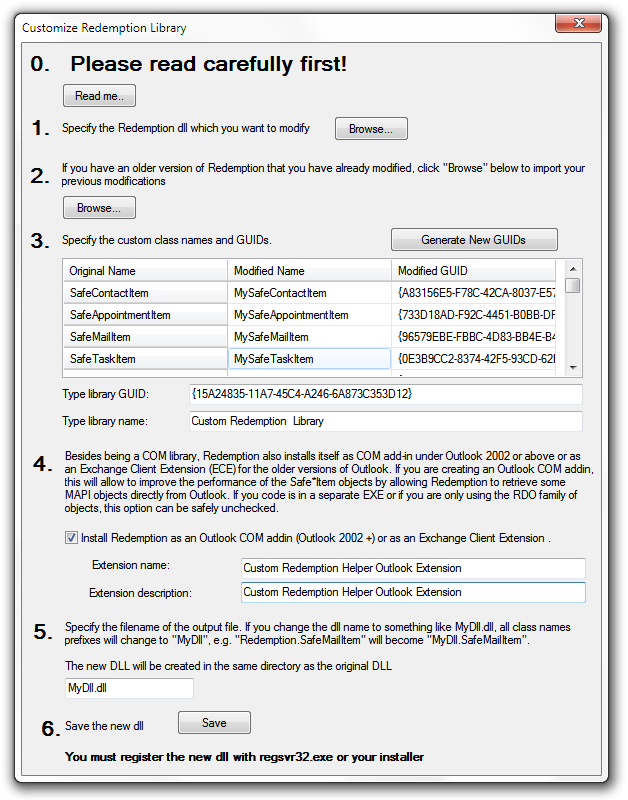
Custom versions of Redemption are guaranteed not to interact with other instances of Redemption, either original or custom. Creating a custom version of Redemption along with using the AuthKey property significantly reduces a chance of malicious code using Redemption.Note that to use a custom version of Redemption, your VB code must use CreateObject() function rather than New.
E.g. the code like
must be changed to (assuming you renamed Redemption.dll to MyDll.dll and the class name SafeMailItem to MyMailItem)Dim sItem as Redemption.SafeMailItem
sItem = New Redemption.SafeMailItemDim sItem as Redemption.SafeMailItem
sItem = CreateObject("MyDll.MyMailItem")On the low level, in the first example VB hardcodes the class GUID of Redemption.SafeMailItem and if you modify the dll name and/or class name the second line will fail.
If you use the second example, VB does not hardcode the class GUID. I.e. you still dim your variable as Redemption.SafeMailItem (since it is only used at design time by VB), but to create an instance of the object, you must specify the modified class name ("MyDll.MyMailItem")
If you are using C++, this means that you need to either use CoCreateInstance() passing the modified class GUID or call CLSIDFromProgID() to obtain the (modified) class GUID, then call CoCreateInstance()
In case of C# or other .Net languages, you can use the code similar to that given below (it is assumed that you have already created the interop DLL):
Note that Redemption will discard "32" or "64" suffix for the custom COM class names. E.g. if you named your dll "MyDll32.dll", the class names will start with "MyDll.*".Type t = Type.GetTypeFromProgID("MyDll.MyMailItem");
SafeMailItem sItem = (SafeMailItem) Activator.CreateInstance(t);
-
Use Registry-free COM (Windows XP or later) (See "Creating Registration-Free COM Objects" on MSDN and "Simplify App Deployment with ClickOnce and Registration-Free COM" in MSDN Magazine). Windows XP allows COM objects to be used without requiring that they be registered. If your application uses a manifest file, you can request that you want Windows to load the specified COM objects from the directory where your executable resides rather than query the registry for the location of the COM library.
To use this feature add (or modify) the manifest file and provide the following (bolded) entries. Note that registry-free COM can be used with other methods discussed above
|
<?xml version="1.0" encoding="utf-8"?> |
Similar to registry-free COM, you can explicitly load Redemption library and create instances of its creatable objects without registering the dll in the registry or even using an application manifest. On the low level, all in-proc COM libraries (dlls) export DllGetClassObject function that the COM system uses after looking up the dll location through the class name/CLSID in the registry. Since you know the Redemption dll location, there is no reason to create any registry entries for the COM system. You will still need to register Redemption in the registry on your development machine to be able to import the type library and/or create the interop dll (in case of .Net languages). At run-time however, you can simply copy Redemption.dll/Redemption64.dll to the target folder and use RedemptionLoader class to create Redemption objects.
//tell the app where the 32 and 64 bit dlls are located
//by default, they are assumed to be in the same
folder as the current assembly and be named
//Redemption.dll
and Redemption64.dll
RedemptionLoader.DllLocation64Bit =
@"c:\SourceCode\Redemption\redemption64.dll";
RedemptionLoader.DllLocation32Bit =
@"c:\SourceCode\Redemption\redemption.dll";
//Create a Redemption object and use it
RDOSession session =
RedemptionLoader.new_RDOSession();
session.Logon(Missing.Value,
Missing.Value,
Missing.Value, Missing.Value,
Missing.Value,
Missing.Value);
RedemptionLoader class can be downloaded here (C#, VB.Net, VBA, VC++ (managed and unmanaged) and Delphi versions are included).