Outlook add-in
Proxy Manager
Send Outlook mail from any Exchange alias SMTP address with the display name you choose.
Proxy Manager runs on the client side, integrates with the Outlook From dropdown, and supports hosted or on-premises Exchange accounts without server components.
- Outlook 2010
- Outlook 2013
- Outlook 2016
- Outlook 2019
- Hosted or on-premises Exchange
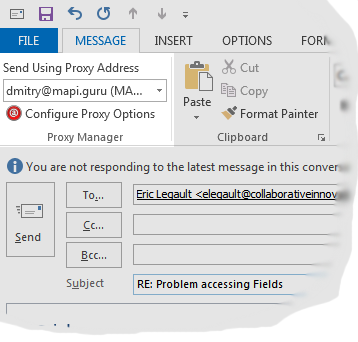

Choose the sender address before Outlook sends the message
Proxy Manager lets you send messages from one of your proxy SMTP addresses while keeping the experience inside Outlook. Select an address, click Send, and Proxy Manager submits the message through SMTP.
Replies and forwards can automatically use the address the original message was sent to, and messages sent by Proxy Manager are stored in Outlook's Sent Items folder.
- English
- German
- Spanish
- Portuguese
- French
- Italian
- Dutch
- Danish
- Russian
Outlook integration
Works from the compose window and Outlook ribbon
Proxy Manager adds its controls to Outlook so the sender address and Proxy Manager options are available while you compose mail.
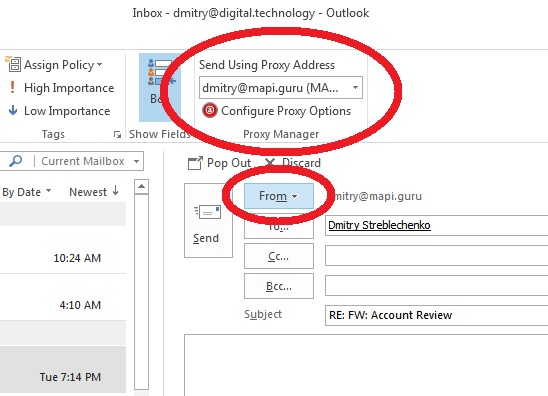
Alias selection
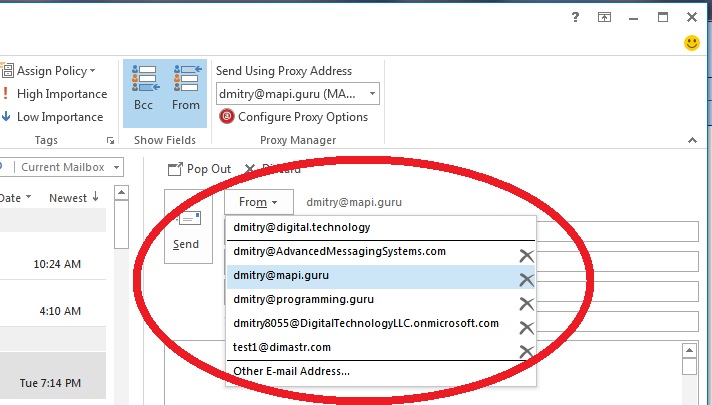
Select an Exchange proxy address from the From dropdown
Use one of the SMTP addresses assigned to your Exchange account and send with the display name configured for that address.
Configuration
Configure names, SMTP settings, and OAuth profiles
Specify SMTP server settings once, associate display names with addresses, and use OAuth2 for Microsoft 365 mailboxes when Basic Authentication is disabled.
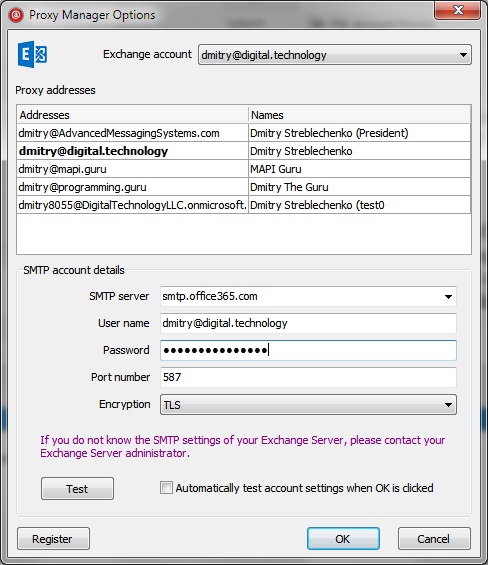
New in version 4.0: Proxy Manager can use OAuth for Microsoft 365 mailboxes.